4. Upload

Now it is time to build your image and upload it to the Kelvin Cloud instance.
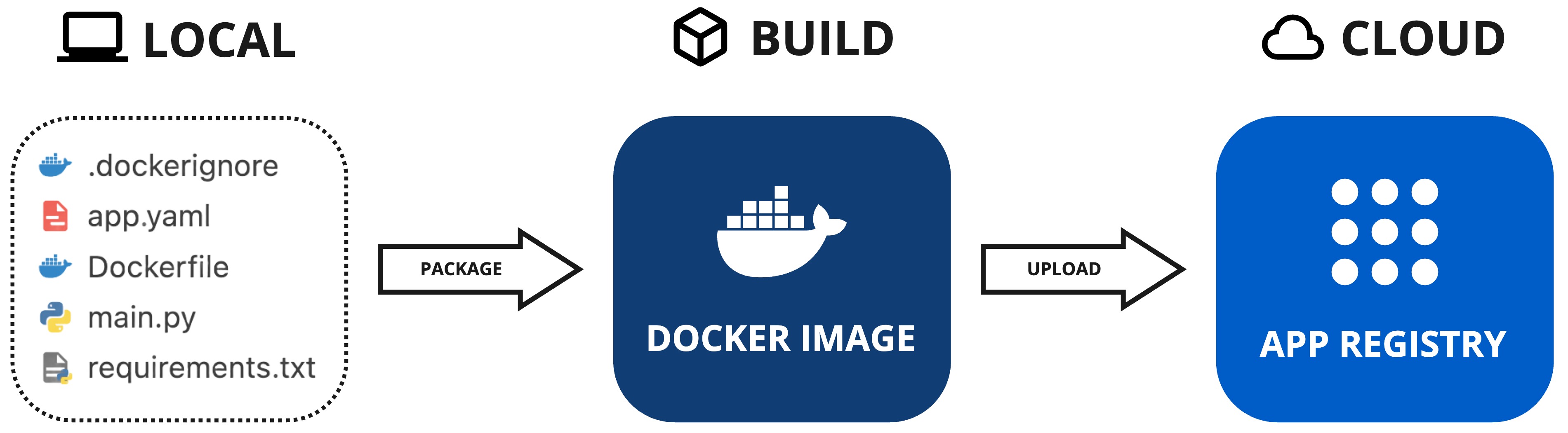
The App Registry is a centralized repository that stores all the SmartApps you create. Once uploaded, you can deploy your SmartApp to any Kelvin Edge cluster connected to your Kelvin Cloud instance.
Let's start by making sure your SmartApp is ready for upload.
Prerequisites
The info section in the app.yaml file defines crucial attributes such as the unique name, display name, description, and version of your app. Below is an example of what your app.yaml file might look like:
info:
  name: event-detection
  title: Event Detection
  description: Monitors if a motor is overheating. If so, it will send a Control Change to reduce the Motor Speed.
  version: 1.0.0
Conflicting Versions
If you try to upload an app with the same version number as an existing one in the App Registry, you’ll encounter an error. Always ensure you increment the version number before uploading.
SDK Login
Before uploading your app, you need to login the SDK with your Kelvin Cloud credentials.
Open a terminal and run the following command:
kelvin auth login <url.kelvin.ai>
And type in your Kelvin Cloud credentials when prompted.
Upload
Uploading your app is straightforward and requires just a single command. Open a terminal in the directory where your app and its associated files are located, and run the following command:
Reminder
Make sure Docker is installed and running before executing the upload command. Docker is essential for packaging and uploading apps to the App Registry.
kelvin app upload
As the command runs, you will observe the app being packaged and subsequently uploaded to the App Registry. Here's a sample output:
[kelvin.sdk][2023-10-03 20:53:51][R] Image successfully built: "event-detection:1.0.0"
[kelvin.sdk][2023-10-03 20:53:51][I] Pushing application content to "https://<url.kelvin.ai>"
       [elapsed: 00:19] - [Layer: 2e1bc7550524] - [Pushed]
       [elapsed: 00:19] - [Layer: f15701d79da8] - [Layer already exists]
[kelvin.sdk][2023-10-03 20:54:10][R] Application "event-detection:1.0.0" successfully pushed to registry "https://<url.kelvin.ai>"
[kelvin.sdk][2023-10-03 20:54:10][R]

            Application successfully uploaded:
                Name: event-detection
                Version: 1.0.0
Congratulations! You successfully uploaded your Kelvin SmartApp™ to the App Registry.
Next Step
The next step is to configure your Kelvin Cloud instance to simulate a real-world edge deployment.