Control Changes
Control Change Messages
Control Changes are a special type of output Message which is a more rigorous fault tolerant process to write any data to an Asset.
Note
It also has failure protocols should it be impossible to write to the Asset, for example if it is offline.
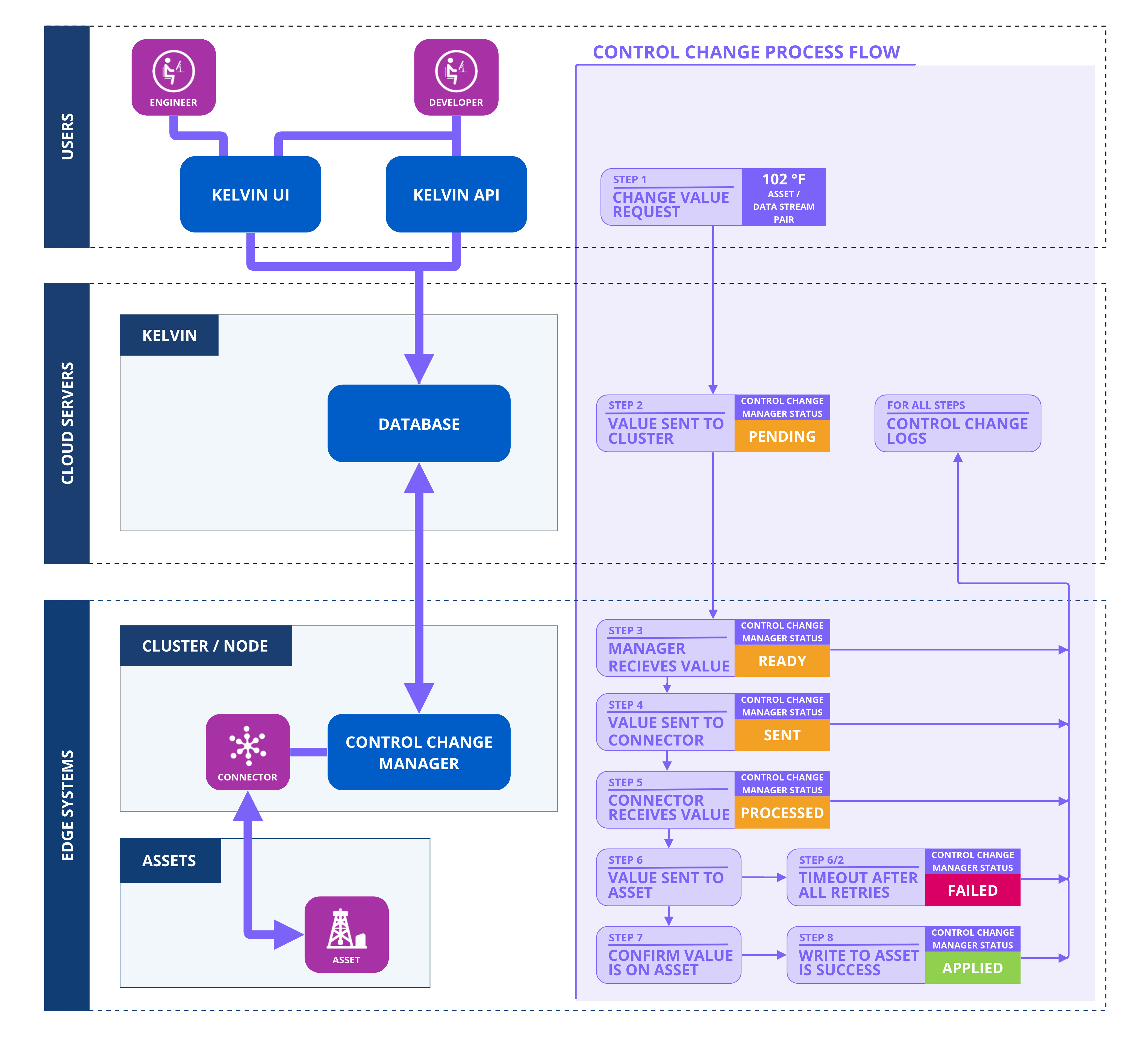
This ensure Operations and Platform Administrators have full control and a visual review of every data change being sent to any Asset.
Some benefits over a standard output data change are;
- The change is independently verified by the standard Connector to ensure the Asset has accepted the change,
- Control changes can be sent with a limits on retries or a time window to get the change written and verified. This avoids data being written after it has become irrelevant to the process.
- All control changes and their status is recorded in the logs
- Dashboards have summaries that can be reviewed to ensure the stability of the infrastructure
- Realtime alerts can be setup using Grafana to allow fast response should monitored control changes fail.
To ensure the output is treated as a control change an extra flag to be set under its output definition (control_change: True):
app:
  type: kelvin
  kelvin:

    outputs:
    - data_type: number
      name: motor_speed_set_point
      control_change: true
The ControlChange Object supports the following attributes :
| Attribute | Required | Default Value | Description |
|---|---|---|---|
resource |
required | N/A | The KRNAssetDatastream that this Control Change is meant for. |
expiration_date |
required | N/A | Absolute datetime or a timedelta (from now) when the Control Change will expire. |
payload |
required | N/A | The desired target value for the control change (Boolean, Integer, Float or String). |
retries |
optional | 0 | Number of retries. |
timeout |
optional | 300s | Timeout for each retry in seconds. 0 means try forever until expiration date. |
control_change_id |
optional | Random UUID | Sets a user specific ID for the control change (UUID). |
from_value |
optional | Initial (trigger) value of the control change. |
Examples
Basic Usage
Here is a minimal Control Change.
from datetime import timedelta

from kelvin.application import KelvinApp
from kelvin.message import ControlChange
from kelvin.krn import KRNAssetDataStream

(...)

# Create and Publish a Control Change
await app.publish(
    ControlChange(
        resource=KRNAssetDataStream("my-motor-asset", "motor_speed_set_point"),
        payload=1000,
        expiration_date=timedelta(minutes=5)
    )
)
Retries
In some cases if a write attempt fails to be validated, you can to build a cool off period before retrying or to give up if the Control Change has retired a certain amount of times, regardless of the expiration date.
from datetime import timedelta

from kelvin.application import KelvinApp
from kelvin.message import ControlChange
from kelvin.krn import KRNAssetDataStream

(...)

# Create and Publish a Control Change
await app.publish(
    ControlChange(
        resource=KRNAssetDataStream("my-motor-asset", "motor_speed_set_point"),
        payload=1000,
        expiration_date=timedelta(minutes=10),
        retries=3, # only attempt 3 extra times to write the data if the first attempt fails
        timeout=60 # retry every minute if the previous attempt failed
    )
)