Recommendations
Recommendation Messages
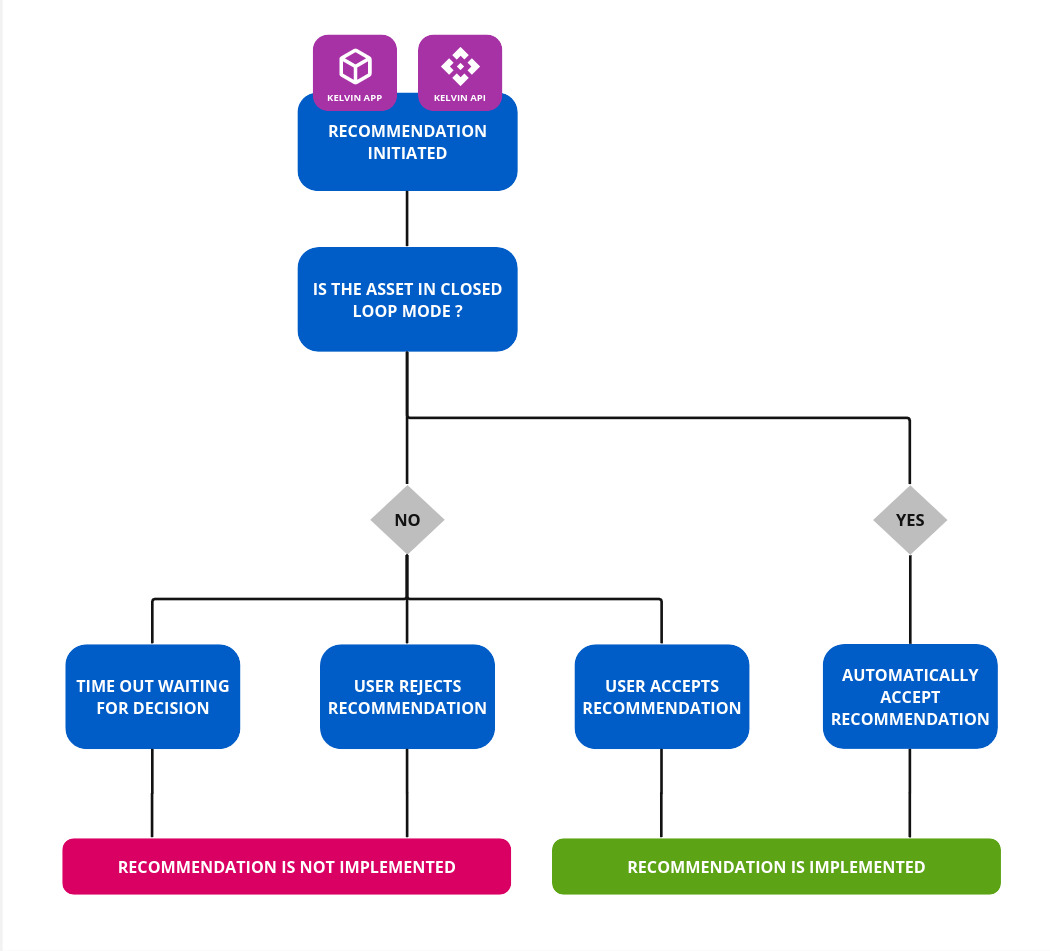
Recommendations in Kelvin are a method to package one or more actions into a single Recommendation, which is then displayed in the Kelvin UI for Operations to review.
The allows Operations to see and decide on the actions before they are implemented. In short this puts the Operations as the man-in-the-middle between the automation programs and the Assets.
Currently the only action available is Control Changes.
Allow automation for some Recommendations
By including the closed_loop parameter in the app.yaml, you enable Operations to determine which Assets will be automatically accepted (closed loop) and which require manual approval (open loop) prior to implementation.
This approach prevents Operations from being overwhelmed with Recommendations that do not require review or manual approval.
You can see a full example of open/closed loop setup in the Event Detection code in our Github repository. Link at the top of this page.
The Recommendation Object supports the following attributes :
| Attribute | Required | Description |
|---|---|---|
resource |
required | The KRNAsset that this Recommendation is meant for. |
type |
required | The Recommendation type (String). (e.g. speed_increase, speed_decrease, etc) |
expiration_date |
optional | Absolute datetime or a timedelta (from now) when the Control Change will expire. |
description |
optional | Detailed description for the Recommendation. |
confidence |
optional | Confidence of the recommendation (from 1 to 4). |
control_changes |
required | List of ControlChange Objects associated with the recommendation. |
metadata |
optional | Metadata for the recommendation. |
auto_accepted |
optional | Sets the Recommendation as auto accepted (Default is False). |
Evidences
When creating Recommendations, it is useful to embed the data used in the calculations for creating the new value in the recommendation.
This data is intended for;
- Operations : They can view the data when deciding whether to accept or reject the recommendation.
- Data Scientists : They can use the data to correlate with the confidence level reported by Operations to improve their machine learning models.
Info
Evidence can only be embedded into Recommendation if used in a Kelvin SmartApp™.
You can not create Recommendations with evidences using the Kelvin API or the Kelvin API Client (Python)
There are a number of different types of evidences that can be embedded with the Recommendation;
Bar Chart
This evidence is for creating bar charts.
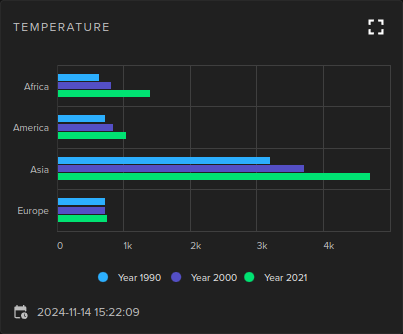
This is how you can add this evidence into your Recommendation.
from kelvin.application import KelvinApp
from kelvin.message.evidences import BarChart
from kelvin.krn import KRNAsset
from datetime import datetime

async def main() -> None:
    app = KelvinApp()
    await app.connect()

    evidences = [
        BarChart(
            title="Sample Bar Chart Title",
            timestamp=datetime.now(),
            x_axis={
                "title": "X-Axis Title",
                "categories": ["Category A", "Category B", "Category C", "Category D"]
            },
            y_axis={
                "title": "Y-Axis Title",
                "min": 0
            },
            series=[
                {"name": "Series 1", "data": [5, 10, 15, 20]},
                {"name": "Series 2", "data": [7, 14, 21, 28]}
            ]
        )
    ]

    recommendation = Recommendation(
        resource=KRNAsset('pcp_51'),
        type="decrease_speed",
        control_changes=[],
        evidences=evidences,
    )

    await app.publish(recommendation)

if __name__ == "__main__":
    asyncio.run(main())
Line Chart
This evidence example is for creating line charts.
There are four types of line charts you can create;
- Linear
- Date Time
- Category
- Logarithmic
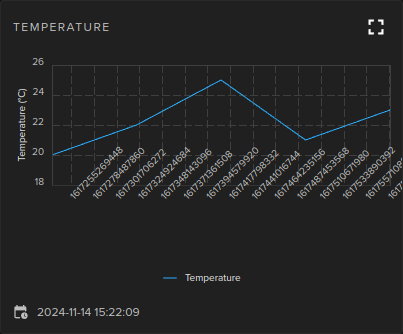
This is how you can add this evidence into your Recommendation.
from kelvin.application import KelvinApp
from kelvin.message.evidences import LineChart
from kelvin.krn import KRNAsset
from datetime import datetime

async def main() -> None:
    app = KelvinApp()
    await app.connect()

    evidences = [
        LineChart(
            title="Sample Chart Title",
            timestamp=datetime.now(),
            x_axis={
                "type":"linear", # | 'linear' | 'datetime' | 'category' | 'logarithmic';
                "categories": ["Category 1", "Category 2", "Category 3"],
                "title": "X-Axis Title"
            },
            y_axis={"title": "Y-Axis Title"},
            series=[
                {"name": "Series 1", "data": [1, 2, 3, 4, 5]},
                {"name": "Series 2", "data": [[1, 2], [2, 3], [3, 5], [4, 7]]}
            ]
        )
    ]

    recommendation = Recommendation(
        resource=KRNAsset('pcp_51'),
        type="decrease_speed",
        control_changes=[],
        evidences=evidences,
    )

    await app.publish(recommendation)

if __name__ == "__main__":
    asyncio.run(main())
Dynacard
This evidence example is for creating line charts.
There are four types of line charts you can create;
- Linear
- Date Time
- Category
- Logarithmic
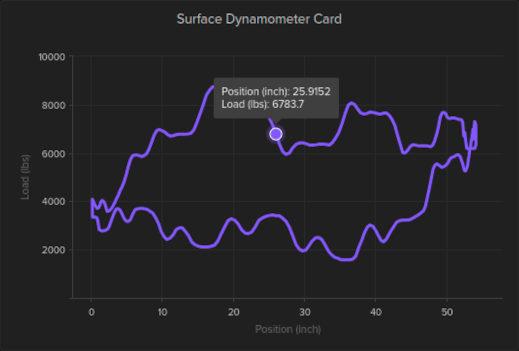
This is how you can add this evidence into your Recommendation.
from kelvin.application import KelvinApp
from kelvin.message.evidences import Dynacard
from kelvin.krn import KRNAsset
from datetime import datetime

async def main() -> None:
    app = KelvinApp()
    await app.connect()

    evidences = [
        Dynacard(
            title="Sample Chart Title",
            timestamp=datetime.now(),
            xAxis={
                    "title": "X-Axis Title"
            },
            yAxis={
                "title": "Y-Axis Title"
            },
            series=[
                {"name": "Series 1", "data": [1, 2, 3, 4, 5]},
                {"name": "Series 2", "data": [[1, 2], [2, 3], [3, 5], [4, 7]]}
            ]
        )
    ]

    recommendation = Recommendation(
        resource=KRNAsset('pcp_51'),
        type="decrease_speed",
        control_changes=[],
        evidences=evidences,
    )

    await app.publish(recommendation)

if __name__ == "__main__":
    asyncio.run(main())
HighCharts
This evidence is for creating any type of chart using the powerful High Charts format.
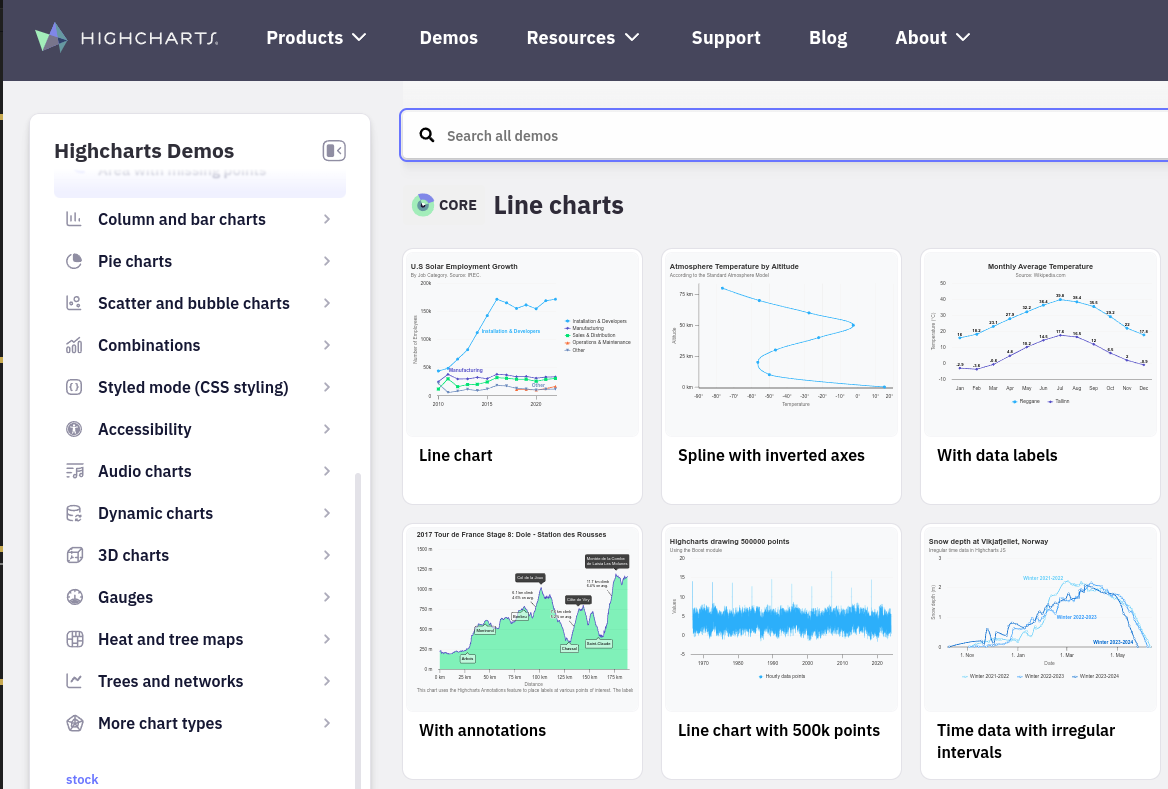
This is how you can add this evidence into your Recommendation.
from kelvin.application import KelvinApp
from kelvin.message.evidences import Chart
from kelvin.krn import KRNAsset
from datetime import datetime

async def main() -> None:
    app = KelvinApp()
    await app.connect()

    evidences = [
        Chart(
            title="Sample Chart Title",
            timestamp=datetime.now(),

            ... # Content here will depend on the type of High Chart you choose to display.

        )
    ]

    recommendation = Recommendation(
        resource=KRNAsset('pcp_51'),
        type="decrease_speed",
        control_changes=[],
        evidences=evidences,
    )

    await app.publish(recommendation)

if __name__ == "__main__":
    asyncio.run(main())
Image
This evidence is for showing images. This is particular useful for computer vision related Recommendations.
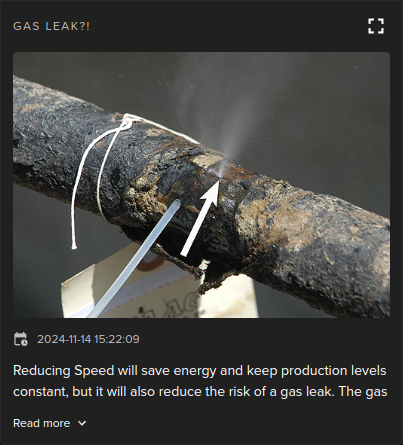
Note
The image must be either from the Kelvin File Storage or a publicly available link.
This is how you can add this evidence into your Recommendation.
from kelvin.application import KelvinApp
from kelvin.message.evidences import Image
from kelvin.krn import KRNAsset
from datetime import datetime

async def main() -> None:
    app = KelvinApp()
    await app.connect()

    evidences = [
        Image(
            title="My Image",
            description="This is the image or evidence description.",
            url="https://www.example.com/image.jpg",
        )
    ]

    recommendation = Recommendation(
        resource=KRNAsset('pcp_51'),
        type="decrease_speed",
        control_changes=[],
        evidences=evidences,
    )

    await app.publish(recommendation)

if __name__ == "__main__":
    asyncio.run(main())
Markdown
This evidence is for showing text in markdown format.
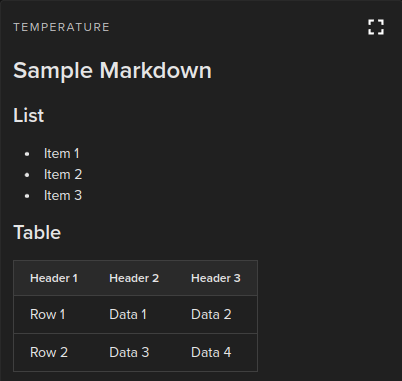
Note
The image must be either from the Kelvin File Storage or a publicly available link.
This is how you can add this evidence into your Recommendation.
from kelvin.application import KelvinApp
from kelvin.message.evidences import Markdown

from kelvin.krn import KRNAsset
from datetime import datetime

async def main() -> None:
    app = KelvinApp()
    await app.connect()

    evidences = [
        Markdown(
            title="My Markdown",
            markdown="""
                # Evidence 1
                Lorem Ipsum is simply dummy text of the printing and typesetting industry.

                # Evidence 2
                ...
            """ # (Multi line) String
        )
    ]

    recommendation = Recommendation(
        resource=KRNAsset('pcp_51'),
        type="decrease_speed",
        control_changes=[],
        evidences=evidences,
    )

    await app.publish(recommendation)

if __name__ == "__main__":
    asyncio.run(main())
IFrame
This evidence is for showing any web content in an iFrame.
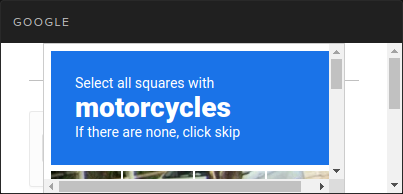
This is how you can add this evidence into your Recommendation.
from kelvin.application import KelvinApp
from kelvin.message.evidences import IFrame

from kelvin.krn import KRNAsset
from datetime import datetime

async def main() -> None:
    app = KelvinApp()
    await app.connect()

    evidences = [
        IFrame(
            title="My IFrame",
            url="https://www.example.com/content/",
        )
    ]

    recommendation = Recommendation(
        resource=KRNAsset('pcp_51'),
        type="decrease_speed",
        control_changes=[],
        evidences=evidences,
    )

    await app.publish(recommendation)

if __name__ == "__main__":
    asyncio.run(main())
Examples
Basic Usage
Here is a minimal Recommendation.
from datetime import timedelta

from kelvin.application import KelvinApp
from kelvin.message import ControlChange, Recommendation
from kelvin.krn import KRNAssetDataStream, KRNAsset

(...)

# Create a Control Change
control_change = ControlChange(
    resource=KRNAssetDataStream("my-motor-asset", "motor_speed_set_point"),
    payload=1000,
    expiration_date=timedelta(minutes=5)
)

# Create and Publish a Recommendation with one Control Change package
await app.publish(
    Recommendation(
        resource=KRNAsset("my-motor-asset"),
        type="decrease_speed",
        control_changes=[control_change]
    )
)
Multiple Control Changes
from datetime import timedelta

from kelvin.application import KelvinApp
from kelvin.message import ControlChange, Recommendation
from kelvin.krn import KRNAssetDataStream, KRNAsset

(...)

# Create a Control Change
control_change_01 = ControlChange(
    resource=KRNAssetDataStream("my-motor-asset_01", "motor_speed_set_point"),
    payload=1000,
    expiration_date=timedelta(minutes=5)
)

control_change_02 = ControlChange(
    resource=KRNAssetDataStream("my-motor-asset_02", "motor_speed_set_point"),
    payload=1000,
    expiration_date=timedelta(minutes=5)
)

control_change_03 = ControlChange(
    resource=KRNAssetDataStream("valve_01", "position_set_point"),
    payload=1000,
    expiration_date=timedelta(minutes=5)
)

# Create and Publish a Recommendation with one Control Change package
await app.publish(
    Recommendation(
        resource=KRNAsset("my-motor-asset"),
        type="decrease_speed",
        control_changes=[control_change_01, control_change_02, control_change_03]
    )
)
Typical ML Usage
When you have a machine learning model producing the recommended control changes, then you can store additional data produced by the ML output
from datetime import timedelta

from kelvin.application import KelvinApp
from kelvin.message import ControlChange, Recommendation
from kelvin.krn import KRNAssetDataStream, KRNAsset

# Normally your ML mode predictions go here
(...)

# Create a Control Change
control_change = ControlChange(
    resource=KRNAssetDataStream("my-motor-asset", "motor_speed_set_point"),
    payload=1000,
    expiration_date=timedelta(minutes=5)
)

# Create and Publish a Recommendation with one Control Change package
# Add also the ML-specific Data
await app.publish(
    Recommendation(
        resource=KRNAsset("my-motor-asset"),
        type="decrease_speed",
        control_changes=[control_change],
        metadata={
            "predicted_speed": 2.5,
            "confidence": 0.87,
            "input_features": {"current_speed": 5, "load": 4},
            "timestamp": "2024-11-18T12:00:00Z",
            "model_version": "1.2.0"
        }
    )
)
Incorporating Evidences
There are a number of types of evidences you can embed into the Recommendation.
Note
Each Recommendation can have an unlimited amount of evidence added.
- Bar Charts
- Line Charts
- Dynacards
- Any type of HighCharts
- Images
- Markdown
- IFrames
You can see full examples here.