Parameter Update Scheduling
Parameter update scheduling allows you to initiate updates that will only occur some time in the future.
There is also the option to revert a schedule to another set of values either at a designated time or initiated manually anytime during the period between the update time and the revert time.
Create a Schedule
To start you can create a new schedule that will apply updated Kelvin SmartApps™ parameter values to selected asset at a defined time.
Multiple Kelvin SmartApps™ asset parameter's can be defined in one schedule.
The revert option must be created at the same time with the create schedule. When creating the revert parameter values, they are defined for each asset and data stream individually, ensuring that the assets and parameters align with the original schedule.
For example if the parameters for two assets were modified and a revert operation is required, the revert must include two assets, each with two data stream parameters.
The schedule must be created in the future and, if a revert operation is requested, the revert date must be defined after the scheduled date.
Upon creation, the current values of Kelvin SmartApps™ asset parameters are stored in the original_resource_parameters field.
To create a new schedule in Kelvin UI, first go to the Configurations tab in Kelvin SmartApps™.
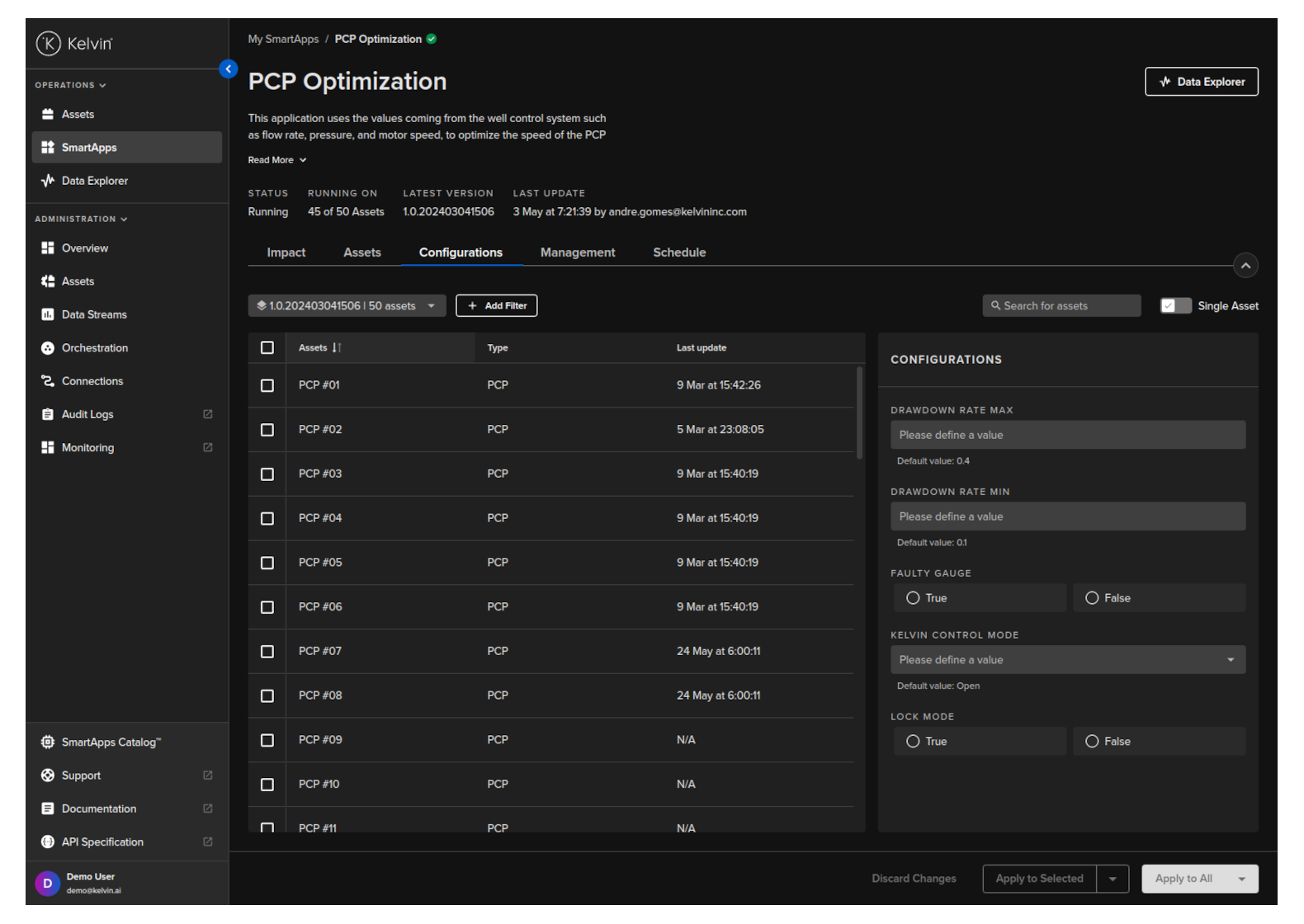
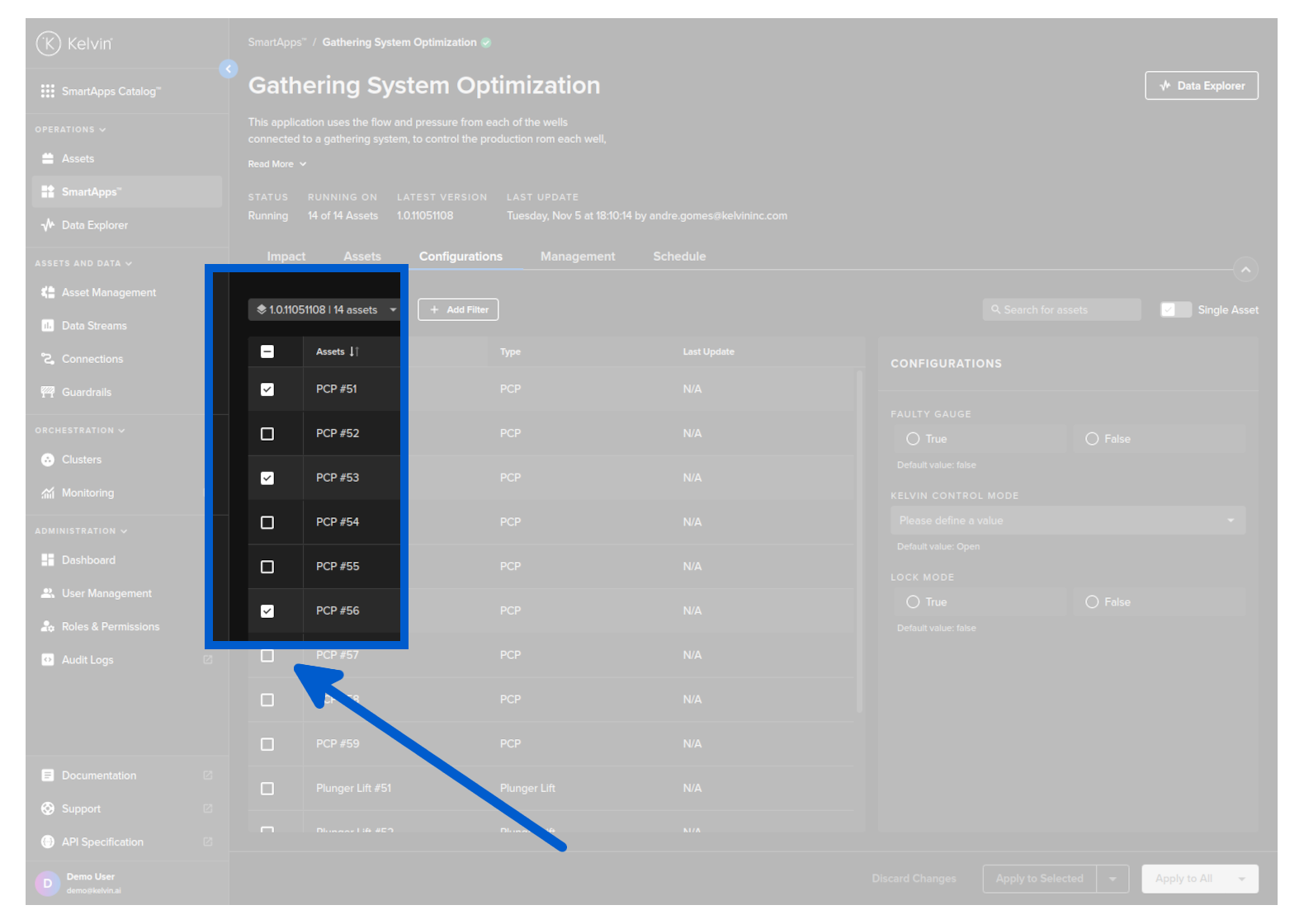
Select the Assets you want to set a scheduled parameter change.
If you do not select any Assets then you will only be able to choose the Apply to All schedule or if you have turned on Single Asset, then the schedule will only be applied to the one Asset.
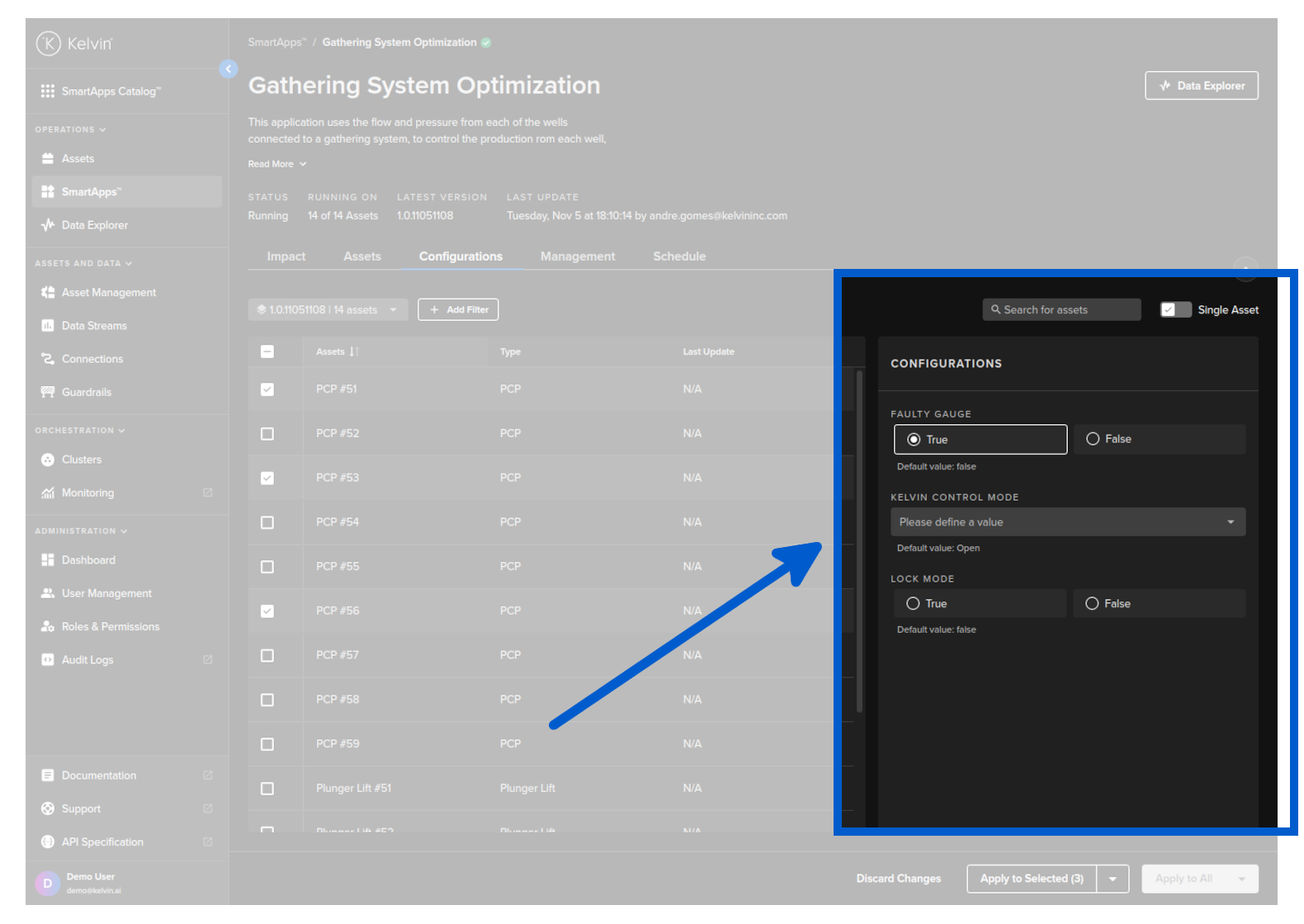
Change the parameters that you want to update.
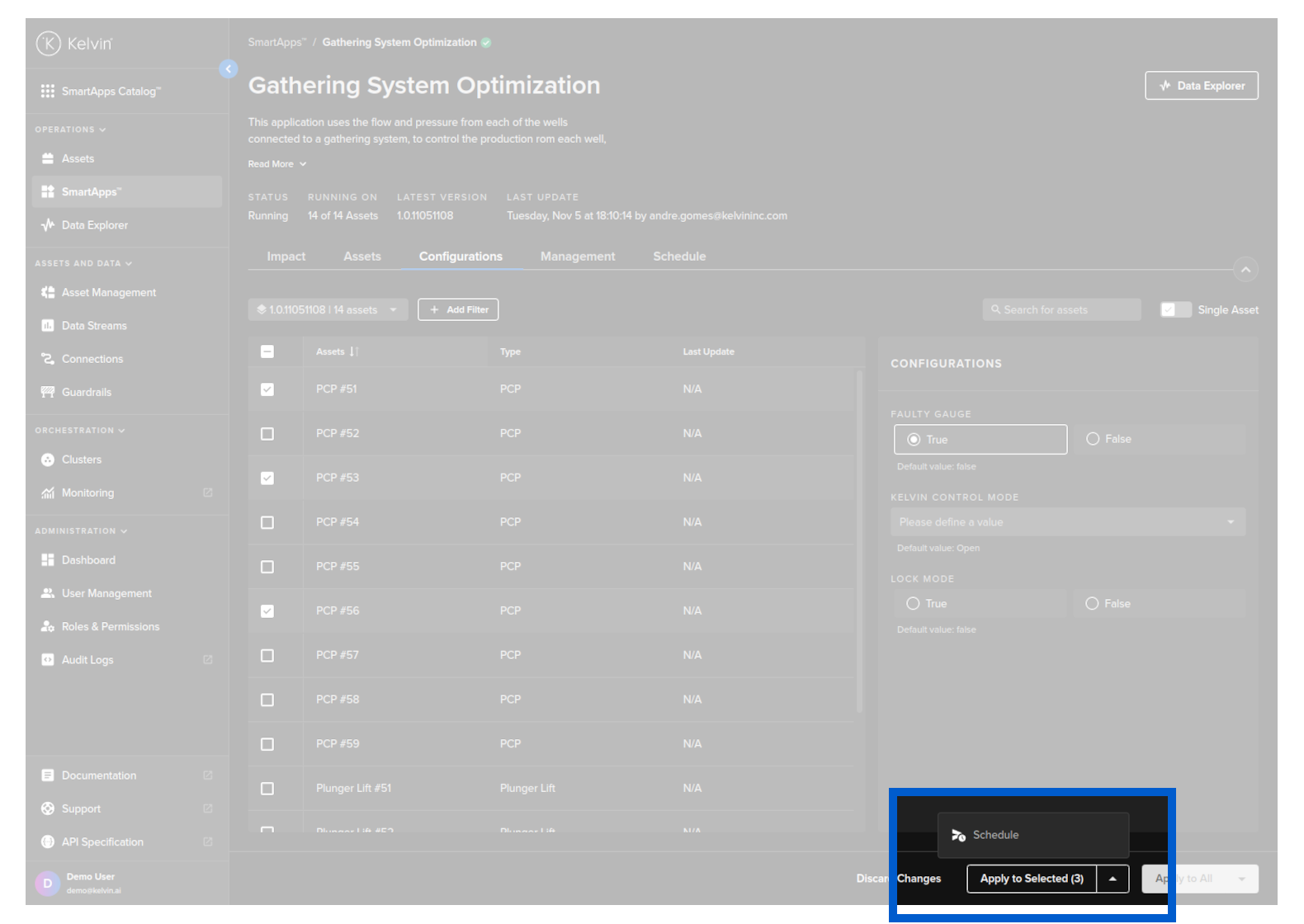
Click the down arrow at the right hand side of the button and click on Schedule option.
If you have selected some Assets, then you can choose to Apply to Selected or Apply to All
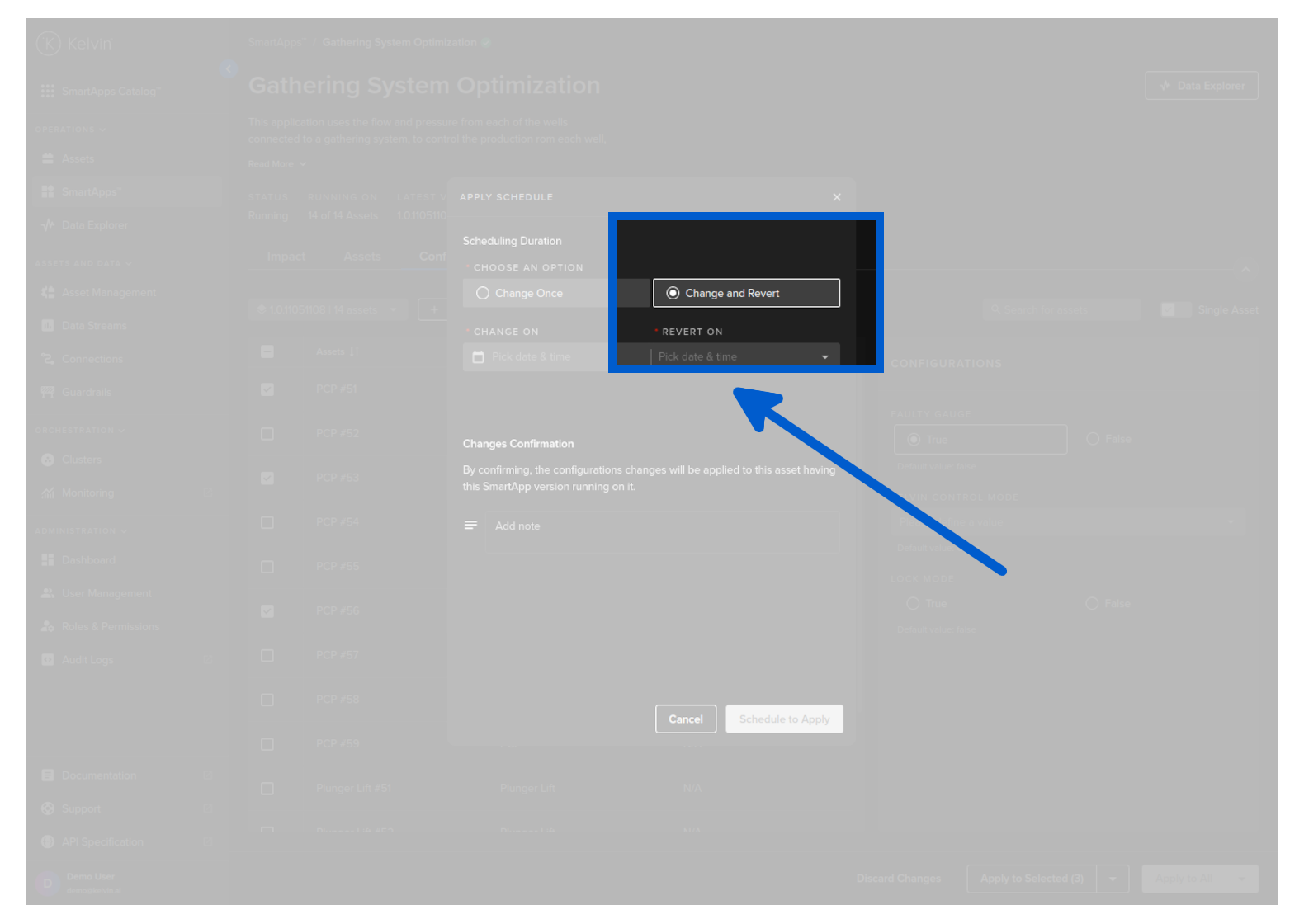
Choose a Scheduling Option. For this example we will choose Change and Revert
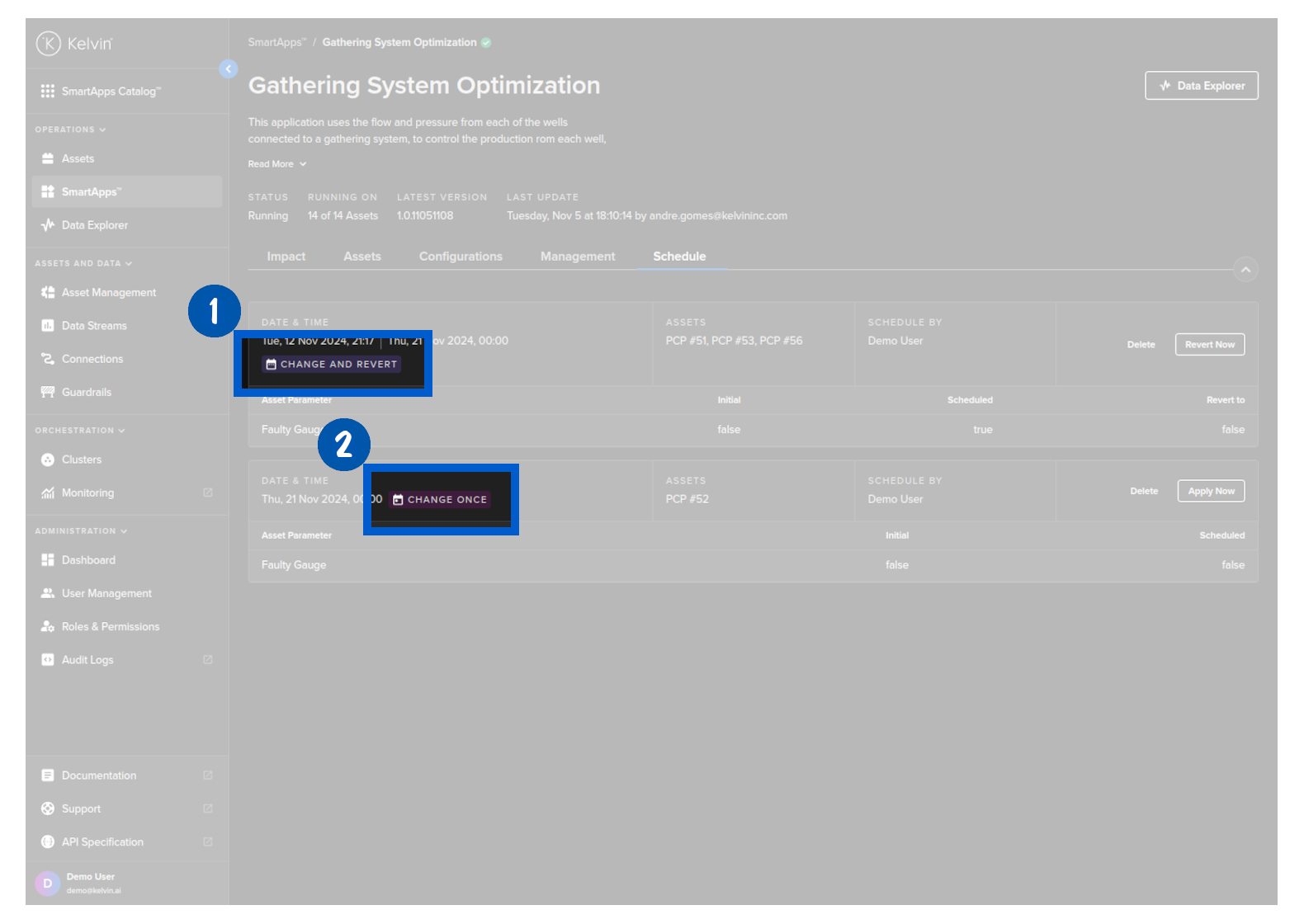
Change Once will change the parameters at the scheduled time and then mark the schedule completed.
Change and Revert will change the parameters at the scheduled time and then change them again to a second value at a second scheduled time. Then the schedule will be marked completed. You will see the options of what value to put in the second value later in this page.
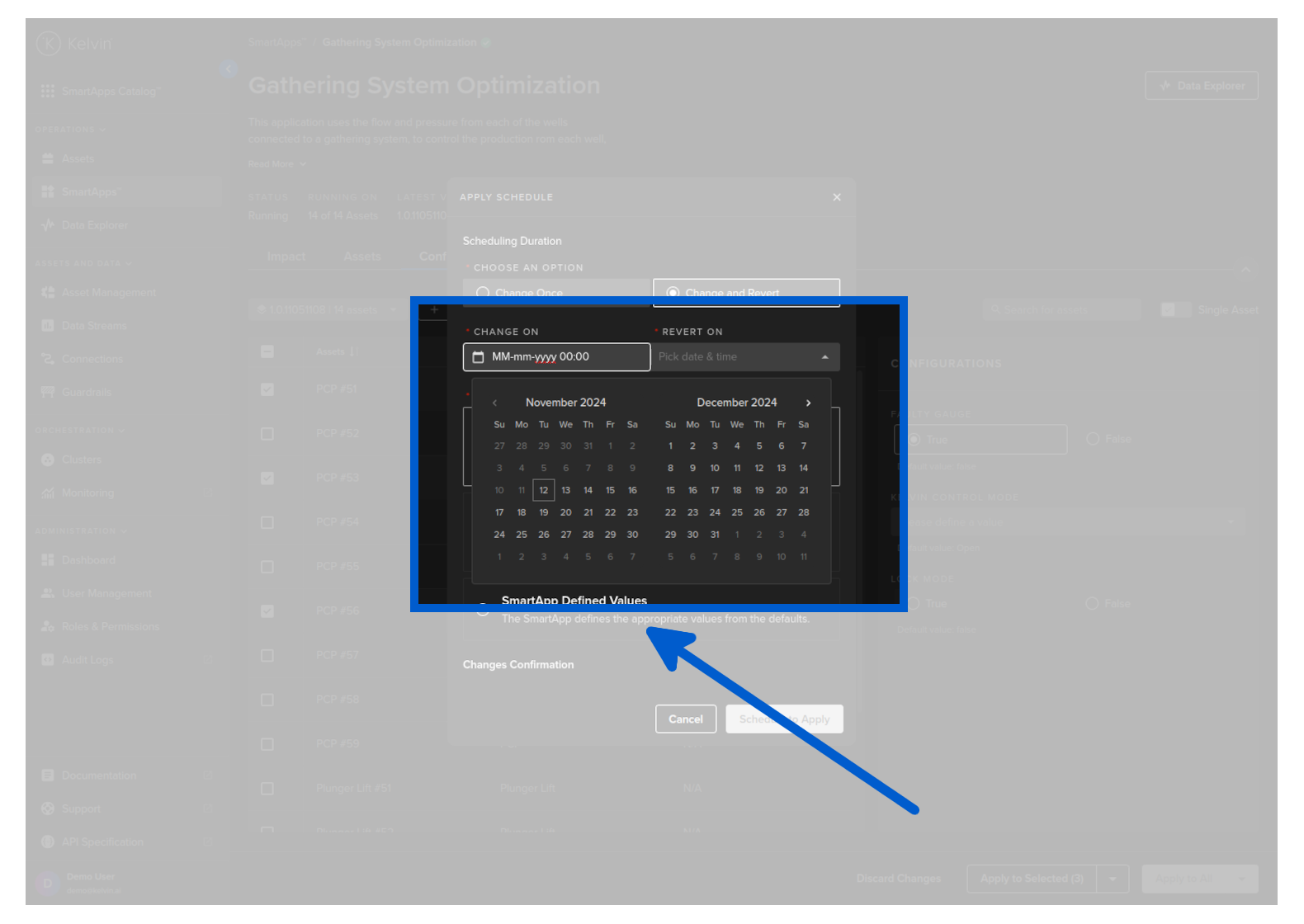
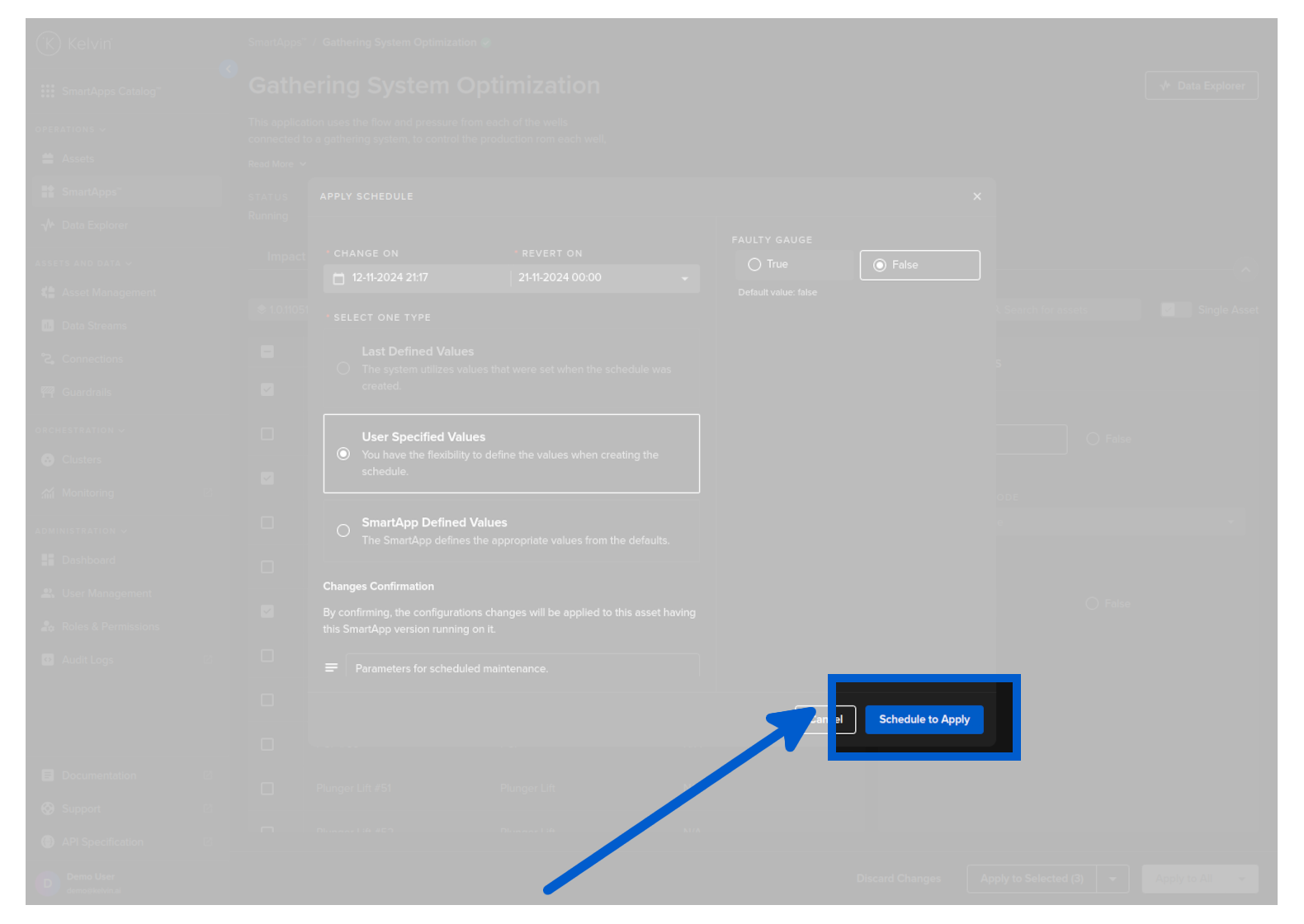
Select the date and time for the change and the revert.
The revert time must be a date/time that occurs after the change date/time.
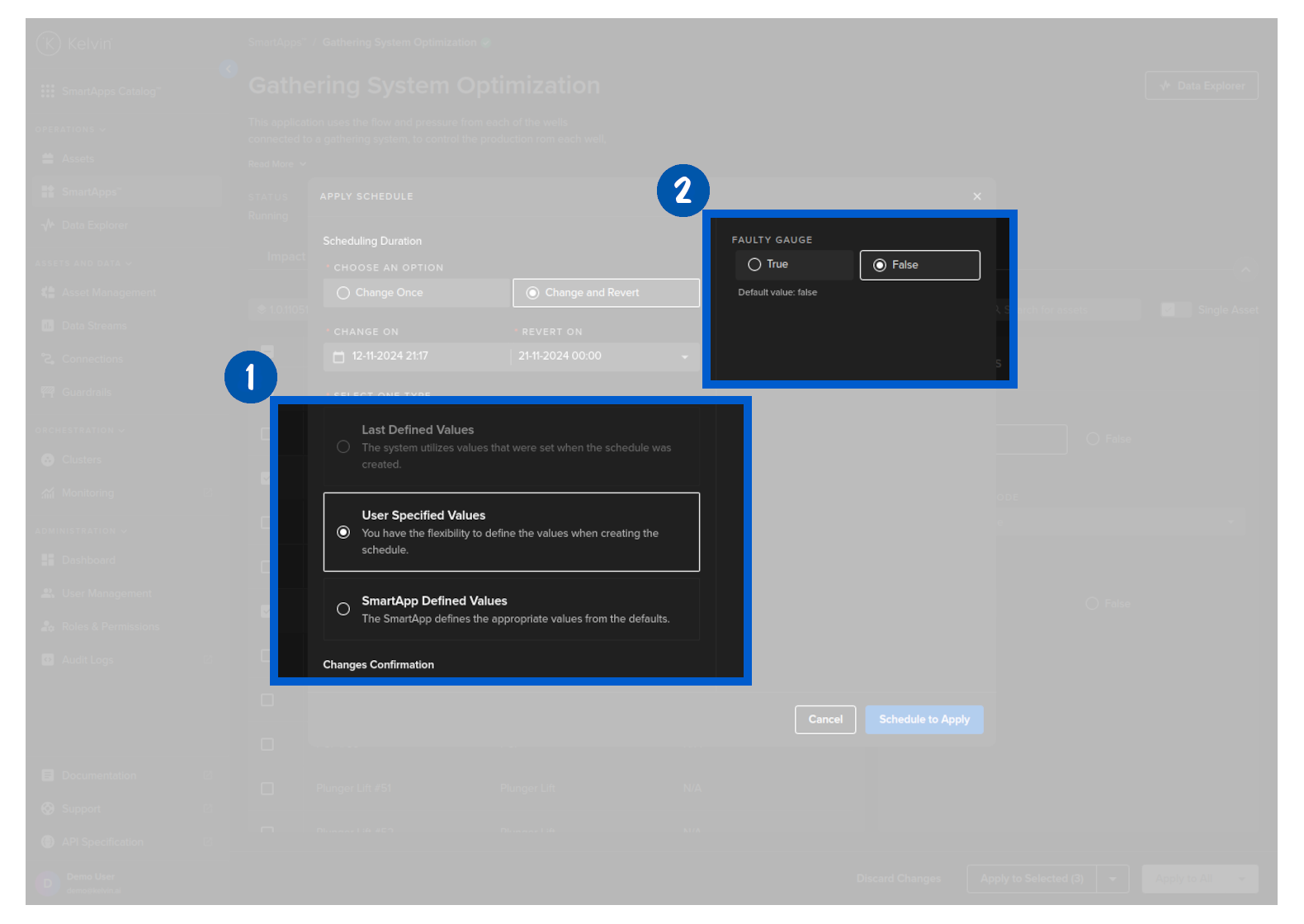
The Select One Type option only appears if you have selected Change and Revert option above. This will define what parameter values to put into the Assets during the revert stage of the Scheduled Parameter change event.
| Type | Description |
|---|---|
| Last Defined Values | The original parameter values of each Asset will be written to the parameter at the revert date/time |
| User Specified Values | You can select new parameter values for each Parameter that has been changed. All Assets will receive the same Parameter value at the revert date/time. |
| Kelvin SmartApps™ Defined Values | The default values of each Asset parameter value will be written to the parameter at the revert date/time |
For this example we will select User Specified Values and put in our revert values for each parameter.
Only parameters that were changed will be show here for a revert value. Any parameters that were not changed will not be shown here. For example GAS FLOW RATE MIN THRESHOLD does not appear as you did not request an initial value change.
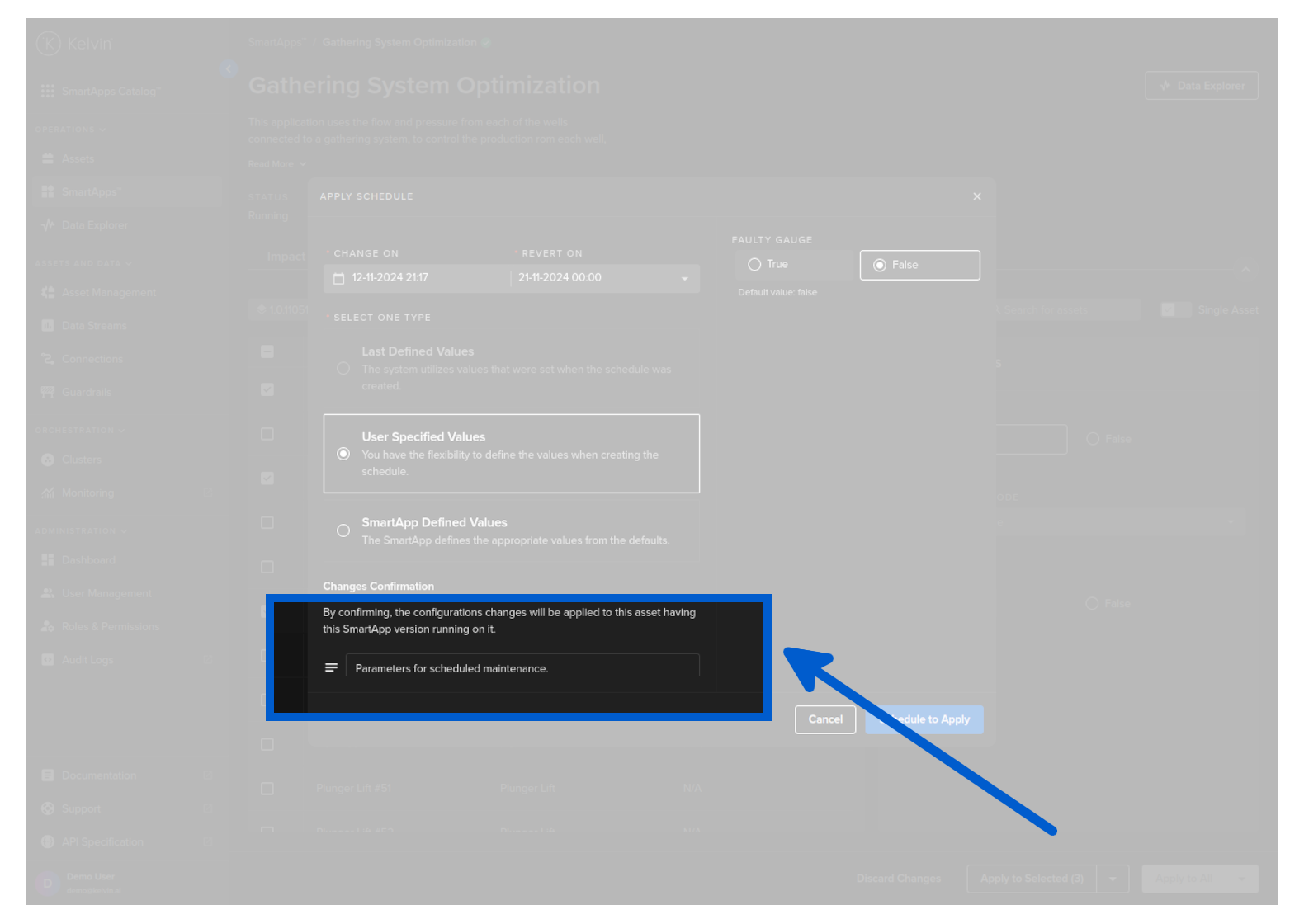
Optionally you can add a note for future reference about this scheduled change.
Then click Schedule to Apply.
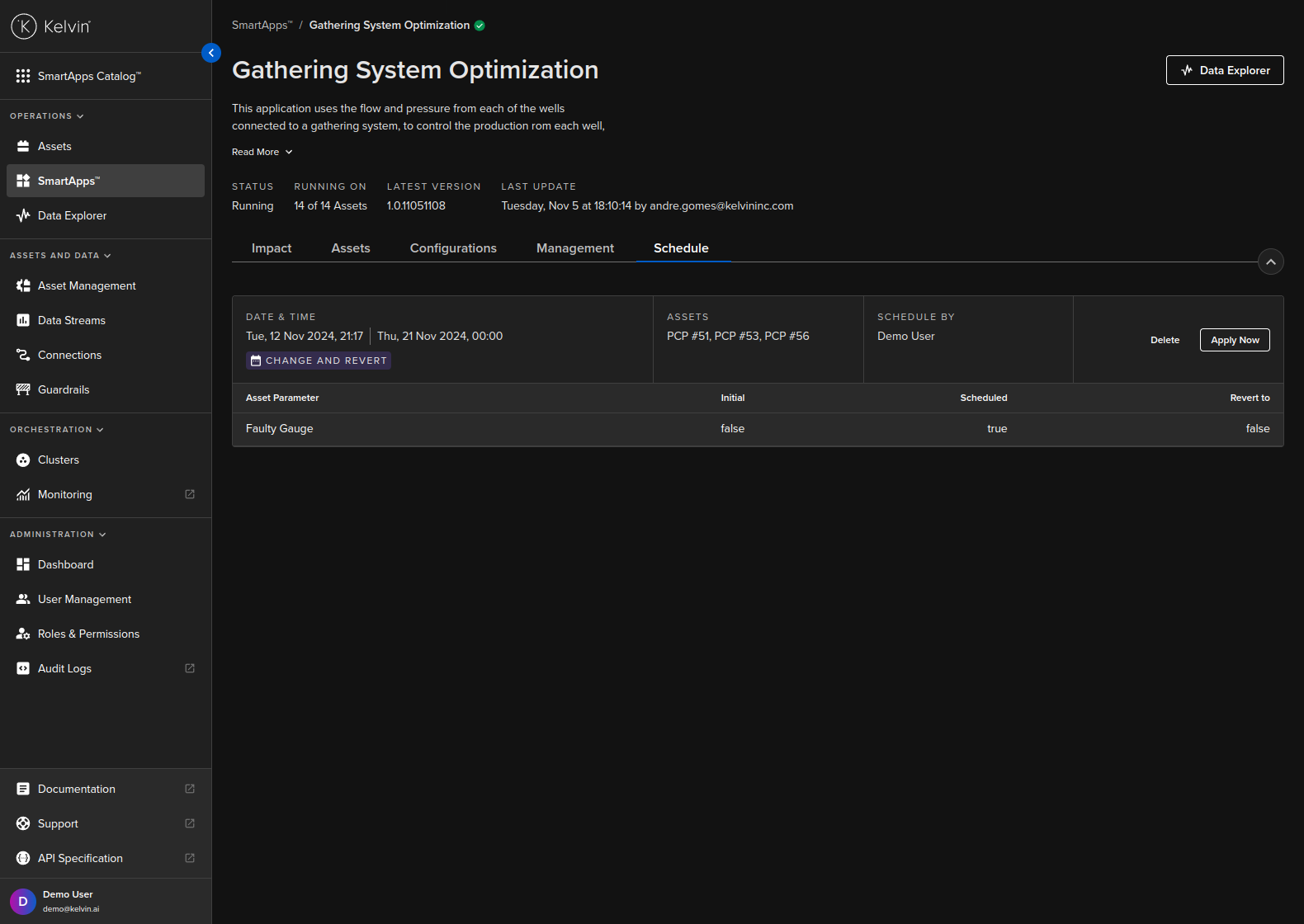
You will then see your schedule appear in the Schedule tab of Kelvin SmartApps™ .
curl -X 'POST' \
'https://<url.kelvin.ai>/api/v4/parameters/schedule/create' \
-H 'Authorization: Bearer <Your Current Token>' \
-H 'accept: application/json' \
-H 'Content-Type: application/json' \
-d '{
"app_name": "pcp-optimization",
"app_version": "1.0.17",
"scheduled_for": "2024-05-04T08:00:00Z",
"comment": "Threshold change for updated maintenance period.",
"resources": [
    "krn:asset:pcp_01",
    "krn:asset:pcp_02"
],
"parameters": {
    "annulus_pressure_max_threshold": 120,
    "annulus_pressure_min_threshold": 60
},
"revert": {
    "scheduled_for": "2024-05-06T18:00:00Z",
    "resource_parameters": [
    {
        "resource": "krn:asset:pcp_01",
        "parameters": {
        "annulus_pressure_max_threshold": 101,
        "annulus_pressure_min_threshold": 50
        }
    },
    {
        "resource": "krn:asset:pcp_02",
        "parameters": {
        "annulus_pressure_max_threshold": 105,
        "annulus_pressure_min_threshold": 55
        }
    }
    ]
}
}'
As long as all the information is correct, you will receive a 200 response like this;
{
"id": "7d1a6b72-5912-404c-a63a-6de88d3beed8",
"app_name": "pcp-optimization",
"app_version": "1.0.17",
"scheduled_for": "2024-05-04T08:00:00Z",
"resources": [
    "krn:asset:pcp_01",
    "krn:asset:pcp_02"
],
"parameters": {
    "annulus_pressure_max_threshold": 120,
    "annulus_pressure_min_threshold": 60
},
"comment": "Threshold change for updated maintenance period.",
"revert": {
    "scheduled_for": "2024-05-06T18:00:00Z",
    "resource_parameters": [
    {
        "resource": "krn:asset:pcp_01",
        "parameters": {
        "annulus_pressure_max_threshold": 101,
        "annulus_pressure_min_threshold": 50
        }
    },
    {
        "resource": "krn:asset:pcp_02",
        "parameters": {
        "annulus_pressure_max_threshold": 105,
        "annulus_pressure_min_threshold": 55
        }
    }
    ]
},
"original_resource_parameters": [
    {
    "resource": "krn:asset:pcp_01",
    "parameters": {
        "annulus_pressure_max_threshold": 101,
        "annulus_pressure_min_threshold": 50
    }
    },
    {
    "resource": "krn:asset:pcp_02",
    "parameters": {
        "annulus_pressure_max_threshold": 101,
        "annulus_pressure_min_threshold": 50
    }
    }
],
"state": "scheduled",
"error_msg": null,
"created_at": "2024-05-03T07:07:40.503655Z",
"created_by": "krn:user:demo@kelvin.ai",
"applied_at": null,
"applied_by": null,
"reverted_at": null,
"reverted_by": null
}
from kelvin.api.client import Client

# Login
client = Client(config={"url": "https://<url.kelvin.ai>", "username": "<your_username>"})
client.login(password="<your_password>")

# Create Scheduled Parameter Change and Revert
response = client.parameters.create_parameters_schedule(data={
    "app_name": "pcp-optimization",
    "app_version": "1.0.05221921",
    "scheduled_for": "2024-06-14T08:00:00Z",
    "comment": "Threshold change for updated maintenance period.",
    "resources": [
        "krn:asset:pcp_01",
        "krn:asset:pcp_02"
    ],
    "parameters": {
        "dd_rate_max": 0.55,
        "dd_rate_min": 0.12
    },
    "revert": {
        "scheduled_for": "2024-06-16T18:00:00Z",
        "resource_parameters": [
            {
                "resource": "krn:asset:pcp_01",
                "parameters": {
                    "dd_rate_max": 0.5,
                    "dd_rate_min": 0.1
                }
            },
            {
                "resource": "krn:asset:pcp_02",
                "parameters": {
                    "dd_rate_max": 0.5,
                    "dd_rate_min": 0.1
                }
            }
        ]
    }
})

print(response)
You will get a response similar to this;
app_name='pcp-optimization' app_version='1.0.05221921' scheduled_for=datetime.datetime(2024, 6, 16, 8, 0, tzinfo=datetime.timezone.utc) resources=['krn:asset:pcp_01', 'krn:asset:pcp_02'] parameters={'dd_rate_max': 0.55, 'dd_rate_min': 0.12} comment='Threshold change for updated maintenance period.' revert=Revert(scheduled_for=datetime.datetime(2024, 6, 18, 18, 0, tzinfo=datetime.timezone.utc), resource_parameters=[ParameterScheduleResourceParameter(resource=KRNAsset(asset='pcp_01'), parameters={'dd_rate_max': 0.5, 'dd_rate_min': 0.1}), ParameterScheduleResourceParameter(resource=KRNAsset(asset='pcp_02'), parameters={'dd_rate_max': 0.5, 'dd_rate_min': 0.1})]) id=UUID('bacf9f6f-04ef-4e2c-916e-718f1cb78bc9') state=<ParameterScheduleState.scheduled: 'scheduled'> original_resource_parameters=[ParameterScheduleResourceParameter(resource=KRNAsset(asset='pcp_01'), parameters={'dd_rate_max': 0.4, 'dd_rate_min': 0.1}), ParameterScheduleResourceParameter(resource=KRNAsset(asset='pcp_02'), parameters={'dd_rate_max': 0.4, 'dd_rate_min': 0.1})] error_msg=None created_at=datetime.datetime(2024, 6, 13, 6, 10, 38, 510879, tzinfo=datetime.timezone.utc) created_by='krn:user:demo@kelvin.ai' applied_at=None applied_by=None reverted_at=None reverted_by=None
Apply a Schedule
Apply a parameter update schedule or activate the revert parameter update manually.
What apply action that will be taken depends on the current state of the schedule.
- The parameter updates will be applied if the schedule is in the scheduled state.
- Revert parameters will be applied if the schedule is in the scheduled-revert state.
Nothing will be done if the schedule has expired. Or if there is the optional revert schedule, then when the revert schedule has expired.
Only service accounts can be the source of the apply.
| Key | Option | Description |
|---|---|---|
| type | schedule | Applies the scheduled parameters if the schedule is in the scheduled state. |
| schedule-revert | Applies the revert parameters if the schedule is in the scheduled-revert state. | |
| source | The source of the change request (restricted to Service Accounts) in krn format |
First go to Kelvin SmartApps™ and click on the schedule tab.
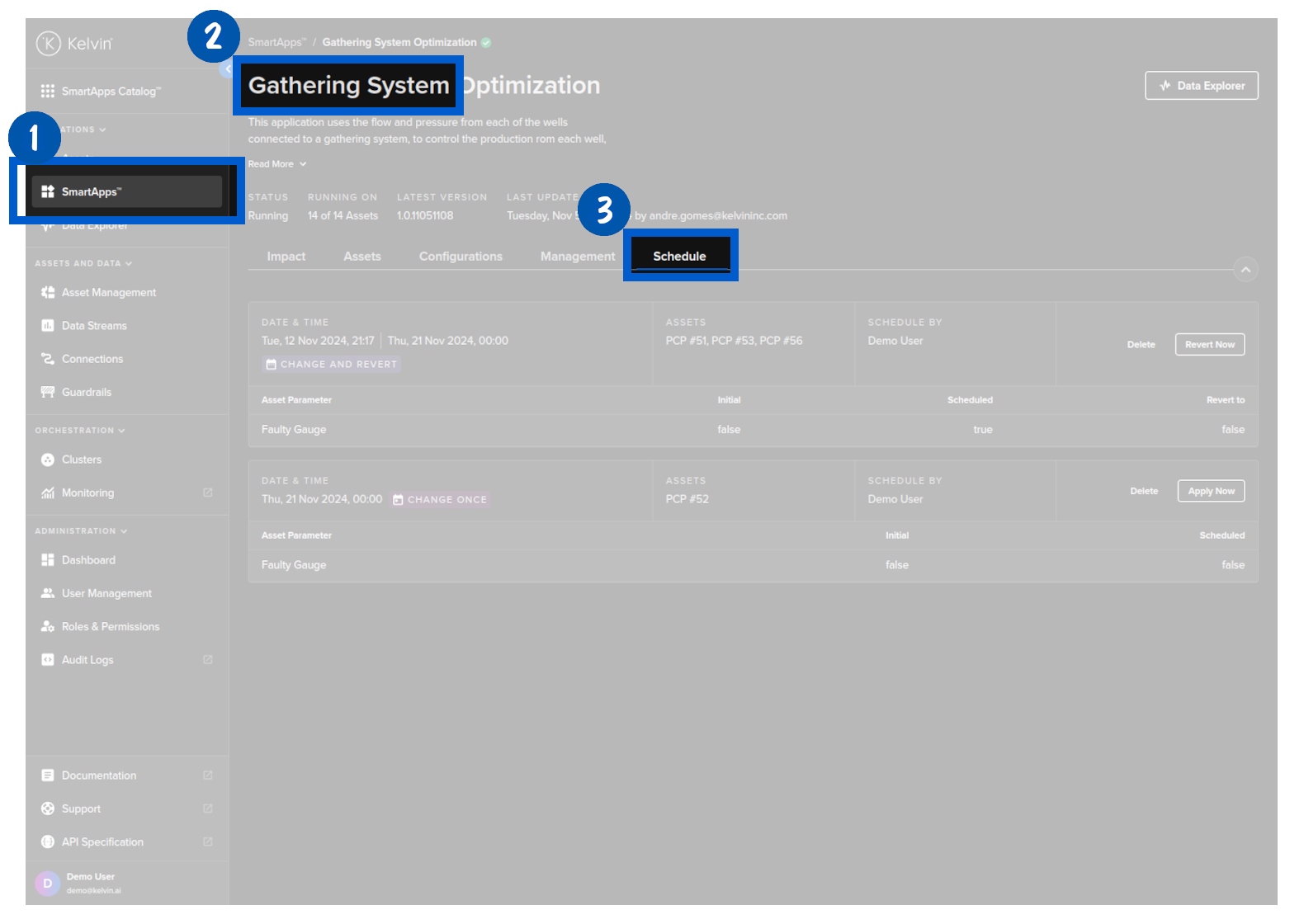
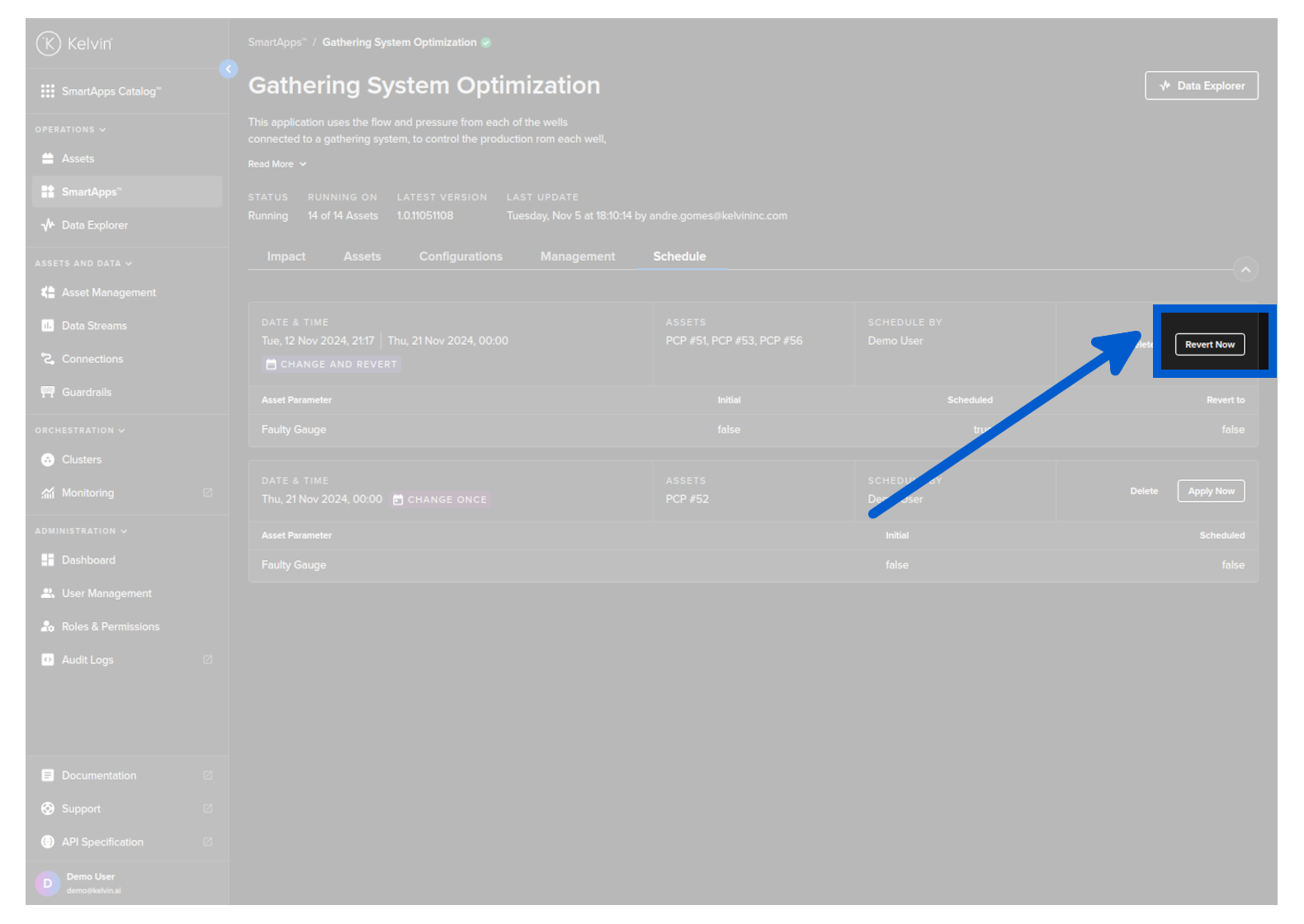
Find the wanted schedule and click on the Apply Now button.
curl -X 'POST' \
'https://<url.kelvin.ai>/api/v4/parameters/schedule/7d1a6b72-5912-404c-a63a-6de88d3beed8/apply' \
-H 'Authorization: Bearer <Your Current Token>' \
-H 'accept: */*' \
-H 'Content-Type: application/json' \
-d '{
        "type": "schedule",
        "source": "krn:srv-acc:well-management"
    }'
from kelvin.api.client import Client

# Login
client = Client(config={"url": "https://<url.kelvin.ai>", "username": "<your_username>"})
client.login(password="<your_password>")

# Apply Scheduled Parameter Change and Revert
response = client.parameters.apply_parameters_schedule(schedule_id="b1fa058d-1aa9-4cf2-9b2b-dda4e4583d92", data={
    "type": "schedule"
})

print(response)
You will get a response similar to this;
None
Delete a Schedule
Delete a schedule.
You will need to know the actual schedule id before proceeding.
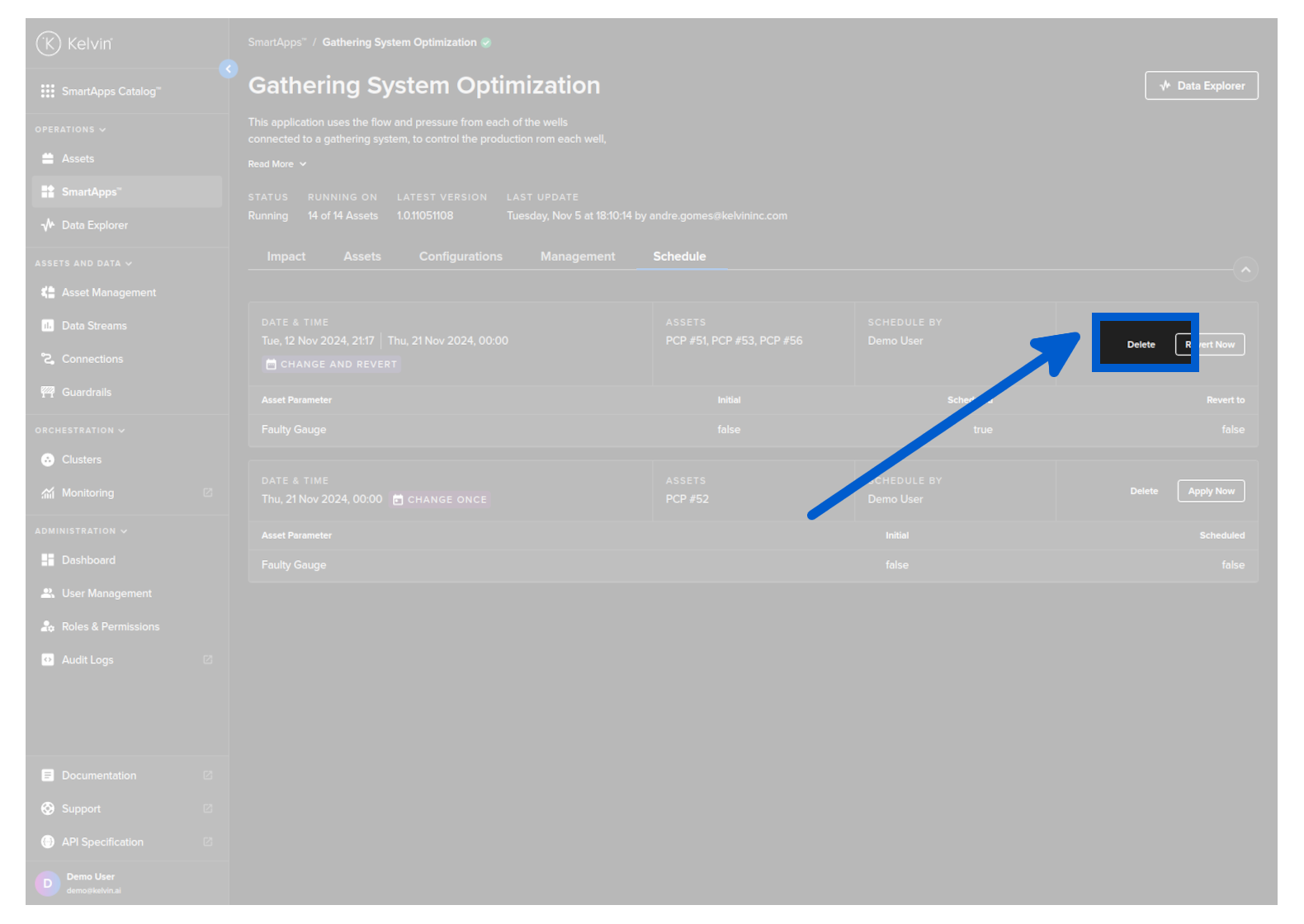
First go to Kelvin SmartApps™ and click on the schedule tab.
Find the wanted schedule and click on the Delete button.
curl -X 'POST' \
'https://<url.kelvin.ai>/api/v4/parameters/schedule/7d1a6b72-5912-404c-a63a-6de88d3beed8/delete' \
-H 'Authorization: Bearer <Your Current Token>' \
-H 'accept: */*' \
-d ''
from kelvin.api.client import Client

# Login
client = Client(config={"url": "https://<url.kelvin.ai>", "username": "<your_username>"})
client.login(password="<your_password>")

# Delete Scheduled Parameter Change and Revert
response = client.parameters.delete_parameters_schedule(schedule_id="bacf9f6f-04ef-4e2c-916e-718f1cb78bc9")

print(response)
You will get a response similar to this;
None
List Schedules
List all schedules based on filters.
First go to Kelvin SmartApps™ and click on the schedule tab.
The overview itself has all the schedules for Kelvin SmartApps™.
If you see an information icon next to the initial number, this means that each Asset has different values for that parameter. You can click on the icon to see the list of values for each Asset.
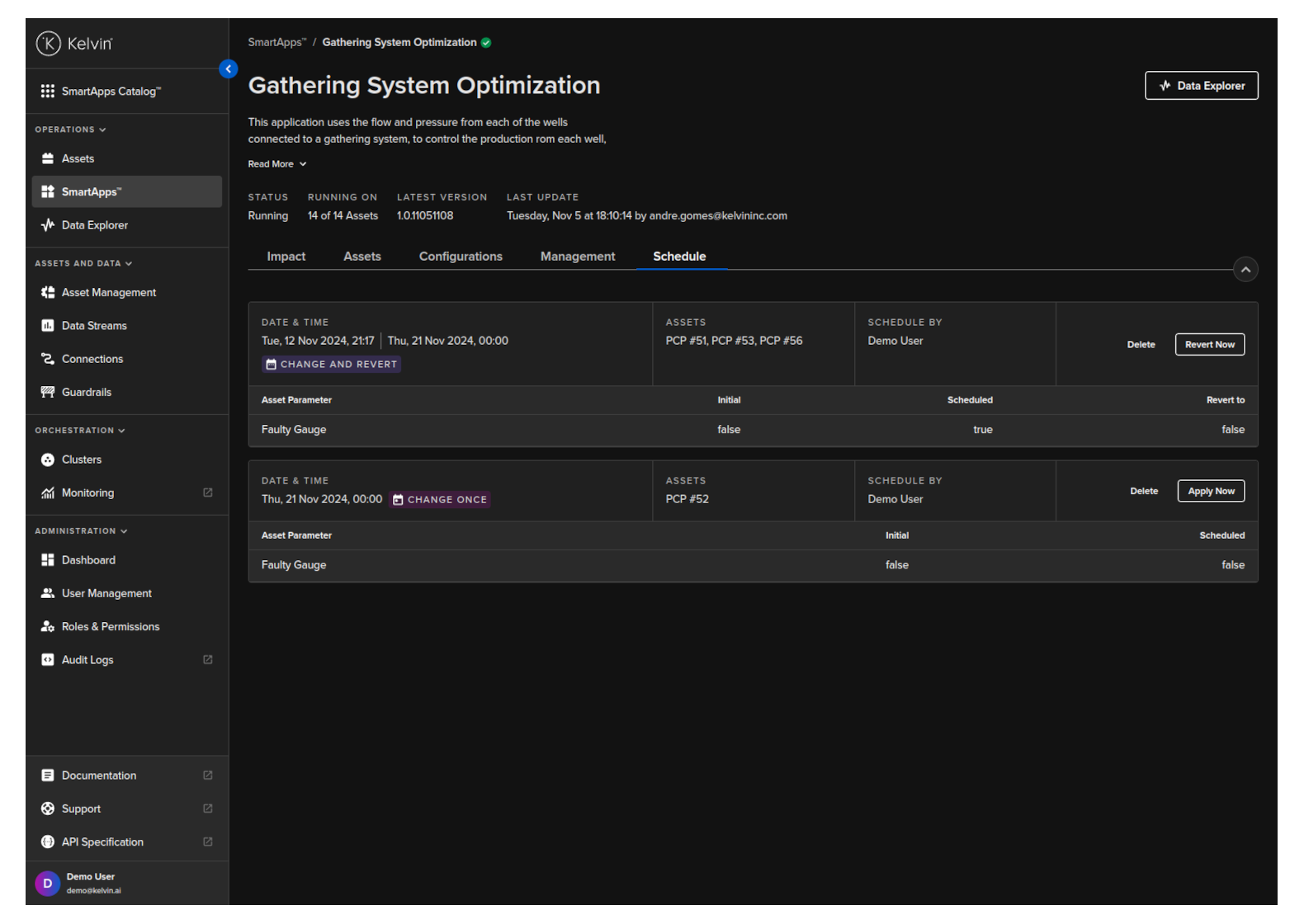
Each schedule is listed as a block with the key information.
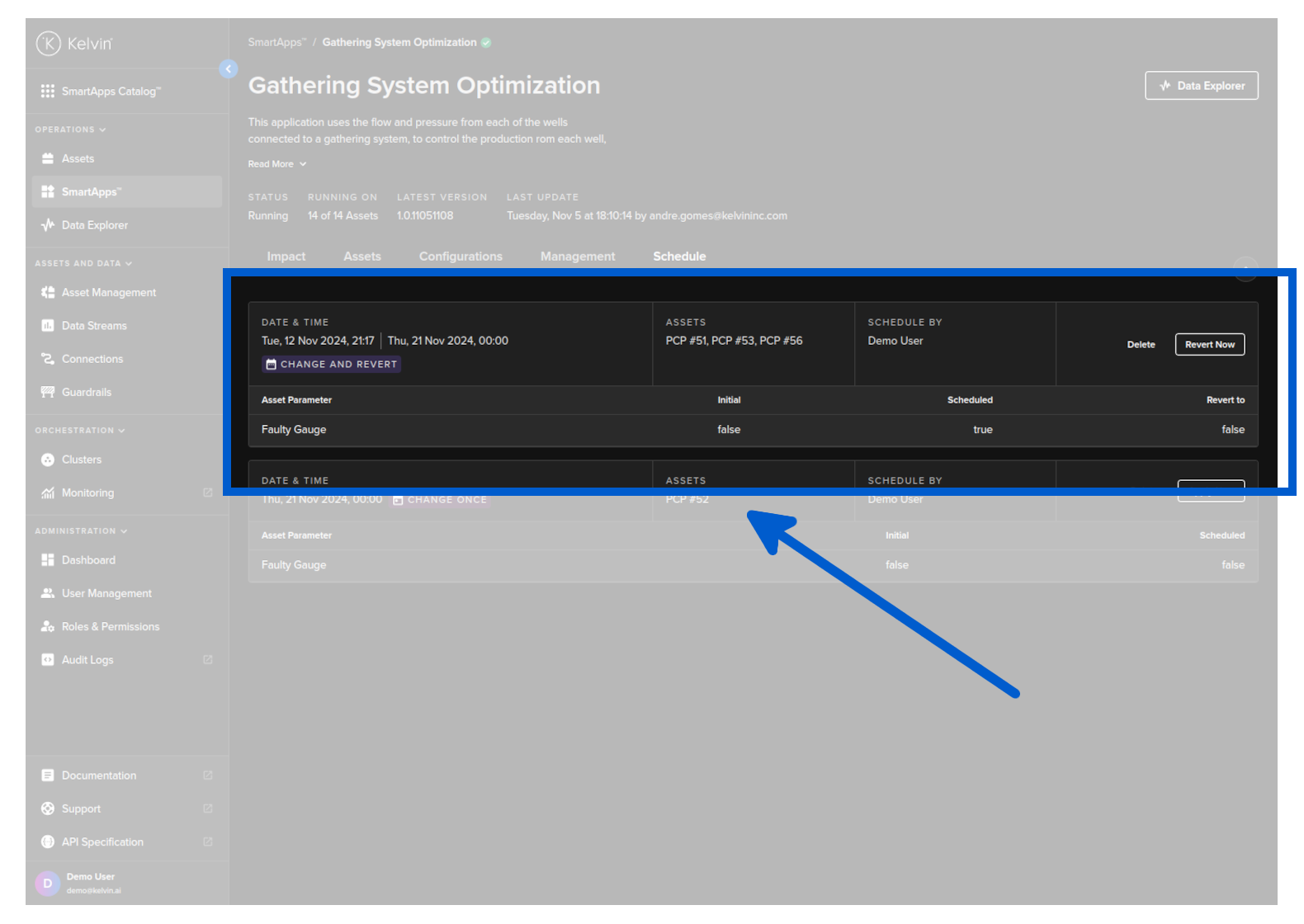
There is also the tags whether the scheduled update parameter has a revert option.
curl -X 'POST' \
'https://<url.kelvin.ai>/api/v4/parameters/schedule/list?pagination_type=cursor&page_size=20&direction=asc' \
-H 'Authorization: Bearer <Your Current Token>' \
-H 'accept: application/json-cursor' \
-H 'Content-Type: application/json' \
-d '{
"apps": [
    {
    "name": "pcp-optimization",
    "version": "1.0.17"
    }
],
"resources": [
    "krn:asset:pcp_03",
    "krn:asset:pcp_04"
]
}'
from kelvin.api.client import Client

# Login
client = Client(config={"url": "https://<url.kelvin.ai>", "username": "<your_username>"})
client.login(password="<your_password>")

# List Scheduled Parameter Change and Revert
response = client.parameters.list_parameters_schedule(data={
    "apps": [
        {
            "name": "pcp-optimization",
            "version": "1.0.05221921"
        }
    ],
    "resources": [
        "krn:asset:pcp_01",
        "krn:asset:pcp_02"
    ]
})

print(response)
You will get a response similar to this;
[ParametersScheduleGet(app_name='pcp-optimization', app_version='1.0.05221921', scheduled_for=datetime.datetime(2024, 6, 14, 17, 0, tzinfo=datetime.timezone.utc), resources=['krn:asset:pcp_01'], parameters={'dd_rate_max': 0.5}, comment='', revert=Revert(scheduled_for=datetime.datetime(2024, 6, 21, 17, 0, tzinfo=datetime.timezone.utc), resource_parameters=[ParameterScheduleResourceParameter(resource=KRNAsset(asset='pcp_01'), parameters={'dd_rate_max': 0.4})]), id=UUID('b03edf7f-5bd2-410e-9923-03f779e5a8fd'), state=<ParameterScheduleState.scheduled: 'scheduled'>, original_resource_parameters=[ParameterScheduleResourceParameter(resource=KRNAsset(asset='pcp_01'), parameters={'dd_rate_max': 0.4})], error_msg=None, created_at=datetime.datetime(2024, 6, 12, 10, 22, 59, 585601, tzinfo=datetime.timezone.utc), created_by='krn:user:demo@kelvin.ai', applied_at=None, applied_by=None, reverted_at=None, reverted_by=None), ParametersScheduleGet(app_name='pcp-optimization', app_version='1.0.05221921', scheduled_for=datetime.datetime(2024, 6, 14, 8, 0, tzinfo=datetime.timezone.utc), resources=['krn:asset:pcp_01', 'krn:asset:pcp_02'], parameters={'dd_rate_max': 0.55, 'dd_rate_min': 0.12}, comment='Threshold change for updated maintenance period.', revert=Revert(scheduled_for=datetime.datetime(2024, 6, 16, 18, 0, tzinfo=datetime.timezone.utc), resource_parameters=[ParameterScheduleResourceParameter(resource=KRNAsset(asset='pcp_01'), parameters={'dd_rate_max': 0.5, 'dd_rate_min': 0.1}), ParameterScheduleResourceParameter(resource=KRNAsset(asset='pcp_02'), parameters={'dd_rate_max': 0.5, 'dd_rate_min': 0.1})]), id=UUID('b1fa058d-1aa9-4cf2-9b2b-dda4e4583d92'), state=<ParameterScheduleState.scheduled: 'scheduled'>, original_resource_parameters=[ParameterScheduleResourceParameter(resource=KRNAsset(asset='pcp_01'), parameters={'dd_rate_max': 0.4, 'dd_rate_min': 0.1}), ParameterScheduleResourceParameter(resource=KRNAsset(asset='pcp_02'), parameters={'dd_rate_max': 0.4, 'dd_rate_min': 0.1})], error_msg=None, created_at=datetime.datetime(2024, 6, 13, 6, 6, 59, 42003, tzinfo=datetime.timezone.utc), created_by='krn:user:demo@kelvin.ai', applied_at=None, applied_by=None, reverted_at=None, reverted_by=None), ParametersScheduleGet(app_name='pcp-optimization', app_version='1.0.05221921', scheduled_for=datetime.datetime(2024, 6, 15, 17, 0, tzinfo=datetime.timezone.utc), resources=['krn:asset:pcp_03', 'krn:asset:pcp_01', 'krn:asset:pcp_06'], parameters={'dd_rate_max': 0.5, 'dd_rate_min': 0.2}, comment='', revert=Revert(scheduled_for=datetime.datetime(2024, 6, 17, 17, 0, tzinfo=datetime.timezone.utc), resource_parameters=[ParameterScheduleResourceParameter(resource=KRNAsset(asset='pcp_03'), parameters={'dd_rate_max': 0.5, 'dd_rate_min': 0.1}), ParameterScheduleResourceParameter(resource=KRNAsset(asset='pcp_01'), parameters={'dd_rate_max': 0.5, 'dd_rate_min': 0.1}), ParameterScheduleResourceParameter(resource=KRNAsset(asset='pcp_06'), parameters={'dd_rate_max': 0.5, 'dd_rate_min': 0.1})]), id=UUID('b23525a2-e470-42c6-9d9a-e92ccd60f2fe'), state=<ParameterScheduleState.scheduled: 'scheduled'>, original_resource_parameters=[ParameterScheduleResourceParameter(resource=KRNAsset(asset='pcp_03'), parameters={'dd_rate_max': 0.4, 'dd_rate_min': 0.1}), ParameterScheduleResourceParameter(resource=KRNAsset(asset='pcp_01'), parameters={'dd_rate_max': 0.4, 'dd_rate_min': 0.1}), ParameterScheduleResourceParameter(resource=KRNAsset(asset='pcp_06'), parameters={'dd_rate_max': 0.4, 'dd_rate_min': 0.1})], error_msg=None, created_at=datetime.datetime(2024, 6, 12, 10, 27, 33, 606183, tzinfo=datetime.timezone.utc), created_by='krn:user:demo@kelvin.ai', applied_at=None, applied_by=None, reverted_at=None, reverted_by=None)]