Testing with Generator
In the Kelvin SDK there is a test tool to help you ingest data to the inputs and debug the outputs to test the performance of your Kelvin SmartApp™.
The Kelvin SDK test generator tool is designed to allow testers to ingest messages from another Python script for testing purposes.
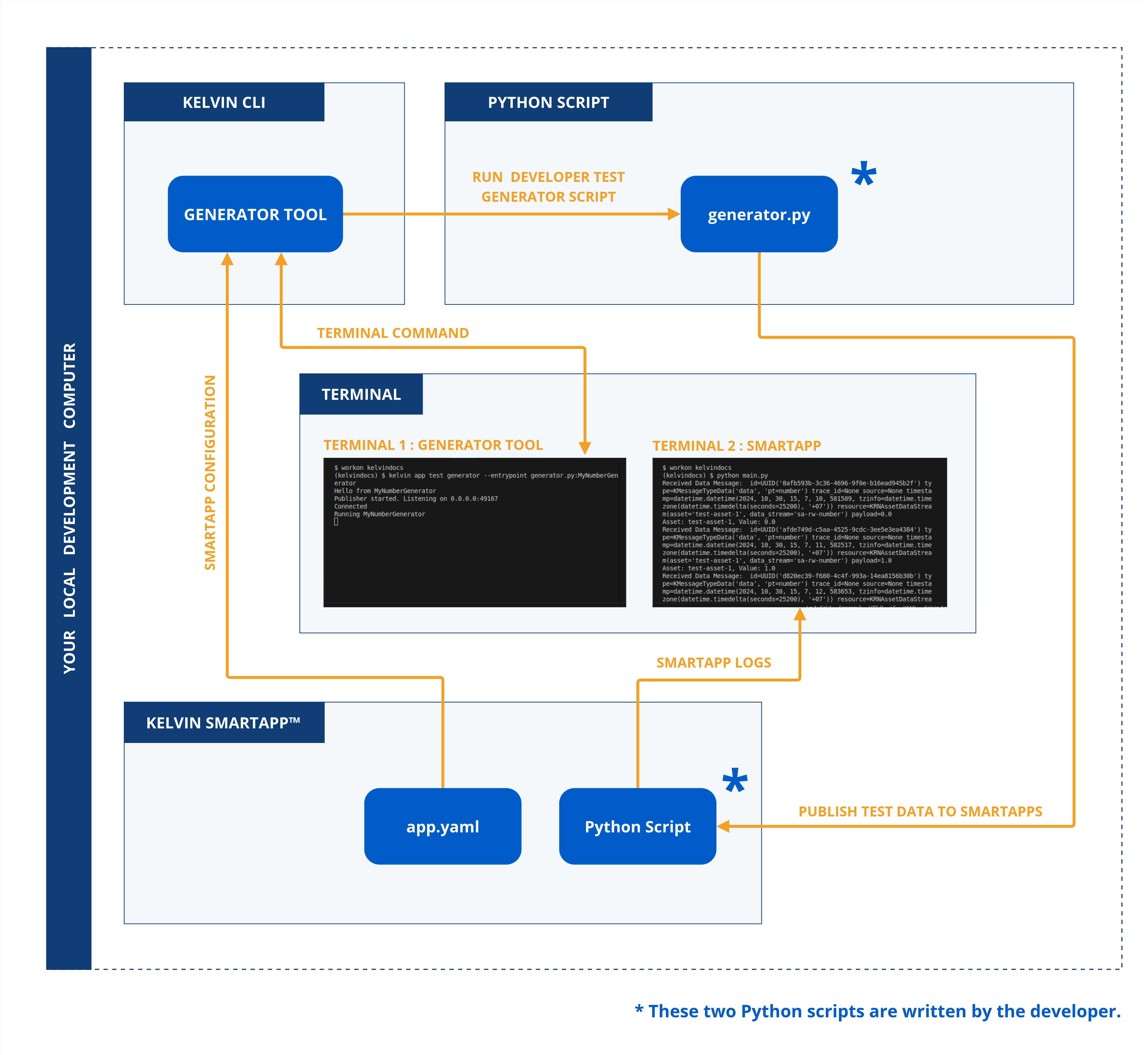
The general command to run the Test Generator tool is;
kelvin app test generator --entrypoint <python script>:<class name>
Generator Tool Overview
The test generator tool supports a variety of options to customize its behavior. Below is a list of the available options:
| Parameter | Required | Description | Note |
|---|---|---|---|
--config TEXT |
optional | Path to the app.yaml |
Default: Current directory |
| `--entrypoint | required | Path to the entrypoint (setuptools style) of the generator python class. It can be path a .py file or path to a module. Eg: mygenerator.py:MyGenerator | |
--asset-count INTEGER |
optional | Number of Assets (test-asset-N) | Default: 1 |
Video Tutorial
You can watch this Event Callback video tutorial which will show you how to setup a Kelvin SmartApp™ and create a Generator Test Python script to test the app all on you local machine with the Kelvin Test Tools.
Copy the code in the Video Tutorial
In the following chapters after the video tutorial you can see and copy all the scripts shown in the video tutorial.
The Generator Tool section starts at minute 2:23.
Generator Python Script
This is a local Python script you use to create the data and send it to the Kelvin SmartApp™ using the command line kelvin app test tool.
Detailed Code Explanations
Click on the for details about the code
| main.py | |
|---|---|
1 2 3 4 5 6 7 8 9 10 11 12 13 14 15 16 17 18 19 20 21 22 23 24 25 26 27 28 29 30 31 32 33 34 35 36 37 38 39 40 41 42 43 44 45 46 47 48 49 50 51 52 53 54 55 56 57 58 59 60 61 62 63 64 65 66 67 68 69 70 71 72 73 74 75 76 77 78 79 80 81 82 83 84 85 86 87 88 89 90 91 92 93 94 95 96 97 98 99 100 | |
- The
asynciomodule is used to ensure the program is running in asynchronous mode. This allows code, especially that which typically waits such as I/O-bound operations, to effectively execute in parallel thereby making the most efficient use of processor time. - The
KRNAssetDataStreamclass is used to define the Asset / Data Stream pair names into the Kelvin format. KRN stands for Kelvin Resource Name. - The
DataGeneratorandMessageDataare two classes used for declaring the Generator and creating the Message to be sent as the test data. - The
MyNumberGeneratorandMyOtherNumberGeneratorclass creates a number from 1 to 10 and sends it as test number data once per second for 10 seconds. - The
MyNumberGeneratorandMyOtherNumberGeneratorclass creates a number from 1 to 10 and sends it as test number data once per second for 10 seconds. - The
MyBooleanGeneratorclass randomly choose eitherTrueorFalseand sends it as test boolean data once per second. - The
MyStringGeneratorclass creates a 7 letter word with random letters and sends it as test string data once per second. - The
MyObjectGeneratorclass load data from a file (it can be generated by the Python script to) and sends it as test object data once per second. See below for a sample of the object data as a dynacard, though in reality it can be anything. - The
CCGeneratorclass creates a control change for an Asset / Data Stream pair and sends it as control change object data once per second for 10 seconds.
Test your SmartApp
- Requirements
Normally you will use the kelvin app test on Kelvin SmartApps™, you will be working with a complete complimentary set of files created by kelvin app create.
As we are only interesting in showing the abilities of the Generator Tool we will just create two files, main.py and app.yaml for this demo purpose.
Info
You can learn more about how to create a Kelvin SmartApp™ in the "Development" ⟹ "Create a SmartApp" page.
main.py
In order to show how to use the generator, we will use it with the example event callback app in the menu Development ⟹ Consume.
If you are not interested in the code, you can simply copy and paste this script into a file called main.py.
| main.py | |
|---|---|
1 2 3 4 5 6 7 8 9 10 11 12 13 14 15 16 17 18 19 20 21 22 23 24 25 26 27 28 29 30 | |
app.yaml
For the app.yaml file, simply copy this and paste into a file called app.yaml.
| main.py | |
|---|---|
1 2 3 4 5 6 7 8 9 10 11 12 13 14 15 16 17 18 19 20 21 22 23 24 25 26 27 28 29 30 31 32 33 | |
-
Run the Generator Test Tool:
To test by sending numbers to your Kelvin SmartApp™
kelvin app test generator --entrypoint generator.py:MyNumberGeneratorTo test by sending control changes to your Kelvin SmartApp™
kelvin app test generator --entrypoint generator.py:MyCCGeneratorand you should see the following output which includes any print statement from the generator Python script and the Kelvin Publisher class itself:
Hello from <Class that is called> Publisher started. Listening on 0.0.0.0:49167 -
Open a NEW terminal window and run the Kelvin SmartApp™:
python3 main.pyand you should see the following output:
Received Data Message: id=UUID('720f9e8d-1dd2-4054-afb4-5d579b31e998') type=KMessageTypeData('data', 'pt=number') trace_id=None source=None timestamp=datetime.datetime(2024, 10, 28, 21, 30, 40, 440062, tzinfo=datetime.timezone(datetime.timedelta(seconds=25200), '+07')) resource=KRNAssetDataStream(asset='test-asset-1', data_stream='sa-rw-number') payload=0.0 Asset: test-asset-1, Value: 0.0 Received Data Message: id=UUID('ca147a01-2f88-4ba6-8d93-5bb186967574') type=KMessageTypeData('data', 'pt=number') trace_id=None source=None timestamp=datetime.datetime(2024, 10, 28, 21, 30, 41, 441811, tzinfo=datetime.timezone(datetime.timedelta(seconds=25200), '+07')) resource=KRNAssetDataStream(asset='test-asset-1', data_stream='sa-rw-number') payload=1.0 Asset: test-asset-1, Value: 1.0 (...) -
Go to the Generator Tool terminal and check the logs:
(...)

Connected
Running MyNumberGenerator