Kelvin API Authentication
The Kelvin API authentication is based on the OpenID Connect (OIDC), which is an open authentication protocol that works on top of the OAuth 3.0 framework.
There are two types of authentication tokens issued:
- User : a pre-registered user on Kelvin. It uses a ClientID, username and password to obtain a valid JWT token. This method should be used by a common user.
- Service Account : a pre-registered ClientID on Kelvin. It uses a Client Secret to obtain a valid JWT token. This method should be used for 3rd party service integrations (backend-to-backend communication).
In the methods below we use cURL for the examples. When using Swagger UI or Postman the principle is the same but you will have to follow specific instructions for the software to obtain and use the tokens in OAUTH2 format.
Method 1: User Authentication
A JWT token can be obtained using the following endpoint:
/auth/realms/kelvin/protocol/openid-connect/token
With application/x-www-form-urlencoded request parameters:
username: User's emailpassword: User's passwordclient_id: ID of the client that you are trying to connect. Example:kelvin-clientgrant_type: must be set topassword
The response returns an access_token, refresh_token and expiration times.
Using cURL from a command line, you would do this;
curl --request POST "https://<url.kelvin.ai>/auth/realms/kelvin/protocol/openid-connect/token" \
     --header "Content-Type: application/x-www-form-urlencoded" \
     --data-urlencode "username=<your-username>" \
     --data-urlencode "password=<your-password>" \
     --data-urlencode "client_id=kelvin-client" \
     --data-urlencode "grant_type=password"
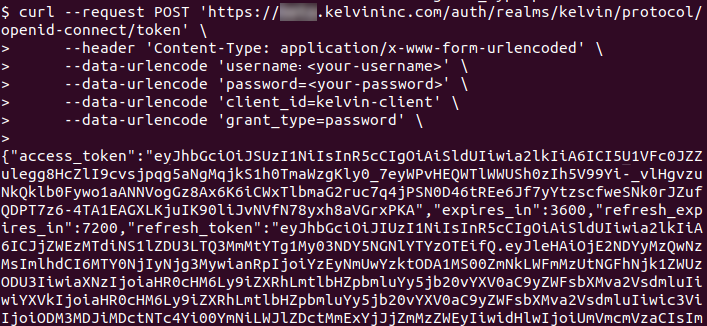
{
   "access_token":"eyJhbGciOiJSUzI1NiIsInR5cCIgOiAiSldUIiwia2lkIiA6ICJfS1hkWml0TzdCUzRJdjU2aVZRa2Y1X0hCSDFqbnRtdF9udGJOQmd1Wlh3In0.eyJleHAiOjE2OTgxNTM1NTgsImlhdCI6MTY5ODE0OTk1OCwianRpIjoiM2IyYmRlODAtZWZlNS00ZTYzLWFhZmYtOWU4Y2YxNzNiZmM0IiwiaXNzIjoiaHR0cHM6Ly9hbHBoYS5rZWx2aW5pbmMuY29tL2F1dGgvcmVhbG1zL2tlbHZpbiIsInN1YiI6ImI3NDAwN2QxLWI1M2UtNGE2ZS05YjY1LWE5NjhlN2QzOGQ2MyIsInR5cCI6IkJlYXJlciIsImF6cCI6ImtlbHZpbi1jbGllbnQiLCJzZXNzaW9u",
   "expires_in":3600,
   "refresh_expires_in":7200,
   "refresh_token":"eyJhbGciOiJIUzI1NiIsInR5cCIgOiAiSldUIiwia2lkIiA6ICJjZWEzMTdiNS1lZDU3LTQ3MmMtYTg1My03NDY5NGNlYTYzOTEifQ.eyJleHAiOjE2NTQ1MTcxNTgsImlhdCI6MTY1NDUwOTk1MTMtMGIzZi00NTdiLWIllbnQiLCJzZXNzaW9uX3N0YXRlIjoiMzBhZGM5MzAtMjVjZC00NTJjLTg2YjUtOGVhZWYyZDZiMmQzIiwic2NvcGUiOiJwcm9maWxlIGtlbHZpbi1zY29wZSBlbWFpbCIsInNpZCI6IjMwYWRjOTMwLTI1Y2QtNDUyYy04NmI1LThlYWVmMmQ2YjJkMyJ9.p0cmVzWLFTMmE1sos-8JoTVWsvRqeW_axEVTy87pGlY",
   "token_type":"Bearer",
   "not-before-policy":0,
   "session_state":"30adc930-25cd-452c-86b5-8eaef2d6b2d3",
   "scope":"profile kelvin-scope email"
}
The access_token should be used as the Bearer credential in all HTTP requests to the Kelvin API with the following header: Authorization: Bearer <access_token>.
Example of using the access token in the header of a request:
curl -X "POST" \
    "https://<url.kelvin.ai>/api/v4/assets/types/create" \
    -H "Authorization: Bearer <replace with your access_token>" \
    -H "Accept: application/json" \
    -H "Content-Type: application/json" \
    -d '{
            "name": "beam_pump",
            "title": "Beam Pump"
        }'
Method 2: Service Account
This authentication method is suited for backend service authentication and it uses a Client ID and Client Secret to obtain a token.
The Client Secret is confidential and should not be public or shared.
A JWT token can be obtained using the following endpoint:
/auth/realms/kelvin/protocol/openid-connect/token
With application/x-www-form-urlencoded request parameters:
client_id: ID of the client that you are trying to connectclient_secret: Secret of the client that you are trying to connectgrant_type: must be set toclient_credentials
Using cURL from a command line, you would do this;
curl --request POST "https://<url>/auth/realms/kelvin/protocol/openid-connect/token" \
     --header "Content-Type: application/x-www-form-urlencoded" \
     --data-urlencode "client_id=<client_id>" \
     --data-urlencode "client_secret=<client_secret>" \
     --data-urlencode "grant_type=client_credentials"