Event Callbacks
Concepts Made Simple
A callback in Python is like a WhatsApp notification. Imagine you’re waiting for a message from a friend, but instead of constantly checking your phone, you let WhatsApp notify you when the message arrives. You only get alerted when the specific event—your friend’s message—actually happens.
In Python, a callback works similarly. Instead of constantly checking for updates, the program waits until a certain event occurs, and when it does, the callback function (like the WhatsApp notification) is triggered to perform a specific action.
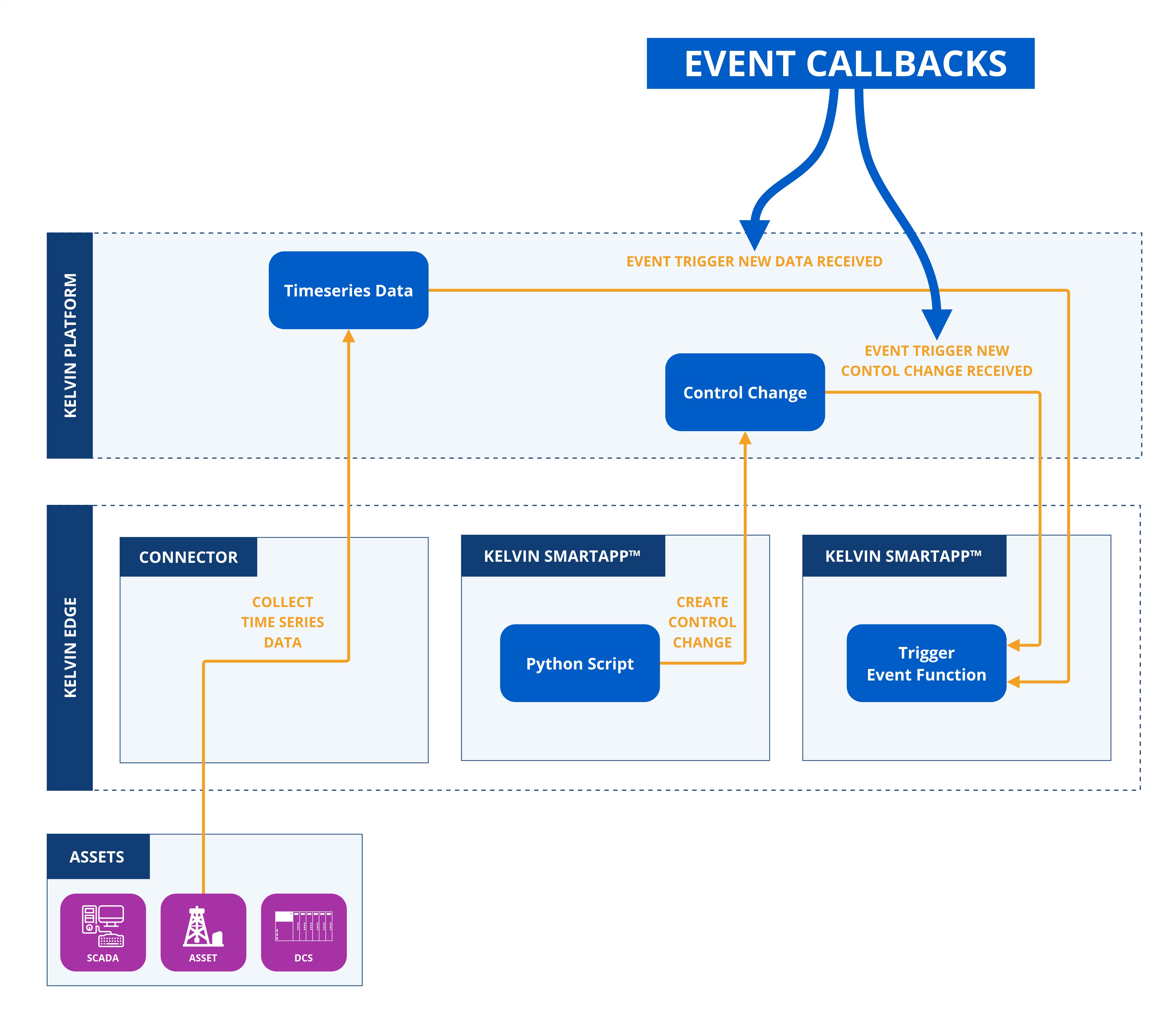
Event Callbacks are functions that are triggered when certain events happen, such as new time series data is received or a control change is initiated.
Currently there are two types of Event Callbacks available in the Python libraries;
- When new data is received in the Asset / Data Stream time series database
- When there is a new Control Chaange object created
Video Tutorial
You can watch this Event Callback video tutorial which will show you how to program and test it on you local machine with the Kelvin test data generator Python script.
Copy the code in the Video Tutorial
In the following chapters after the video tutorial you can see and copy all the scripts shown in the video tutorial.
Time Series Data Event
When any new time series data is created for any Asset / Data Stream pair, a callback event is created.
Detailed Explanation of Parameters
Response Parameters
-
id: UUID('db18aaaf-9a70-4c3e-babb-b7571867871f')
- Description: A unique random generated UUID as the key
idfor the time series data.
- Description: A unique random generated UUID as the key
-
type: KMessageTypeData('data', 'pt=number')
- Options:
number,boolean,string - Description: The format of the data to expect.
- Options:
-
trace_id: UUID('db18aaaf-9a70-4c3e-babb-b7571867871f')
-
timestamp: datetime.datetime(2024, 10, 28, 11, 51, 44, 601689, tzinfo=datetime.timezone(datetime.timedelta(seconds=25200), '+07'))
- Description: The time of recording of the time series data in the local computer's timezone.
-
resource: KRNAssetDataStream(asset='test-asset-1', data_stream='sa-rw-number')
- Description: The Asset and Data Stream names associated with the time series data.
-
payload: The actual value in the declared
typekey format.
The full code is given here for the main.py script.
Detailed Code Explanations
Click on the for details about the code
| main.py | |
|---|---|
1 2 3 4 5 6 7 8 9 10 11 12 13 14 15 16 17 18 19 20 21 22 23 24 25 26 27 28 29 30 31 32 33 | |
- The
asynciomodule is used to ensure the program is running in asynchronous mode. This allows code, especially that which typically waits such as I/O-bound operations, to effectively execute in parallel thereby making the most efficient use of processor time. - The
KelvinAppclass is used to initlize and connect the Kelvin SmartApp™ to the Kelvin Platform. - The
AssetDataMessageis a class representing the structure and properties of the asset data messages which will be held in an instance calledmsg. - The
on_asset_inputcallback function is triggered automatically whenever a new asset / data stream time series data associated with the Kelvin SmartApp™ is received on the platform. It serves as an event handler to process incoming data in real time, ensuring that relevant actions or data updates occur immediately upon receipt. - The
mainfunction initializes the Kelvin SmartApp™, connects it to the Kelvin Platform, and configures an event callback to execute a specific function whenever new data arrives from an Asset associated with the Kelvin SmartApp™ on the Kelvin Platform.
When you run this Python script, the following output will be view in the terminal or logs;
Received Data Message:  id=UUID('db18aaaf-9a70-4c3e-babb-b7571867871f') type=KMessageTypeData('data', 'pt=number') trace_id=None source=None timestamp=datetime.datetime(2024, 10, 28, 11, 51, 44, 601689, tzinfo=datetime.timezone(datetime.timedelta(seconds=25200), '+07')) resource=KRNAssetDataStream(asset='test-asset-1', data_stream='sa-rw-number') payload=9.0

Asset: test-asset-1, Value: 9.0
Control Change Data Event
When any new control change is initiated, a callback event is created.
Detailed Explanation of Parameters
Response Parameters
-
id: UUID('db18aaaf-9a70-4c3e-babb-b7571867871f')
- Description: A unique random generated UUID as the key
idfor the control change object.
- Description: A unique random generated UUID as the key
-
type: KMessageTypeData('data', 'pt=number')
- Options:
number,boolean,string - Description: The format of the data to expect.
- Options:
-
trace_id: UUID('db18aaaf-9a70-4c3e-babb-b7571867871f')
-
timestamp: datetime.datetime(2024, 10, 28, 11, 51, 44, 601689, tzinfo=datetime.timezone(datetime.timedelta(seconds=25200), '+07'))
- Description: The time of recording of the time series data in the local computer's timezone.
-
resource: KRNAssetDataStream(asset='test-asset-1', data_stream='sa-rw-number')
- Description: The Asset and Data Stream names associated with the control change.
-
payload: The actual value in the declared
typekey format.
The full code is given here for the main.py script.
Detailed Code Explanations
Click on the for details about the code
| main.py | |
|---|---|
1 2 3 4 5 6 7 8 9 10 11 12 13 14 15 16 17 18 19 20 21 22 23 24 25 26 27 28 29 30 | |
- The
asynciomodule is used to ensure the program is running in asynchronous mode. This allows code, especially that which typically waits such as I/O-bound operations, to effectively execute in parallel thereby making the most efficient use of processor time. - The
KelvinAppclass is used to initlize and connect the Kelvin SmartApp™ to the Kelvin Platform. - The
AssetDataMessageis a class representing the structure and properties of the asset data messages which will be held in an instance calledmsg. - The
on_control_changecallback function is triggered automatically whenever a new control change object is initiated to an Asset associated with the Kelvin SmartApp™. It serves as an event handler to process incoming control change data in real time, ensuring that relevant review, actions or data updates occur immediately upon receipt. - The
mainfunction initializes the Kelvin SmartApp™, connects it to the Kelvin Platform, and configures an event callback to execute a specific function whenever a new control change is initiated for an asset associated with the Kelvin SmartApp™.
When you run this Python script, the following output will be view in the terminal or logs;
Received Control Message:  id=UUID('44ba34f7-6689-464f-9804-7bcc0e347f68') type=KMessageTypeData('data', 'pt=number') trace_id=None source=None timestamp=datetime.datetime(2024, 10, 28, 14, 29, 41, 553346, tzinfo=datetime.timezone(datetime.timedelta(seconds=25200), '+07')) resource=KRNAssetDataStream(asset='test-asset-1', data_stream='sa-cc-number') payload=20.0

Asset: test-asset-1, Value: 20.0
Data Generator for Local SmartApp Testing
Easily test your SmartApp locally on your computer.
Comprehensive documentation is available for the Generator Tool. Click here to learn how to use this event callback script with the Test Generator on the "Test a SmartApp" ⟹ "Generator" page.