Upload
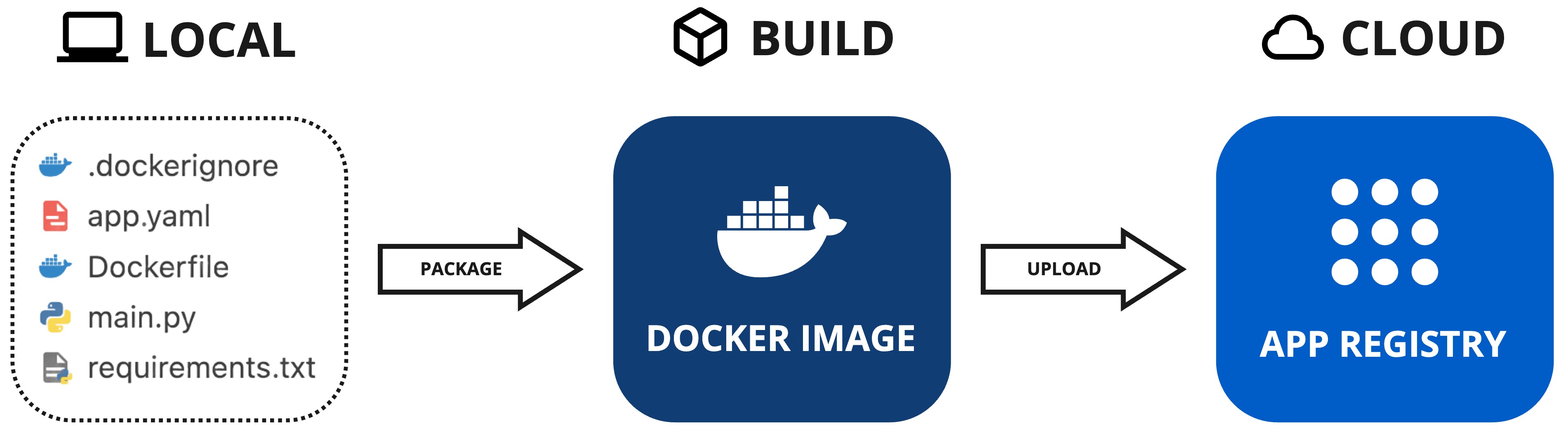
In this page, you'll upload your Kelvin SmartApp™ to the App Registry within your Kelvin Cloud instance. The App Registry is a centralized repository that stores all the Kelvin SmartApps™ you create. Once uploaded, you can deploy your SmartApp to any Kelvin Edge cluster connected to your Kelvin Cloud instance.
Let's start by making sure your Kelvin SmartApp™ is ready for upload.
Prerequisites
The info section in the app.yaml file defines crucial attributes such as the unique name, display name, description, and version of your app. Below is an example of what your app.yaml file might look like:
| app.yaml Example | |
|---|---|
1 2 3 4 5 | |
Conflicting Versions
If you try to upload an app with the same version number as an existing one in the App Registry, you’ll encounter an error. Always ensure you increment the version number before uploading.
SDK Login
Before uploading your app, you need to login the SDK with your Kelvin Cloud credentials.
Open a terminal and run the following command:
| Kelvin SDK Login Command Example | |
|---|---|
1 | |
And type in your Kelvin Cloud credentials when prompted.
Additional Preparations
Apart from setting up the app.yaml, you can also customize other files specific to the compilation process.
Dockerfile
This is a standard Dockerfile that you can customize to suit your application's needs.
Refer to the official Docker documentation for details on the available options and configurations for the Dockerfile.
requirements.txt
This is a standard requirements.txt file used to specify the Python libraries required by your application.
You can add any dependencies that your Python program needs here.
.dockerignore
This is a standard .dockerignore file used to exclude files or directories from being included in your Kelvin SmartApp™ image.
Use this file to ensure that unnecessary or sensitive files are not compiled into the Kelvin SmartApp™.
Build
Before uploading, you have the option to build your application to verify that all components compile successfully.
Note
This step is optional. You can proceed directly to the upload step, which will automatically build the Kelvin SmartApp™ as part of the process.
Open a terminal in the directory where your app and its associated files are located, and run the following command:
| Building Your Kelvin SmartApp™ | |
|---|---|
1 | |
| Options | Description |
|---|---|
--app-dir PATH |
The path to the application's directory. Assumes the current directory if not specified. |
--build-arg TEXT |
Additional custom arguments that are passed straight to the docker build command. |
--multiarch TEXT |
Comma-separated list of architectures to build.Supported Architectures: amd64,arm64,arm32. ny other value will be passed to docker build engine as is.Default is amd64 |
-v, --verbose |
Display all executed steps to the screen. |
--help |
Show this message and exit. |
Upload
Uploading your app is straightforward and requires just a single command. Open a terminal in the directory where your app and its associated files are located, and run the following command:
Reminder
Make sure Docker is installed and running before executing the upload command. Docker is essential for packaging and uploading apps to the App Registry.
| Upload Kelvin SmartApp™ to Cloud | |
|---|---|
1 | |
As the command runs, you will observe the app being packaged and subsequently uploaded to the App Registry. Here's a sample output:
| Upload CLI Ouput | |
|---|---|
1 2 3 4 5 6 7 8 9 10 | |