Deploy a Workload
When you deploy a workload, you can choose whether to deploy immediately or to stage the workload at the edge and apply it at a later time.
| Field | Option | Description |
|---|---|---|
| Standard | None | This will use the standard Kubernetes deployment process for workload containers and the workload will be automatically started after downloaded to the edge. |
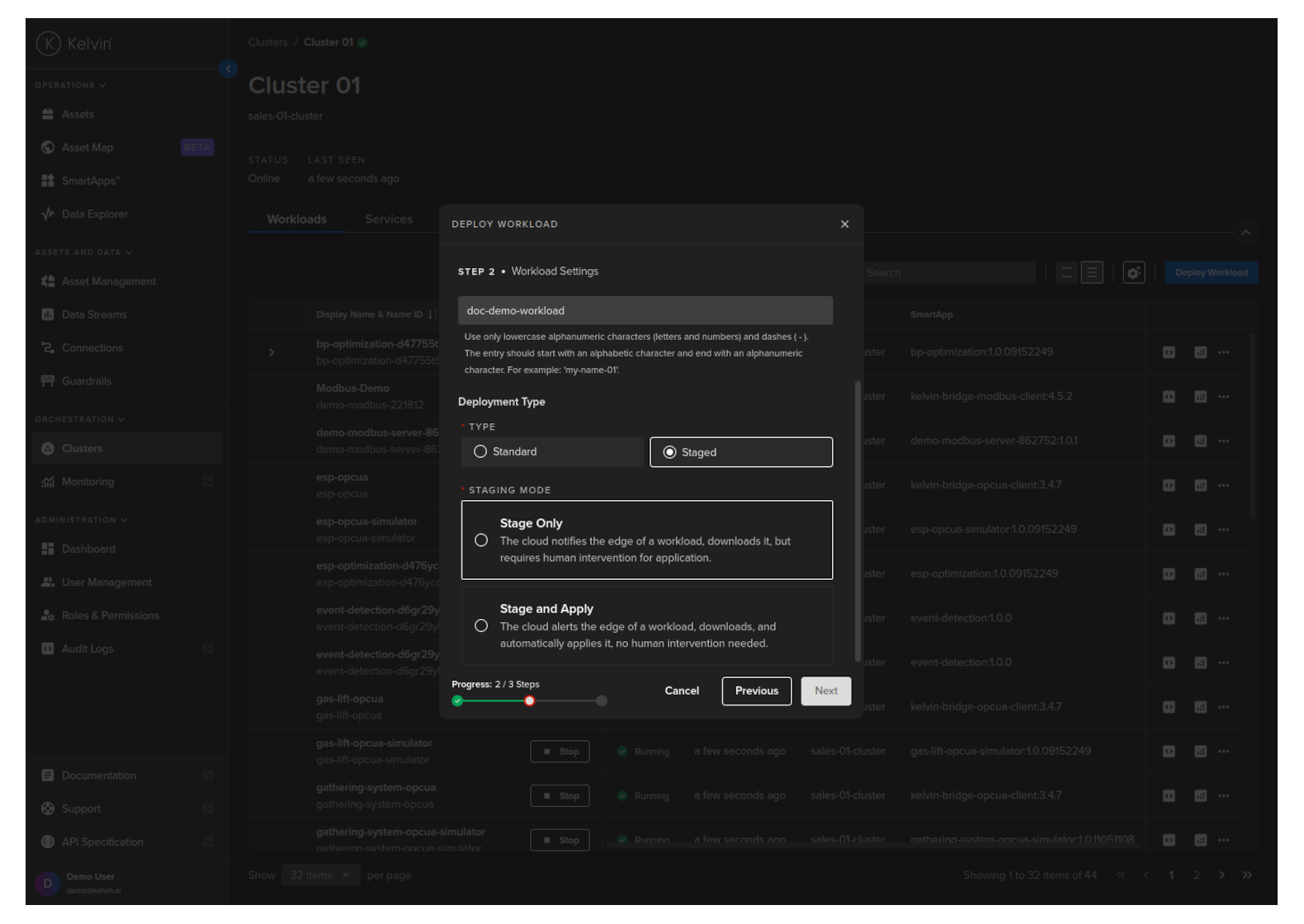
| Staged | Stage Only | This will download the workload to the edge but will not start the workload. You will need to send an additional command to start the workload either through the Kelvin API or locally in the terminal of the edge computer |
| Staged | Stage and Apply | This will use Kelvin's deployment process for workload containers and the workload will be automatically started after downloaded to the edge. The difference to the Kubernetes deployment process is that Kelvin will download all workloads and stage them first. Only when all workloads have been successfully downloaded will the start command be given to all the workloads. |
To start, got to Cluster, select a cluster then click on the Deploy Workload button;
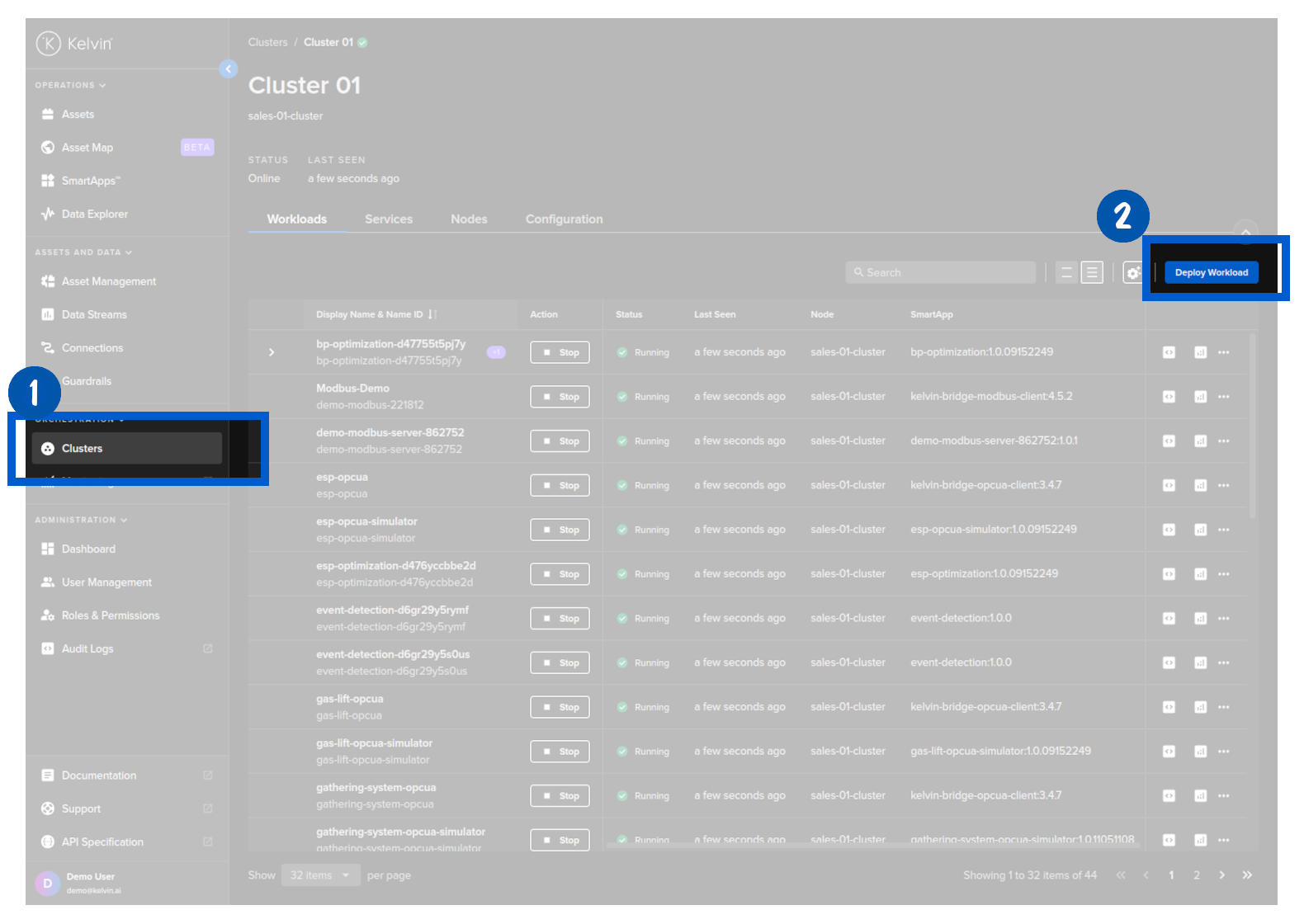
Then you select the app and the version you want to deploy. When ready click Next to go to Step 2.

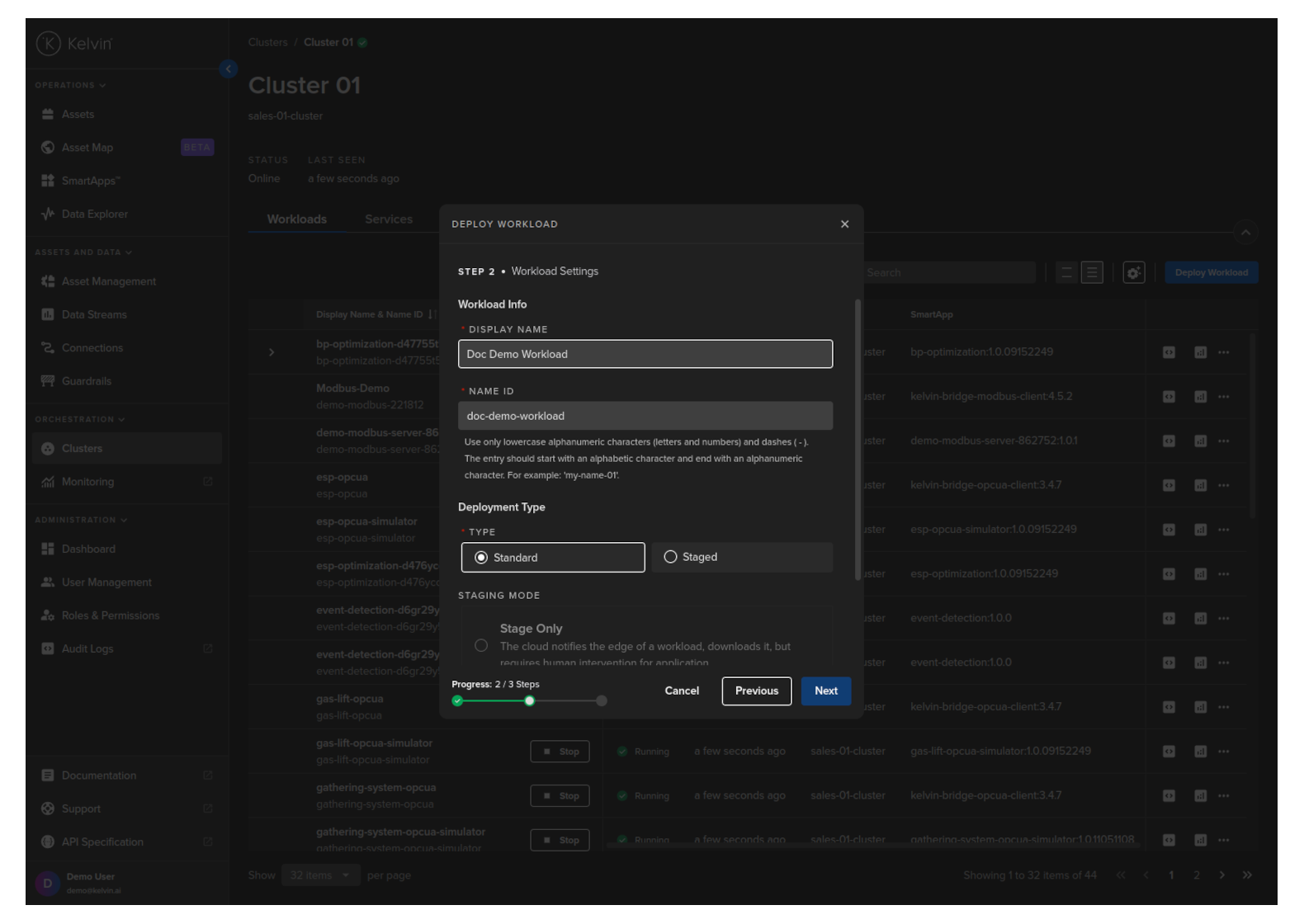
In Step 2 you can provide a custom Workload name and choose whether it is to be Standard or Staged deployment.
The staged process is very useful in cases where you have poor Internet connection and want to ensure that all workloads are downloaded first before they are started.
It is also useful in cases where you want to have the new/upgrade workload downloaded and ready at the edge but only want to do the change at a time that minimizes disruptions to the operations, like during maintenance shifts. This procedure allows the Operations to initiate the workload start/upgrade regardless of the Internet connectivity and reliability.
For Standard mode, you do not have any other options.
For Staged mode, you have two options;
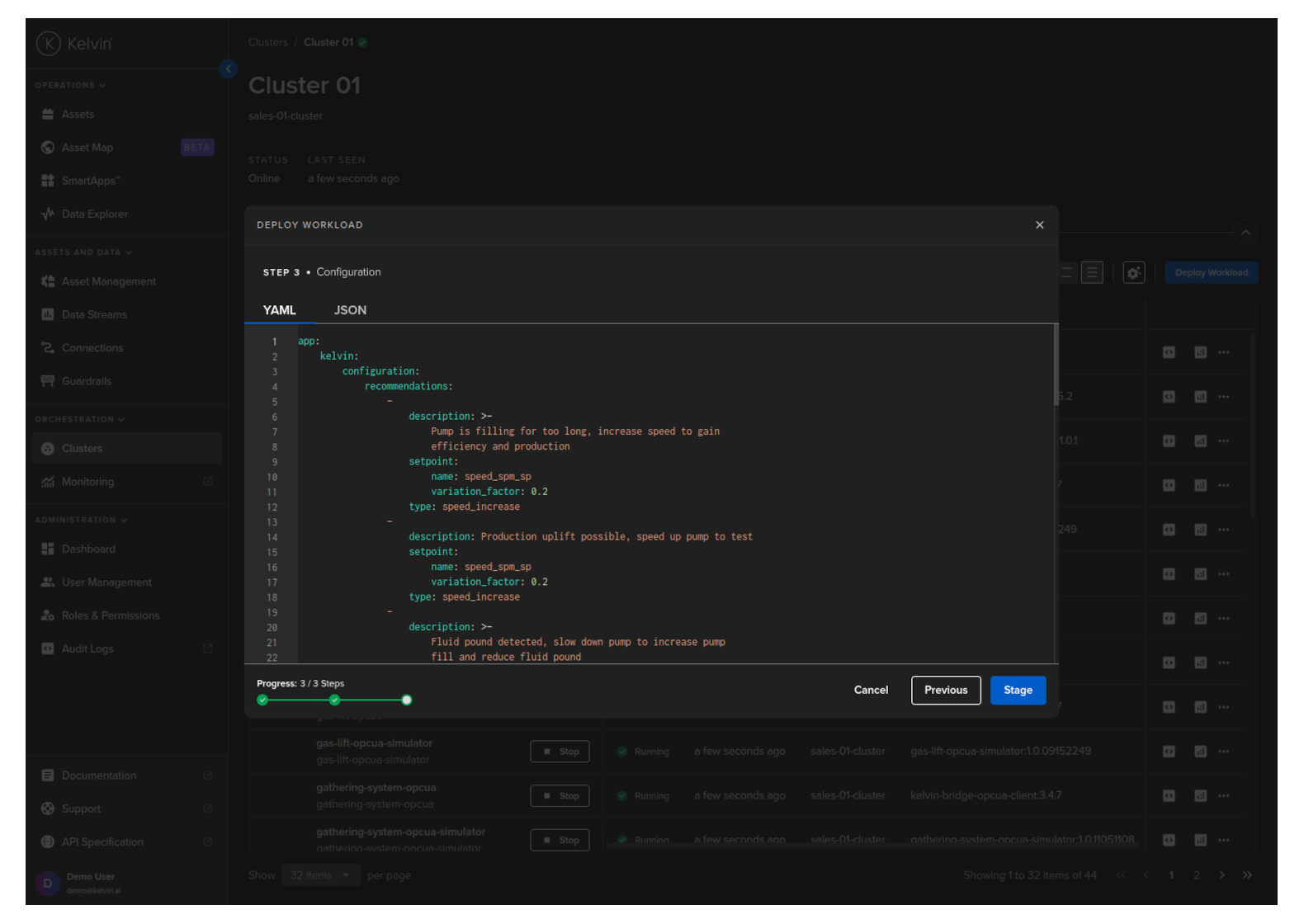
Click next to continue to Step 3. Here you can modify the app.yaml configuration file to suit your requirements and then click on Deploy. Confirm the deployment, then the Workload will be deployed to the edge.
You can then see the status of the Workload in the Workloads list going from Pending, Deploying to Running.
You can even deploy the app if the Cluster is offline. It will be placed in a queue with a status of Pending and will be automatically deployed when the Cluster comes back online.
This example only does a standard workload deploy. For staged workload documentation read more in the chapter Staged Workload Deploy
curl -X "POST" \
  "https://<url.kelvin.ai>/api/v4/workloads/deploy" \
  -H "Authorization: Bearer <Your Current Token>" \
  -H "Accept: application/json" \
  -H "Content-Type: application/json" \
  -d '{
        "app_name": "esp-optimization",
        "app_version": "1.0.05221921",
        "cluster_name": "dev-01-cluster",
        "name": "doc-demo-staged-workload",
        "payload": {
            "app": {
                "kelvin": {
                    "assets": [
                        {
                            "metrics": {
                                "casing_pressure": {
                                    "remote": true
                                },
                                "gas_flow_rate": {
                                    "remote": true
                                },
                                "speed": {
                                    "remote": true
                                },
                                "speed_sp": {
                                    "remote": true
                                }
                            },
                            "name": "esp_21"
                        },
                        {
                            "metrics": {
                                "casing_pressure": {
                                    "remote": true
                                },
                                "gas_flow_rate": {
                                    "remote": true
                                },
                                "speed": {
                                    "remote": true
                                },
                                "speed_sp": {
                                    "remote": true
                                }
                            },
                            "name": "esp_26"
                        }
                    ],
                    "configuration": {
                        "recommendations": [
                            {
                                "description": "Water level increasing, higher pump speed will lead water level to return to optimal.",
                                "setpoint": {
                                    "name": "speed_sp",
                                    "variation_factor": 0.1
                                },
                                "type": "increase_speed"
                            },
                            {
                                "description": "Production gain possible after step test, with higher pump speed",
                                "setpoint": {
                                    "name": "speed_sp",
                                    "variation_factor": 0.1
                                },
                                "type": "increase_speed"
                            }
                        ]
                    },
                    "inputs": [
                        {
                            "data_type": "number",
                            "name": "casing_pressure"
                        },
                        {
                            "data_type": "number",
                            "name": "gas_flow_rate"
                        },
                        {
                            "data_type": "number",
                            "name": "speed"
                        },
                        {
                            "data_type": "number",
                            "name": "speed_sp"
                        }
                    ],
                    "language": {
                        "python": {
                            "entry_point": "app:App"
                        },
                        "type": "python"
                    },
                    "outputs": [
                        {
                            "control_change": true,
                            "data_type": "number",
                            "name": "speed_sp",
                            "storage": "node-and-cloud"
                        }
                    ]
                },
                "type": "kelvin"
            },
            "info": {
                "description": "This application uses the values coming from the well control system such as flow rate, pressure, and motor speed, to optimize the speed of the ESP motor. As a byproduct we have a lower energy use by the equipment.",
                "name": "esp-optimization",
                "title": "ESP Optimization",
                "version": "1.0.05221921"
            },
            "spec_version": "4.12.0",
            "system": {
                "environment_vars": [
                    {
                        "name": "KELVIN_GW_MODE",
                        "value": "SOCKETS"
                    }
                ]
            }
        },
        "instantly_apply": true,
        "staged": false,
        "source": "krn:user:demo@kelvin.ai",
        "title": "Doc Demo Staged Workload"
    }'
You will get a response similar to this;
created=datetime.datetime(2024, 5, 23, 8, 52, 7, 803281, tzinfo=datetime.timezone.utc) name='doc_demo_asset_type' title='Documentation Demo Asset Type' updated=datetime.datetime(2024, 5, 23, 8, 52, 7, 803281, tzinfo=datetime.timezone.utc)
This example only does a standard workload deploy. For staged workload documentation read more in the chapter Staged Workload Deploy
from kelvin.api.client import Client

# Login
client = Client(config={"url": "https://<url.kelvin.ai>", "username": "<your_username>"})
client.login(password="<your_password>")

# Deploy Standard Workload
response = client.workload.deploy_workload(data={
    "app_name":"esp-optimization",
    "app_version":"1.0.05221921",
    "cluster_name":"dev-01-cluster",
    "name":"doc-demo-staged-workload",
    "payload":{
        "app":{
            "kelvin":{
                "assets":[
                {
                    "metrics":{
                        "casing_pressure":{
                            "remote":True
                        },
                        "gas_flow_rate":{
                            "remote":True
                        },
                        "speed":{
                            "remote":True
                        },
                        "speed_sp":{
                            "remote":True
                        }
                    },
                    "name":"esp_21"
                },
                {
                    "metrics":{
                        "casing_pressure":{
                            "remote":True
                        },
                        "gas_flow_rate":{
                            "remote":True
                        },
                        "speed":{
                            "remote":True
                        },
                        "speed_sp":{
                            "remote":True
                        }
                    },
                    "name":"esp_26"
                }
                ],
                "configuration":{
                "recommendations":[
                    {
                        "description":"Water level increasing, higher pump speed will lead water level to return to optimal.",
                        "setpoint":{
                            "name":"speed_sp",
                            "variation_factor":0.1
                        },
                        "type":"increase_speed"
                    },
                    {
                        "description":"Production gain possible after step test, with higher pump speed",
                        "setpoint":{
                            "name":"speed_sp",
                            "variation_factor":0.1
                        },
                        "type":"increase_speed"
                    }
                ]
                },
                "inputs":[
                {
                    "data_type":"number",
                    "name":"casing_pressure"
                },
                {
                    "data_type":"number",
                    "name":"gas_flow_rate"
                },
                {
                    "data_type":"number",
                    "name":"speed"
                },
                {
                    "data_type":"number",
                    "name":"speed_sp"
                }
                ],
                "language":{
                "python":{
                    "entry_point":"app:App"
                },
                "type":"python"
                },
                "outputs":[
                {
                    "control_change":True,
                    "data_type":"number",
                    "name":"speed_sp",
                    "storage":"node-and-cloud"
                }
                ]
            },
            "type":"kelvin"
        },
        "info":{
            "description":"This application uses the values coming from the well control system such as flow rate, pressure, and motor speed, to optimize the speed of the ESP motor. As a byproduct we have a lower energy use by the equipment.",
            "name":"esp-optimization",
            "title":"ESP Optimization",
            "version":"1.0.05221921"
        },
        "spec_version":"4.12.0",
        "system":{
            "environment_vars":[
                {
                "name":"KELVIN_GW_MODE",
                "value":"SOCKETS"
                }
            ]
        }
    },
    "instantly_apply": True,
    "staged": False,
    "source": "krn:user:demo@kelvin.ai",
    "title":"Doc Demo Staged Workload"
    })

print(response)
You will get a response similar to this;
acp_name='beta-dev-01-cluster' app_name='esp-optimization' app_version='1.0.05221921' cluster_name='dev-01-cluster' created=datetime.datetime(2024, 6, 17, 9, 54, 46, 510308, tzinfo=datetime.timezone.utc) download_status=<WorkloadDownloadStatus.pending: 'pending'> enabled=True instantly_apply=None name='doc-demo-staged-workload' networking=[] node_name=None payload={'app': {'kelvin': {'assets': [{'metrics': {'casing_pressure': {'remote': True}, 'gas_flow_rate': {'remote': True}, 'speed': {'remote': True}, 'speed_sp': {'remote': True}}, 'name': 'esp_21'}, {'metrics': {'casing_pressure': {'remote': True}, 'gas_flow_rate': {'remote': True}, 'speed': {'remote': True}, 'speed_sp': {'remote': True}}, 'name': 'esp_26'}], 'configuration': {'recommendations': [{'description': 'Water level increasing, higher pump speed will lead water level to return to optimal.', 'setpoint': {'name': 'speed_sp', 'variation_factor': 0.1}, 'type': 'increase_speed'}, {'description': 'Production gain possible after step test, with higher pump speed', 'setpoint': {'name': 'speed_sp', 'variation_factor': 0.1}, 'type': 'increase_speed'}]}, 'inputs': [{'data_type': 'number', 'name': 'casing_pressure'}, {'data_type': 'number', 'name': 'gas_flow_rate'}, {'data_type': 'number', 'name': 'speed'}, {'data_type': 'number', 'name': 'speed_sp'}], 'language': {'python': {'entry_point': 'app:App'}, 'type': 'python'}, 'outputs': [{'control_change': True, 'data_type': 'number', 'name': 'speed_sp', 'storage': 'node-and-cloud'}]}, 'type': 'kelvin'}, 'info': {'description': 'This application uses the values coming from the well control system such as flow rate, pressure, and motor speed, to optimize the speed of the ESP motor. As a byproduct we have a lower energy use by the equipment.', 'name': 'esp-optimization', 'title': 'ESP Optimization', 'version': '1.0.05221921'}, 'spec_version': '4.12.0', 'system': {'environment_vars': [{'name': 'KELVIN_GW_MODE', 'value': 'SOCKETS'}]}} pre_download=None status=WorkloadStatus(last_seen=datetime.datetime(2024, 6, 17, 9, 54, 46, 540447, tzinfo=datetime.timezone.utc), message='Pending for deploy', state=<WorkloadStatus.pending_deploy: 'pending_deploy'>, warnings=None) title='Doc Demo Staged Workload' updated=datetime.datetime(2024, 6, 17, 9, 54, 46, 510308, tzinfo=datetime.timezone.utc) staged=None