Edge Hardware Requirements
On this page you will learn about the hardware requirements for the Edge.
Overview
Before talking about the hardware requirements, it is important to understand the infrastructure backbone technology that is used on the Kelvin Platform - Kubernetes.
Afterwards when you decide the hardware setup and the flavor of Kuberentes you want to use and whether you want to manage it yourself, then you can check what type of hardware requirements you will need for your edge devices.
The core server components which make up the Kelvin Cloud Instance run in the cloud on Azure, AWS, etc.
All your connections to assets, inhouse programs and Kelvin SmartApps™ run on edge computers which connect to the Kelvin Cloud Instance.
These edge computers can physically be three types;
- A physical computer sitting at a location near your assets or personnel running any downloadable flavor of Kubernetes.
- A virtual machine installed in a server at your location or in the cloud running any downloadable flavor of Kubernetes.
- A cloud-based PaaS providing dedicated full services exclusively in the cloud. The flavor of Kubernetes is usual custom built by the PaaS provider like Google or Amazon.
There can be many reasons to consider when choosing the type of edge computer to use. Some questions you can consider in deciding the hardware setup are;
- Are your assets IIoT compliant with secure industrial communication protocols ?
- Do you need direct serial communications to your assets ?
- What is your company policy on Internet communications for all assets ?
- Do you have a reliable Internet connection ?
- Are your assets stationary or mobile ?
- ...
Kelvin Platform & Kubernetes
The basic Kelvin Platform infrastructure and what types of hardware is being used looks like this.
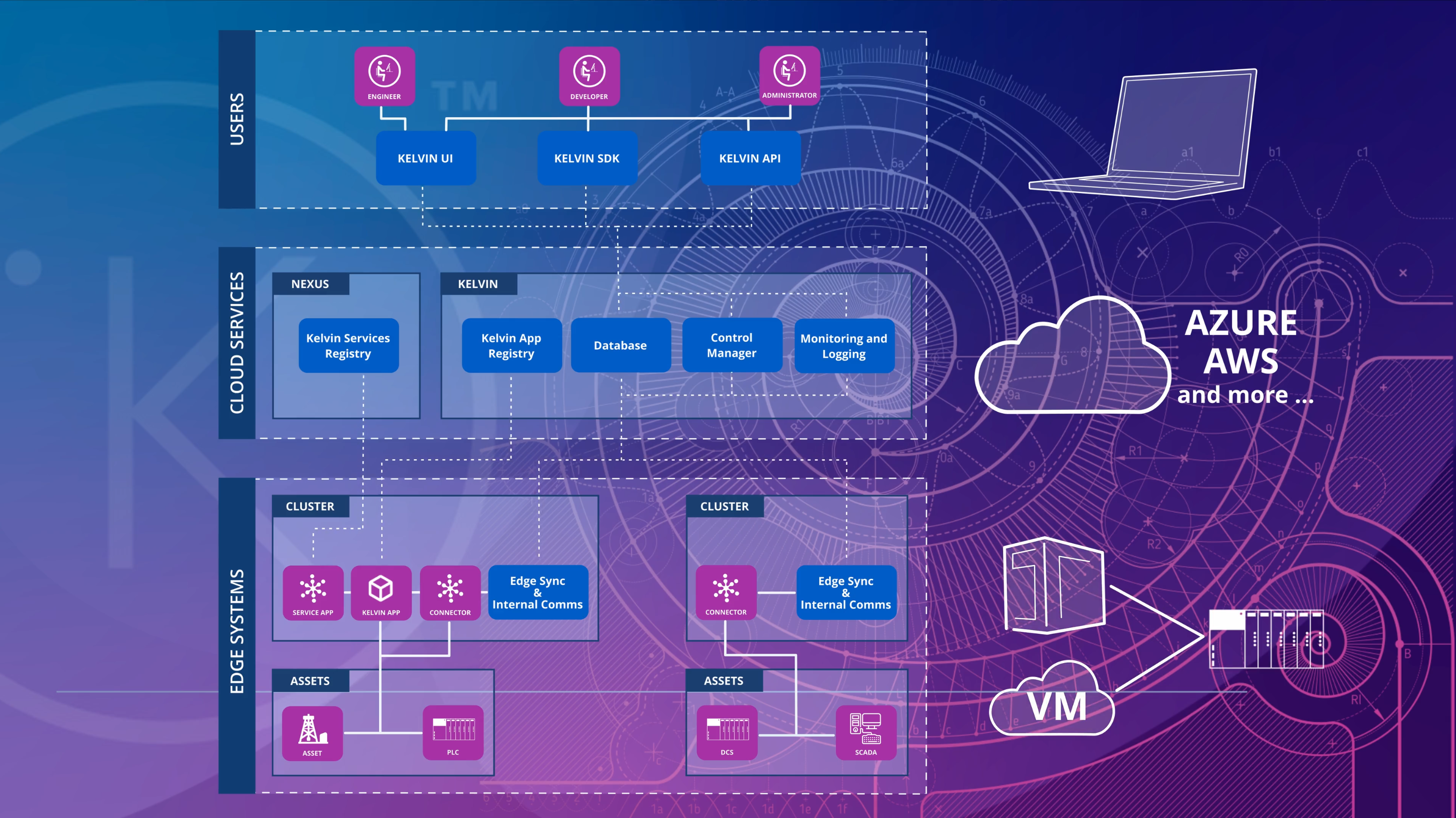
Kelvin Platform is built on top of Kuberenetes. This provides a proven secure infrastructure backbone for large scale industrial projects.
Kubernetes comes in many different flavors, all of which can be used as the backbone for the Kelvin Platform. You can even you use a mixture of different Kubernetes flavors all on the same Kelvin Platform.
Some common Kubernetes flavors used on physical computers or in virtual machines are;
The Virtual Machines can be hosted at a physical location or in the Cloud.
Do not confuse VM's with cloud-based PaaS. With VM's Kelvin or you have full control over the Kubernetes software, cloud-based PaaS provide Kubernetes services but not the software itself.
- Kubernetes
- K3s
- etc.
And some common Kubernetes flavors that are provided only in the cloud as services only by cloud-based providers are;
- AKS: Microsoft's cloud based Kubernetes solution
- EKS: Amazon's cloud based Kubernetes solution
- GKE: Google's cloud based Kubernetes solution
- etc.
Kubernetes Management
Kelvin Managed
If you have no knowledge about Kunernetes or do not wish to manage your own Kunernetes Clusters, Kelvin can transparently install and manage everything for you.
Kelvin uses the K3s flavor of Kubernetes.
With this solution, there are no requirements for you to have any knowledge about K3s.
Self Managed
However If you are an expert in Kuberenetes or already have your own setup, then you can continue to use your own Kubernetes clusters and register them within the Kelvin Platform.
Kelvin's core services will then be deployed to your Clusters and Nodes, integrating them into the Kelvin Platform.
You can use cloud-based Kuberenetes PaaS service providers or you can use clusters like kubernetes or K3s on your own computers or VM's.
For this solution you will need to manage your own Kubernetes infrastructure, installation and maintenence. Kelvin will only install and manage its core services on the nodes.
Hardware Requirements
Kelvin Managed
Here are the hardware guidelines should you you choose Kelvin to install and manage all your Kubernetes Clusters.
Kelvin managed clusters must reside on either a phyical computer or on a virtual machine (VM).
The Virtual Machine can be physically hosted on a computer at the asset's location or in the cloud.
Kelvin can not manage any cloud-based PaaS services.
In Kelvin UI, Kelvin API or Kelvin API Client (Python) you should choose the K3s option as the Cluster type when creating your cluster.
Do not select K3s option if you want to install and manage your own K3s clusters.
If you want to directly manage your own K3s cluster, then you should choose the Kubernetes option.
If you choose K3s, Kelvin will use a K3s flavor of Kubernetes that is installed and managed transparently by Kelvin.
You do not need to have any knowledge of Kubernetes or how it works. Everything is handled by Kelvin.
All you need to do is provide a computer or VM with Ubuntu server or similar installed on it.
Specifications
For cases where you select K3s, Kelvin will manage all aspects of the kubernetes cluster including installing, setting up and maintaining the Clusters.
For physical hardware and assuming each node is a computer, the minimum requirements for each computer will be;
It is strongly recommended to use SSD disks.
| Processor | Min CPU Cores | Min RAM | Min HDD |
|---|---|---|---|
| x86_64 | 2 | 4 GB | 25 GB |
| arm64 | 2 | 2 GB | 25 GB |
For arm64 based devices, only OPUA Connection is currently compatible. Other Connections for arm64 will be available soon.
You can also build Kelvin SmartApps™ for the arm64 with the Kelvin SDK.
For Virtual Machines based clusters, the virtual requirements are;
| Deployment Size | No of Nodes | Min No of VCPUS | Min Amount of RAM |
|---|---|---|---|
| Small | 1 - 10 | 2 | 4 GB |
| Medium | 10 - 100 | 4 | 8 GB |
| Large | 100 - 250 | 8 | 16 GB |
Initial Setup
The computer must be installed with a Linux operating system. Kelvin recommends using Ubuntu LTS 22.04 or later server edition.
Even though the control plane should be hosted on a linux OS, Windows nodes are supported provided that the operating system is Windows Server 2019 or Windows Server 2022.
See further details on the Kubernetes wesbite.
You will need to first create the Cluster on the Kelvin Platform through either the Kelvin UI, Kelvin API or Kelvin API Client (Python). This will create a provision script that you can then run on your edge hardware to complete the setup process.
You can get more details on the Provision a K3S page.
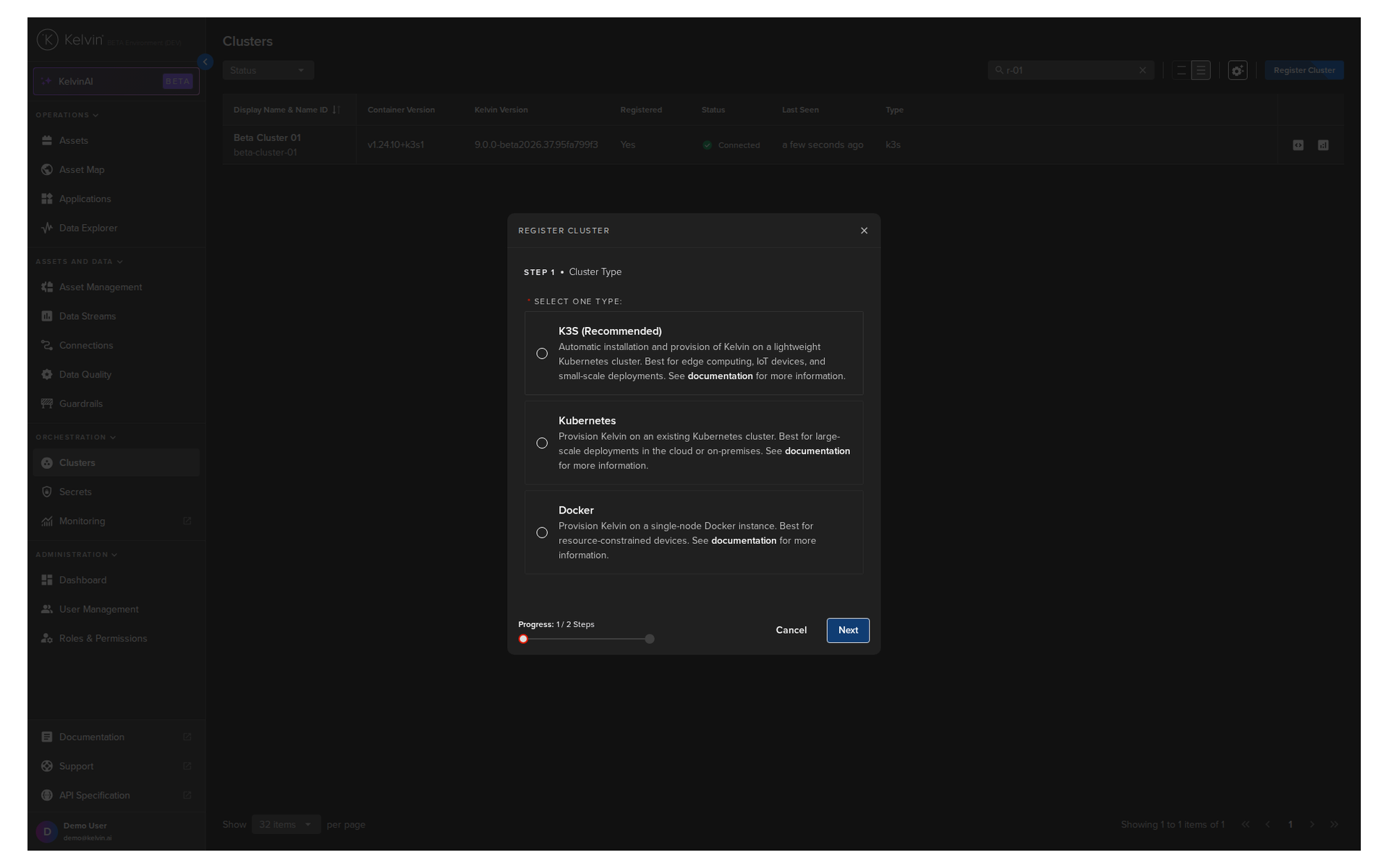
Figure: Creating a new K3s in the Kelvin UI
Before starting the Kelvin install command, make sure to check these notes first;
- You will need to have some limited experience with working on a Linux terminal as the setup instructions given in the Kelvin UI will need to be typed into the edge computer terminal.
- The edge computer will need Internet access for the initial setup. Once it is fully running and Kelvin SmartApps™, Docker Apps and Connectors have been deployed, the edge computer can run without an Internet connection.
- You can remotely SSH into the computer and remotely start the Kelvin Cluster installation process.
Everything else will be setup and handled by Kelvin.
Self Managed
With self managed solutions, you can choose two options;
- Install a Kubernetes flavor on a physical computer or in a virtual machine (the VM can be hosted on a local machine or in the cloud)
- Use a cloud-based PaaS solution. (This is only a cloud based solution)
Here are the hardware guidelines should you decide to install and manage your own Cluster infrastructure and just let Kelvin install its core services on your clusters.
We recommend you read the hardware requirements recommended by the developer of the Kuberenetes service you want to use.
In Kelvin UI, Kelvin API or Kelvin API Client (Python) you should choose the kubernetes option as the Cluster type when creating your cluster.
Do not select K3s option if you want to install and manage your own K3s clusters.
You should choose the kubernetes option.
Specifications
Kubernetes
Kubernetes managed clusters can reside on either a phyical computer or on a virtual machine (VM).
The Virtual Machine can be physically hosted on a computer at the asset's location or in the cloud.
When setting up your Kubernetes cluster here are some links to the Kubernetes documentation that can help you decide what type of hardware and software setup to implement.
K3s
K3s managed clusters can reside on either a phyical computer or on a virtual machine (VM).
The Virtual Machine can be physically hosted on a computer at the asset's location or in the cloud.
When setting up your Kubernetes cluster here are some links to the Kubernetes documentation that can help you decide what type of hardware and software setup to implement.
Amazon EKS
Amazon EKS clusters must resideon AWS.
When setting up your cluster on EKS here are some links to the EKS documentation that can help you decide what type of services and infrastructure setup to implement.
- Choosing an AWS container service
- Getting started with AWS Batch on Amazon EKS
- Amazon EKS service quotas
- Choosing an Amazon EC2 instance type
- Amazon EKS pricing
Microsoft AKS
Microsoft AKS clusters must reside in the Microsoft Azure.
When setting up your cluster on AKS here are some links to the AKS documentation that can help you decide what type of services and infrastructure setup to implement.
- Kubernetes core concepts for Azure Kubernetes Service
- Azure Well-Architected Framework review
- Quotas, virtual machine size restrictions, and region availability
- Azure Kubernetes Service (AKS) architecture design
- Optimize costs in Azure Kubernetes Service
Initial Setup
To join you Cluster to the Kelvin Platform, you will need to first create the Cluster on the Kelvin Platform through either the Kelvin UI, Kelvin API or Kelvin API Client (Python).
Any new nodes added to the Cluster will be automatically detected and incorporated in the Kelvin Platform.
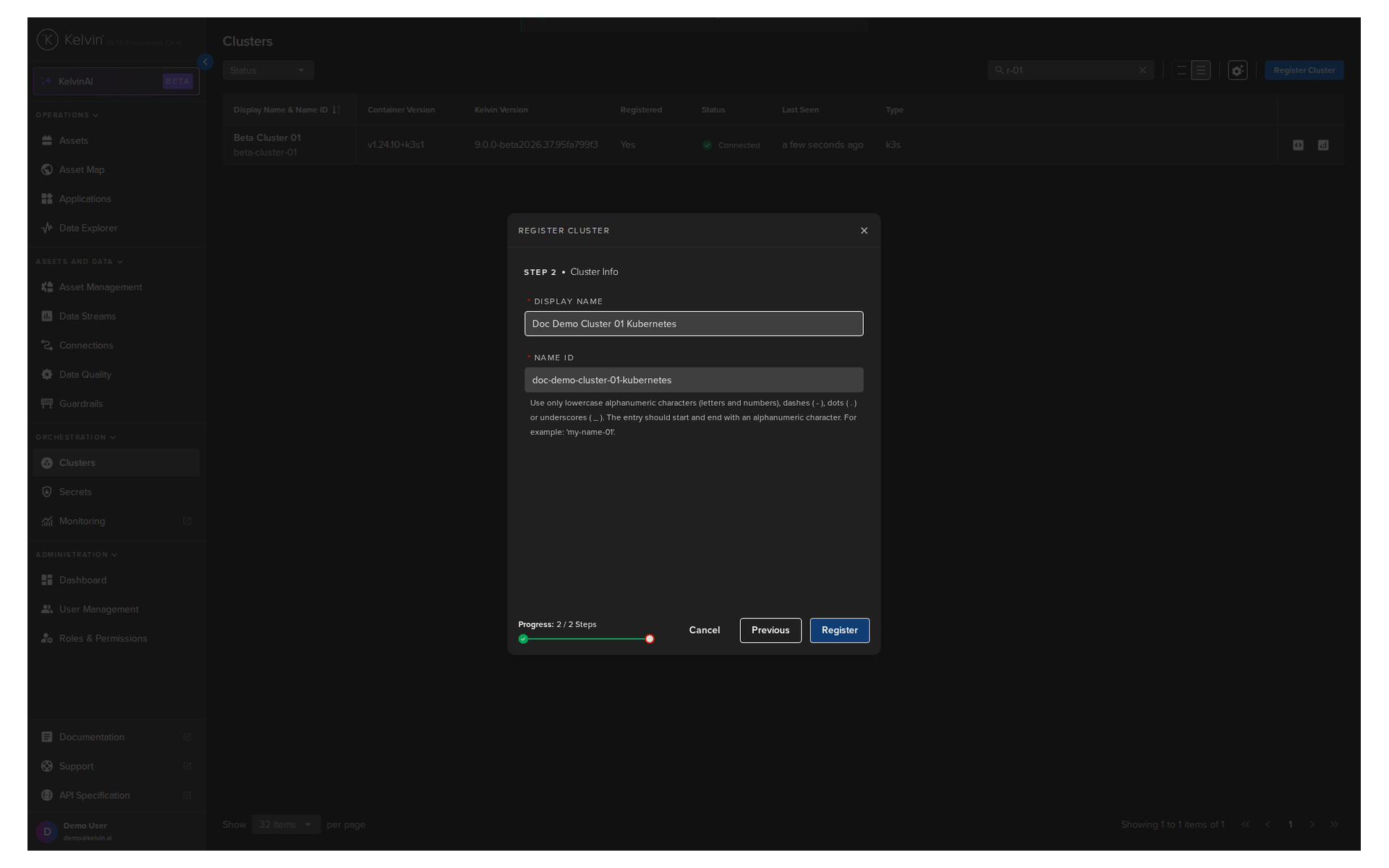
Use the kubectl command and yaml file provided during initialization to join the worker nodes to the cluster.