Skip to content

View Workload Status

You can check the current status of any workload at any time.

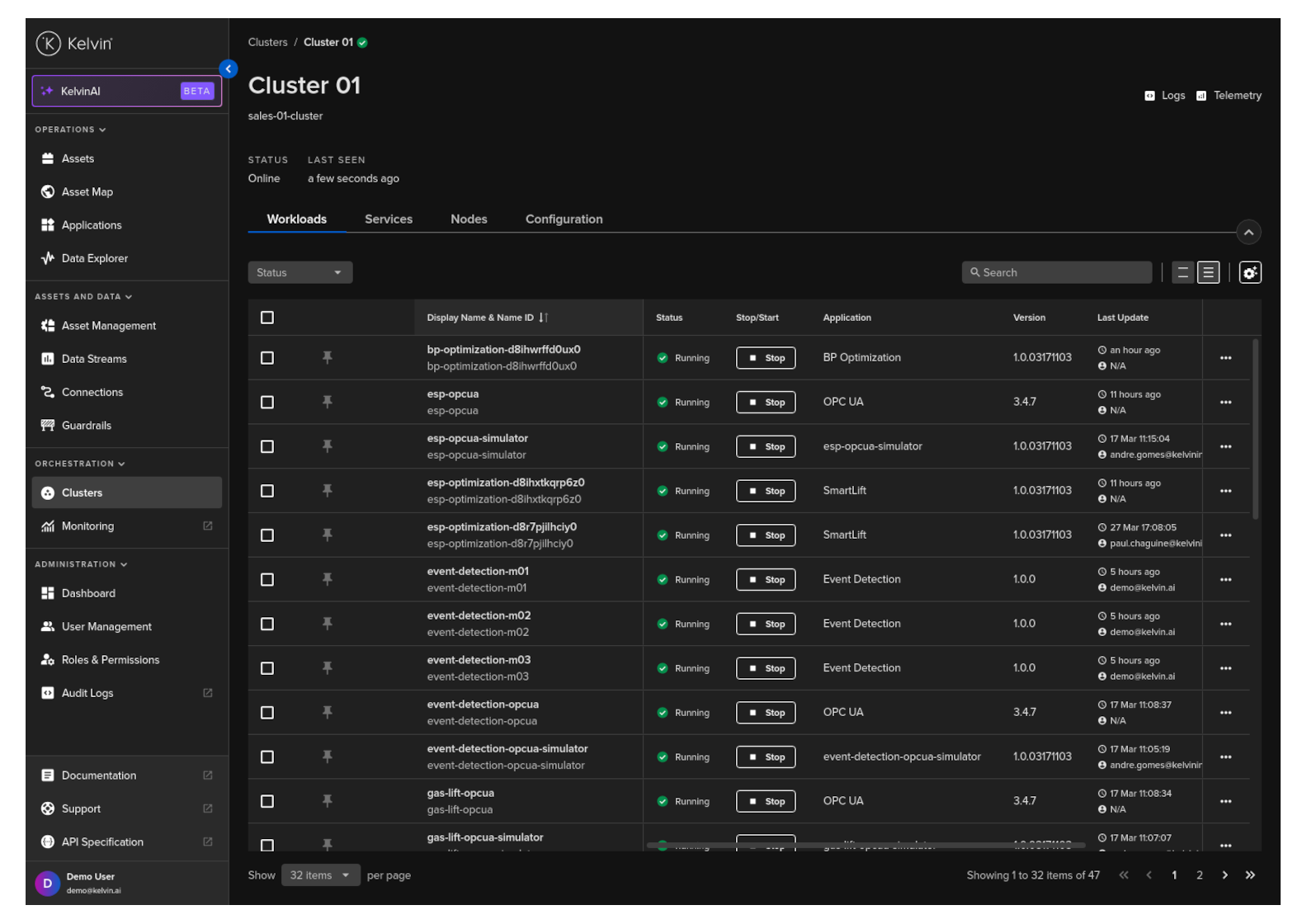
This status will indicate whether the workload is running, stopped, staged, or in another state, and it will also display detailed information about its current configuration, including assigned assets, recommendation definitions, environment variables, and more.

You can see the status of the workload for any Kelvin SmartApp™ in the Kelvin UI.

Click on Applications, select the Kelvin SmartApp™ card, then navigate to the Workload tab to view the list of workloads and their current status for that Kelvin SmartApp™.
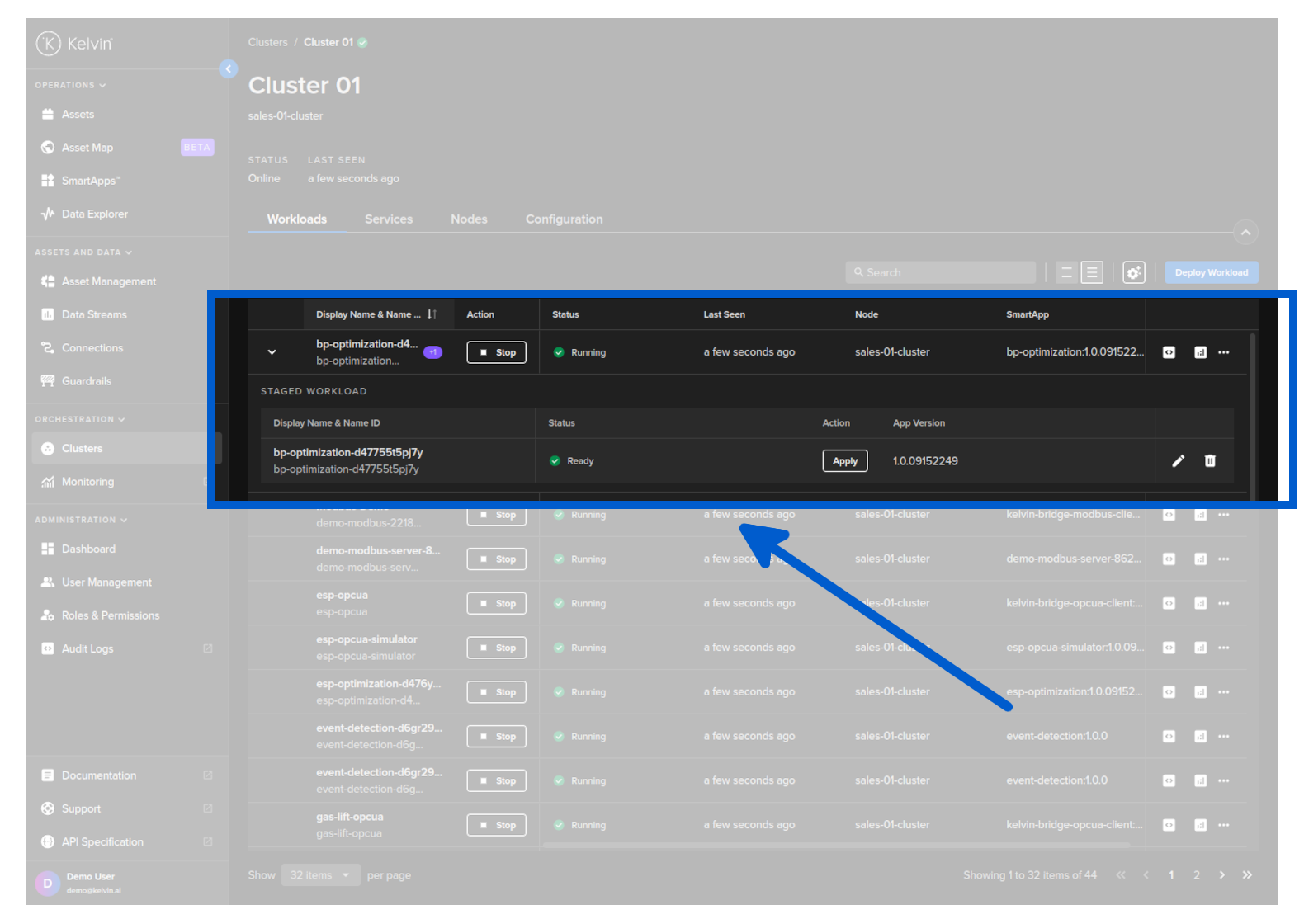
If the Workload has a staged Workload waiting to be activated then you will be able to expand the row and see details about the staged Workload.
API cURL Example
1
2
3
4
curl -X "GET" \
    "https://<url.kelvin.ai>/api/v4/apps/workloads/list?sort_by=name&pagination_type=cursor&page_size=20&direction=asc" \
    -H "Authorization: Bearer <Your Current Token>" \
    -H "Accept: application/json-cursor"

You will get a response similar to this;

API cURL Example Response
 1
 2
 3
 4
 5
 6
 7
 8
 9
10
11
12
13
14
15
16
17
18
19
20
21
22
23
24
25
26
27
28
{
  "pagination": {
    "next_page": null,
    "previous_page": null
  },
  "data": [
    {
      "name": "pcp-optimization-d1gdvz1gst7n",
      "title": "pcp-optimization-d1gdvz1gst7n",
      "enabled": true,
      "acp_name": "beta-dev-01-cluster",
      "cluster_name": "beta-dev-01-cluster",
      "node_name": "beta-dev-01-cluster",
      "app_name": "pcp-optimization",
      "app_version": "1.0.05221921",
      "created": "2024-05-22T18:27:27.70517Z",
      "updated": "2024-06-13T14:13:18.985888Z",
      "status": {
        "state": "running",
        "message": "Running",
        "last_seen": "2024-06-14T04:57:52.520335503Z",
        "warnings": null
      },
      "download_status": "pending",
      "staged": null
    }
  ]
}
API Client (Python) Example
 1
 2
 3
 4
 5
 6
 7
 8
 9
10
11
from kelvin.api.client import Client

# Login
client = Client(config={"url": "https://<url.kelvin.ai>", "username": "<your_username>"})
client.login(password="<your_password>")

# Get Workloads List
response = client.app_workloads.list_workloads()

# Print the result
print(response[0])

You will get a response similar to this;

API Client (Python) Example Response
1
WorkloadSummary(updated_at=datetime.datetime(2025, 1, 22, 17, 52, 57, 879669, tzinfo=datetime.timezone.utc), updated_by=None, created_at=datetime.datetime(2025, 1, 22, 17, 52, 57, 879669, tzinfo=datetime.timezone.utc), created_by=None, title='asddsa', app_name='pcp-opcua-simulator', app_version='1.0.09122316', app_type='external', cluster_name='if-docker-cluster', node_name=sales-01-cluster, download_status='pending', download_error=None, status=WorkloadStatus(last_seen=datetime.datetime(2025, 1, 29, 11, 42, 30, 796253, tzinfo=datetime.timezone.utc), message='Unreachable', state='unreachable', warnings=None), staged=None)