Timeseries Data
Timeseries Data Messages
Note
Visit the concept overview for Data Streams to understand how time series data references are constructed using one Asset name and one Data Stream name as a pair.
Timeseries data from Assets can be served to the Kelvin SmartApp™ in multiple ways, depending on the preferred data consumption method.
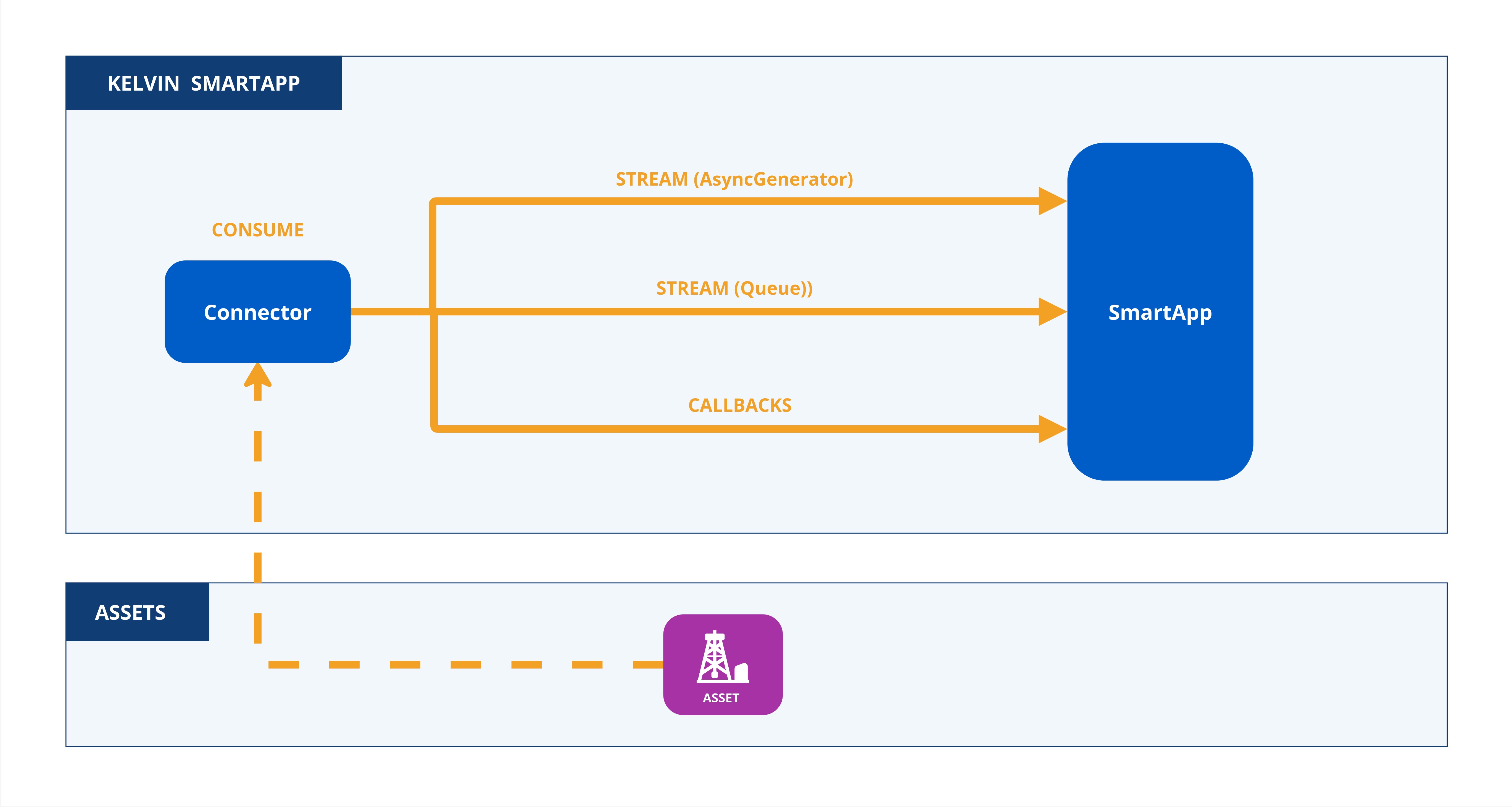
Data can be consumed primarily in two ways:
-
Asynchronous Consumption (
async): This approach pauses program execution until new data arrives, resuming only when data is available. To enhance efficiency and reduce unnecessary executions, filters can also be applied to limit the types of data that trigger events. -
Callback Consumption: In this method, a callback function allows the program to continue performing other tasks while waiting for new data, enabling non-blocking execution suitable for concurrent operations.
Each method provides flexible and efficient handling of Asset timeseries data, tailored to specific application requirements and performance needs.
In order to consume streaming data, the inputs section needs to filled in the app.yaml file.
Note
That means that Kelvin SmartApps™ is only going to be able to consume the specified inputs. i.e.:
| app.yaml Example | |
|---|---|
1 2 3 4 5 6 | |
inputs is an array (list) composed by two fields:
- A unique name to identify the input. This will be used in the Python code to reference the input. It must contain only lowercase alphanumeric characters. The characters
.,_and-are allowed to separate words instead of a space BUT can not be at the beginning or end of the name. - An expected data type, which can be:
number,booleanorstring.
Now that we've defined Kelvin SmartApps™ inputs, there are a few ways to consume them within the Kelvin Python library.
Streams are a different way of filtering inputs as a Python Async Generator, also based upon a filter function.
Info
Different Data filters are available within the filters class, such as input_equals(input: str), resource_equals(resource: KRN) and asset_equals(asset: str). On the following example we're gonna use the most common and expected use case (input_equals(input: str)).
Filters to limit which inputs are monitored can be expressed as filters.input_equals(input: str).
| Streams (with AsynGenerator) Python Example | |
|---|---|
1 2 3 4 5 6 7 8 9 10 11 12 13 14 15 16 17 18 19 20 21 22 | |
Filters can be used to filter a specific subset of the Kelvin Inputs as a Python Message Queue based upon a filter function.
Info
Different Data filters are available within the filters class, such as input_equals(input: str), resource_equals(resource: KRN) and asset_equals(asset: str). On the following example we're gonna use the most common and expected use case (input_equals(input: str)).
Filters to limit which inputs are monitored can be expressed as filters.input_equals(input: str).
| Streams (with Queue) Python Example | |
|---|---|
1 2 3 4 5 6 7 8 9 10 11 12 13 14 15 16 17 18 19 20 21 22 23 24 | |
The callback on_asset_input can be used to read every input flowing into Kelvin SmartApps™:
| Timeseries Data Event Python Example | |
|---|---|
1 2 3 4 5 6 7 8 9 10 11 12 13 14 15 16 17 18 19 20 21 22 23 24 25 26 27 28 | |