Secrets
This section aims to explain how secrets are used in the context of a Kelvin application.
You can find more about secrets here.
Where to use secrets
The server will look up for secrets in the following app.yaml parts:
system.environment_varssystem.volumes[{text.data}]app.kelvin.core.uploader.authentication.openid_password.passwordapp.kelvin.core.uploader.authentication.openid_password.usernameapp.kelvin.core.uploader.authentication.openid_client_credentials.client_secretapp.kelvin.core.uploader.authentication.openid_client_credentials.client_id
Please note that app.kelvin.uploader.authentication is filled for you by the server. Only populate if want to override the defaults.
The following example shows the uploader configurations using secrets.
Example
Setting uploader authentication with a secrets:
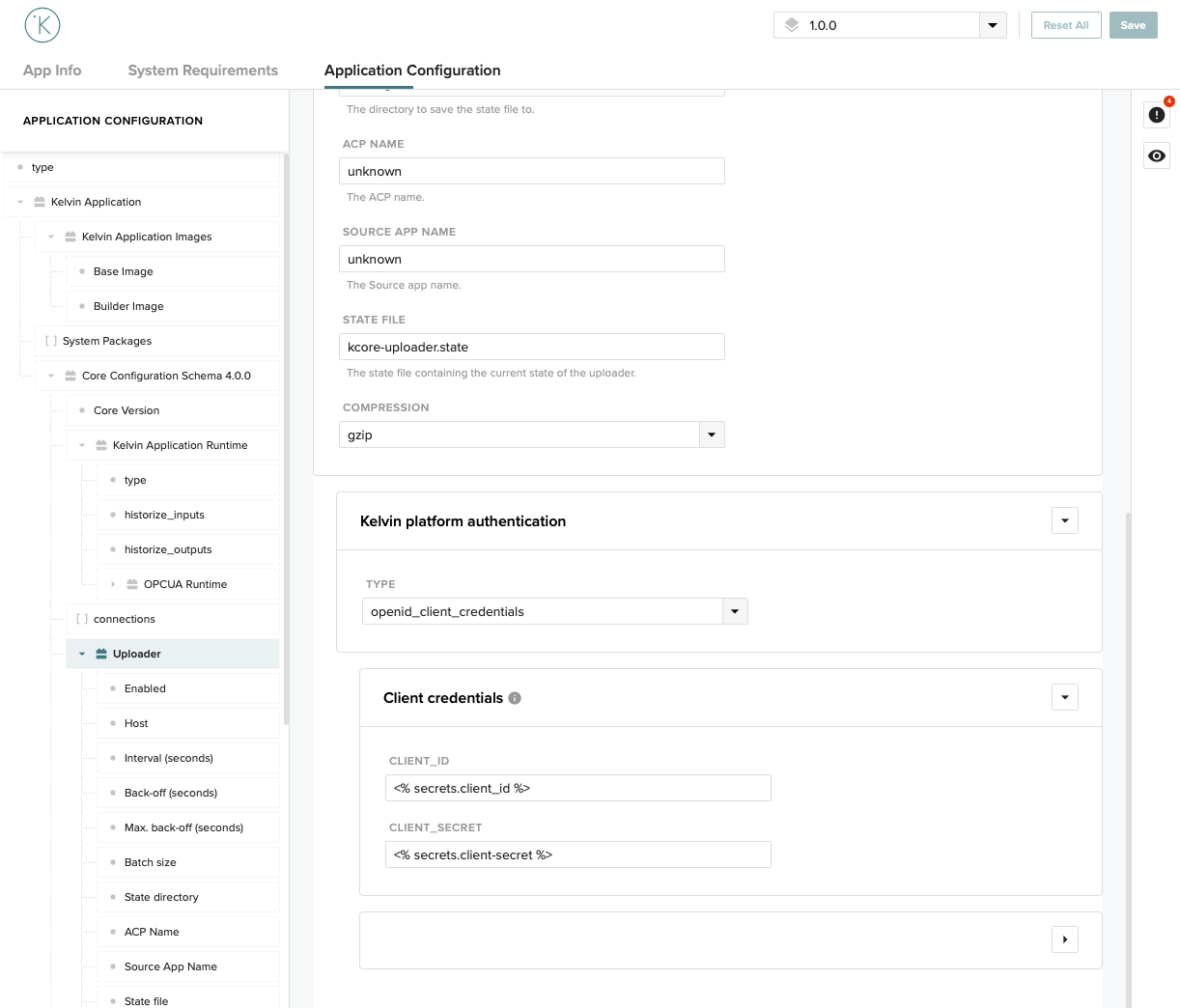
...
app:
  type: kelvin
  kelvin:
    ...
    uploader:
      enabled: true
      host: host.kelvininc.com
      authentication:
        type: openid_client_credentials
        openid_client_credentials:
          client_id: "<% secrets.client_id %>"
          client_secret: "<% secrets.client-secret %>"
      batch: 1000
...
Using secrets in your code
Secrets can be used to dynamically pass sensitive data to your application. As mentioned above, there are plenty reference points in which secrets can be specified but only those available universally through environment variables are accessible to your code.
Defining the secret in the platform
The following commands require a session
Check the Quickstart guide on how to login.
It all starts by defining a secret in the platform. Or, if already present, using an existing one:
kelvin secrets create mysecret --value="this is my super secret"
More info on how to create secrets in:
Check the Managing secrets.
Declaring the secret in the app configuration file
To use the secret, declare it in your app configuration file as system environment variable:
# app.yaml
...
system:
  environment_vars:
    - name: mysecret
      value: <% secrets.mysecret %> # notice the secrets prefix
  privileged: false
...
Accessing the secret in the application
And finally, as an example, access the secret in the application using python's very own os package:
class App(DataApplication):
    """Application."""

    def init(self) -> None:
        """
        Initialisation method
        """
        # Custom initialisation logic

    def process(self):
        ...
        mysecret = os.environ.get("mysecret", "error!")
        sensitive_api_data = do_api_call(password=mysecret)
        ...
        temperature = self.data.get('temperature') # or simply self.data.temperature
        if temperature:
            print(f"Received new temperature value: {temperature}")
            doubled_temperature = temperature.value * 2

            doubled_temperature_object = Float32("doubled_temperature")
            doubled_temperature_object.value = doubled_temperature

            print(f"Emitting doubled temperature value: {doubled_temperature_object}")
            self.emit(doubled_temperature_object)