Polling Data from the Internet
Overview
The Kelvin Platform has the ability to accept inputs from many sources.
In this tutorial, we will use an example application to pull information from an API endpoint to make control
decisions. Control applications can utilize information from API endpoints such as weather, commodity prices,
and more. This is one of many prebuilt Kelvin applications using the Kelvin App framework. For this tutorial,
we will be using the api-poller application to do the following:
- Poll data from the internet (in this case weather data).
- Create a buffer where the time series data is stored.
- Enforce checks on the data to make sure the app only executes when the right data is present.
Prerequisite:
- Complete the Getting Started Guide.
- Sign up to access the Open Weather API at https://openweathermap.org/api. (Note: You will need the API key from your account.)
Source Code
The source code for this application is available at GitHub.
In the following steps, we will walk through the logic and how it was created.
App logic
The app will perform the following functions:
- pull data from the openweathermap API (note that to use this API, you will need a unique API key, which will be placed
in the
paramsdictionary where it says"appid": "<replace_with_app_id>") - calculate °F from the original °K
- store up to 1 minute of the data
- output the average temperature over that window
Use a code editing tool (e.g. Visual Studio Code) on your machine, open the api-poller application folder and open the api_poller/api_poller.py.
This file contains the application code below. Update line 14 with the API key from your free Openweathermap.org account.
Here's what that Looks like in code:
from kelvin.sdk.app import DataApplication
import requests


class App(DataApplication):

    def call_api(self):
        """
        Call the openweathermap API and same the `temp_f` variable into our buffer
        """

        base_url = "http://api.openweathermap.org/data/2.5/weather"
        params = {
            "appid": "<replace_with_app_id>",
            "q": "San Francisco"
        }

        with requests.get(base_url, params=params) as response:
            try:
                temp_kelvin = response.json()['main']['temp']
            except KeyError:
                self.logger.warn(f'Not a valid request response, exiting. {response.json()}')
                return

        self.logger.info('temp_kelvin', temp_kelvin=temp_kelvin)
        temp_f = round(((9 / 5) * (temp_kelvin - 273) + 32), 1)

        self.make_message("raw.float32", 'temp_f', store=True, value=temp_f)

    def output_avg_temp(self):
        """
        Calculate the mean temperature and emit the value
        """

        # Check that we have enough data as defined in the `topics` section of our app.yaml
        if self.data_status != {}:
            self.logger.warning(f"DATA STATUS ERROR : {self.data_status}")
            return

        # compute mean
        mn = self.data['temp_f'].series().mean()
        self.logger.info(f'mean temp_f:{mn}')

        # Create and emit message
        msg = self.make_message("raw.float32", name='avg_temp', value=mn)
        self.emit(msg)

    def process(self):
        """
        Main run function
        """
        self.call_api()
        self.output_avg_temp()
call_api() Calls the API, converts the data to Fahrenheit, and saves the data in our buffer.
output_avg_temp() Emits our value.
process() Is the function which is called on app execution, and coordinates call_api() and output_avg_temp() functions.
Outputs
Example
Open up the Kelvin Studio configuration tool.
kelvin studio start --input app.yaml
Once Kelvin Studio is opened:
- Select the Application Configuration tab at the top.
- Scroll down and select Outputs on the left menu.
Outputs
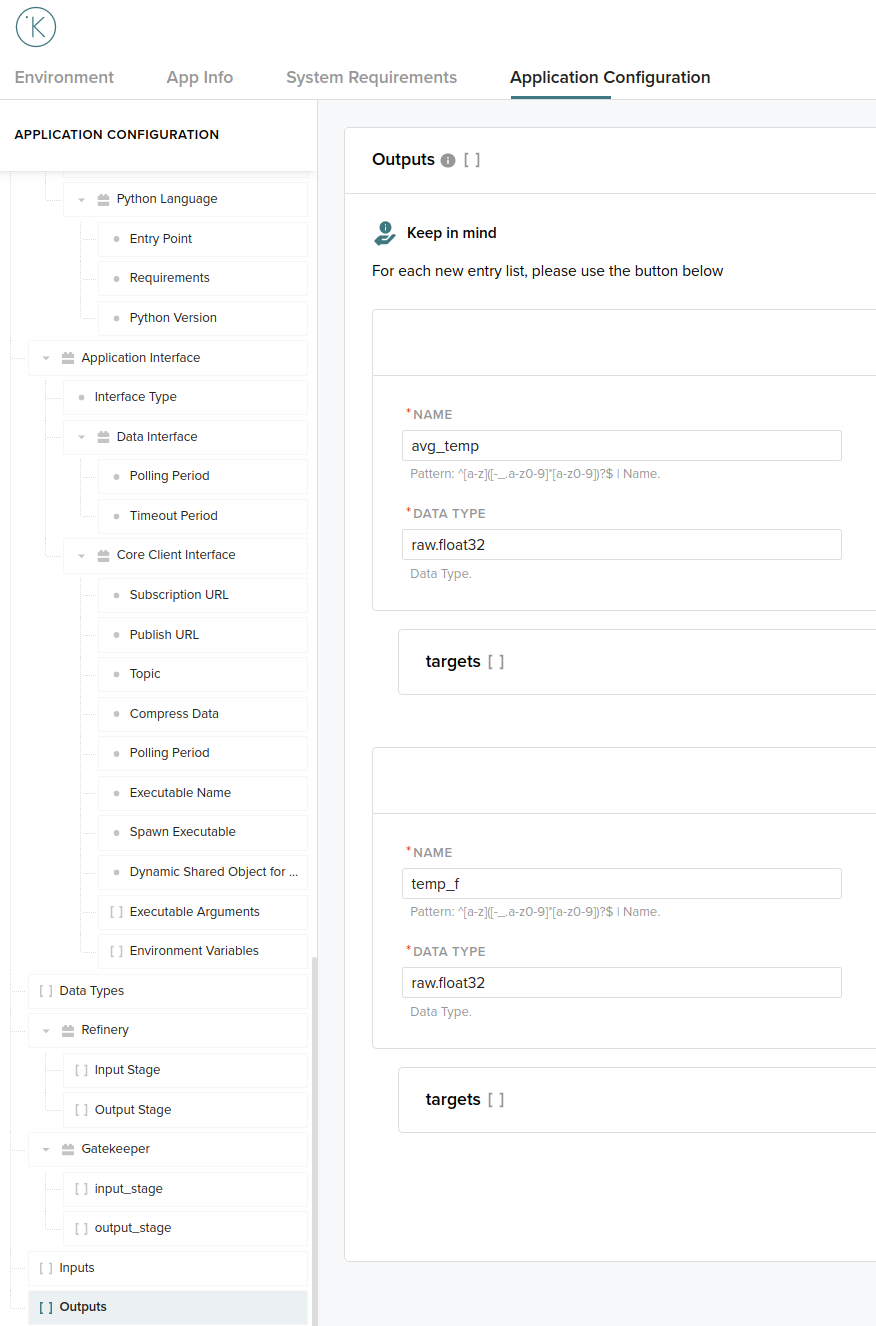
The following is the outputs snippet from the app.yaml that includes the input fields we added using Kelvin Studio.
Available on github.com.
outputs:
  - data_type: raw.float32
    name: avg_temp
    targets:
      - asset_names: [ ]
        workload_names: [ ]
  - data_type: raw.float32
    name: temp_f
    targets:
      - asset_names: [ ]
        workload_names: [ ]
The outputs tell our app what will be the output, as well as the data_type associated with each output.
Requirements
The application will be executed in a contained environment. It is then necessary to define which project libraries are required.
That can be done in the requirements.txt file.
The entirety of this file is:
# This is where required Python libraries are listed
requests
requestsis the library used to poll the API in the app.
Running the app
Once these steps have been completed, we can build and run the app.
kelvin app buildto build the container.
kelvin app build
This will be the first interaction:
[kelvin.sdk][2021-07-07 17:11:13][I] Assessing basic application info..
[kelvin.sdk][2021-07-07 17:11:13][I] Valid schema available locally. Using cached version (/home/gabriel/.config/kelvin/schemas/2.0.0.json)
[kelvin.sdk][2021-07-07 17:11:15][I] Building "Kelvin type" application "api-poller"
[kelvin.sdk][2021-07-07 17:11:16][I] Processing application data types..
[kelvin.sdk][2021-07-07 17:11:16][I] Loading all data type files from directory "/home/user/.config/kelvin/datatypes"
[kelvin.sdk][2021-07-07 17:11:16][R] 13 data types loaded from directory "/home/user/.config/kelvin/datatypes"
[kelvin.sdk][2021-07-07 17:11:16][I] Retrieving data types for "api-poller"
[kelvin.sdk][2021-07-07 17:11:17][I] Downloading data type "raw.float32:2.0.0"
[kelvin.sdk][2021-07-07 17:11:17][R] Data type "raw.float32:2.0.0" successfully downloaded to "/home/user/kics-app-examples/kelvin_apps/api-poller/build/datatype/raw_float32__2-0-0.yml"
[kelvin.sdk][2021-07-07 17:11:19][R] Successfully logged on registry "demo.kelvininc.com:5000"
[kelvin.sdk][2021-07-07 17:11:19][I] Pulling "demo.kelvininc.com:5000/kelvin-core-python:7.0.2-aeaba1b" from "demo.kelvininc.com"
 [elapsed: 00:00] - [Layer: 7.0.2-aeaba1b] [Pending..]
[kelvin.sdk][2021-07-07 17:11:20][R] Successfully pulled "demo.kelvininc.com:5000/kelvin-core-python:7.0.2-aeaba1b" from "demo.kelvininc.com"
[kelvin.sdk][2021-07-07 17:11:20][I] Pulling "demo.kelvininc.com:5000/data-model-builder:6.0.1-081bf89" from "demo.kelvininc.com"
 [elapsed: 00:00] - [Layer: 6.0.1-081bf89] [Pending..]
[kelvin.sdk][2021-07-07 17:11:21][R] Successfully pulled "demo.kelvininc.com:5000/data-model-builder:6.0.1-081bf89" from "demo.kelvininc.com"
[kelvin.sdk][2021-07-07 17:11:21][I] Building new image for "api-poller:1.0.0". Please wait..
[kelvin.sdk][2021-07-07 17:13:46][R] Image successfully built: "api-poller:1.0.0"
kelvin emulation startto run the app in the container.
kelvin emulation start --show-logs
This will be the first interaction:
[kelvin.sdk][2021-07-07 17:16:16][R] Emulation configuration loaded from: "/home/user/kics-app-examples/kelvin_apps/api-poller/app.yaml"
[kelvin.sdk][2021-07-07 17:16:17][I] Valid schema available locally. Using cached version (/home/user/.config/kelvin/schemas/2.0.0.json)
[kelvin.sdk][2021-07-07 17:16:20][R] Kelvin Emulation System is online
[kelvin.sdk][2021-07-07 17:16:20][I] Loading configuration and starting the application "api-poller:1.0.0"
[kelvin.sdk][2021-07-07 17:16:20][I] Valid schema available locally. Using cached version (/home/user/.config/kelvin/schemas/2.0.0.json)
[kelvin.sdk][2021-07-07 17:16:23][R] Overriding existing configuration with "/home/user/kics-app-examples/kelvin_apps/api-poller/app.yaml"
[kelvin.sdk][2021-07-07 17:16:23][R] Application successfully launched: "api-poller:1.0.0"