The KICS Platform
The Kelvin Intelligent Control Software (KICS) is the software platform for building and managing control applications.
Control applications combine insights, events and actions into powerful automation workflows.
KICS provides tools and interfaces to ease the effort of data science, app development, testing, validation, management, and finally orchestration and deployment.
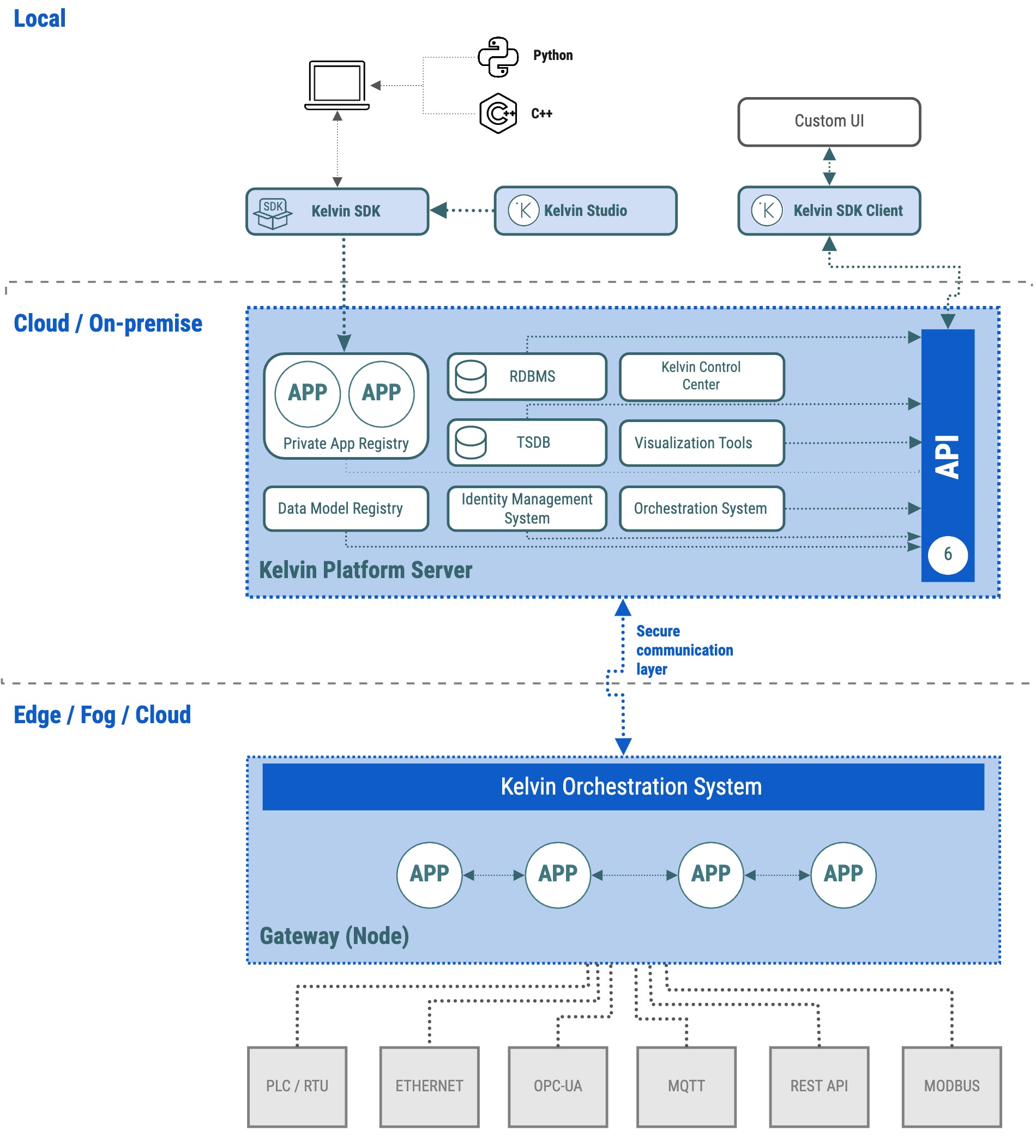
The KICS Platform consists of three parts:
- Platform Development Tools enabling users to create, test and manage applications
- Kelvin Platform Server hosting Platform User Interface, Data and Application services
- Nodes hosting applications and data connections to control systems
Platform Development Tools
Kelvin SDK
Kelvin SDK is a command-line interface for users to interact with the KICS Platform. It provides access to all its functionalities through a set of specific, tailored commands.
It enables users to create, test, deploy and manage Python, Docker or Bridge Applications.
Kelvin SDK is part of the KICS package available on PyPI, and can be installed on Linux, MAC and Windows machines.
Kelvin Studio
Kelvin Studio is a graphical user interface to build and update Kelvin Application configurations. The application's configuration contains all the settings required to successfully build and run the application on the KICS Platform.
Kelvin SDK Client
Kelvin SDK Client is a wrapper that makes it easy for users to securely access data and services on the KICS Platform.
Built in JavaScript and Python, it brings powerful integration capabilities to users that wish to integrate their applications.
Kelvin Platform Server
App Registry
This is the application repository hosting all applications on the Kelvin Platform Server instance. It is secure and private as each customer will have their own Kelvin Platform Server Instance.
Data Type Registry
This is the registry on Kelvin Platform server hosting all data types on the Platform instance. It enables all users on the same Platform instance to access any data types built on the Platform. Users on the same Platform instance can collaborate and leverage each other's data types.
Kelvin Control Center
This is a UI application that provides the user interface to deploy and manage gateways as well as applications on the Platform. It is the primary user interface for KICS production deployment.
Data Viewer
This is a UI application to visualize data collected and stored on the KICS Platform.
Kelvin REST API
Kelvin REST API provides a comprehensive set of APIs for users to access data and information on KICS Platform. This is the portal for external software to communicate and exchange data and information with KICS Platform.
Node
Node is a virtual or physical server connected to Kelvin Platform Server through a secure communication layer. It hosts running applications and connections to external devices or control systems.
High-Level User Workflow
As indicated in the Platform architecture diagram above, the high-level user workflow on the KICS Platform consists of :
- Install Kelvin SDK on a local machine, and use it to build and test a python, docker or bridge applications.
- Upload the new applications to the App Registry on the Kelvin Platform Server.
- Set up a Node and connect it to the Kelvin Platform Server.
- Connect external devices and control systems through standard Industrial protocols (i.e, OPC-UA, MQTT SparkPlug B and Modbus) to the Node in the KICS Platform.
- Deploy and manage applications (available in App Registry) on a Node using either Kelvin SDK or Kelvin Control Center.
- Data is stored in a Time Series Database and accessible through Kelvin REST APIs.
- Custom UI applications can be developed using the Kelvin SDK Client.