Secrets
With generic applications being able to deploy essentially anything, the need to obfuscate information arises. Secrets are an easy way to store sensitive information like passwords, tokens or certificates.
This tutorial aims to explain how to create, delete and reference secrets.
Creating and deleting secrets
Creating a secret can be done via kelvin using the following command:
kelvin secrets create <secret-name> --secret-value <secret-value>
Delete works in the following fashion:
kelvin secrets delete <secret-name>
Referencing a secret
Referencing a secret is done using the following notation: <% secrets.secret-name %>. The parts of app.yaml where
secrets can be used are:
system.environment_varssystem.volumes[{text.data}]
There are more places where this interpolation happens (e.g. uploader secrets), but they are not relevant to generic applications.
The following example shows how one would create an environment variable and mount a text file from secrets.
Example
Setting an environment variable with a secret using studio:
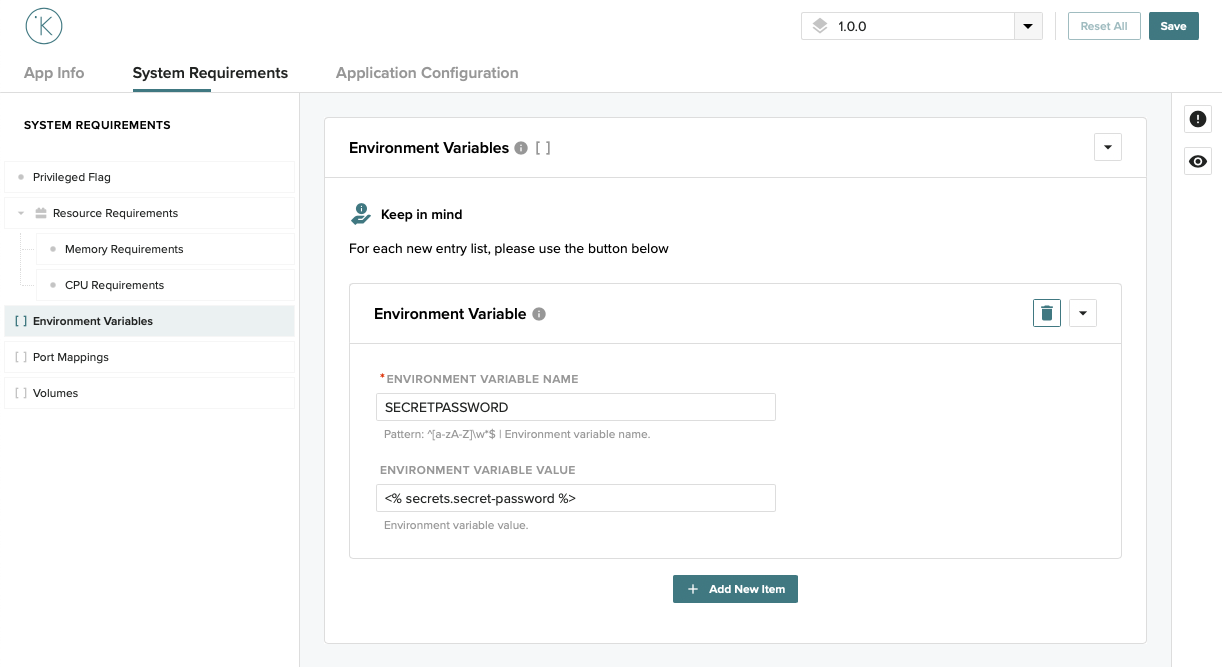 Setting a volume with a secret using studio:

...
system:
  environment_vars:
    - name: SECRETPASSWORD
      value: <% secrets.secret-password %>
  volumes:
    - name: cert
      target: cert.crt
      type: text
      text:
        base64: false
        encoding: utf-8
        data: <% secrets.secret-file %>
...
Final considerations
Once a secret is created it cannot be changed, if you made a mistake you have to recreate it.
Deleting a secret does not remove it from running applications using it. If you made a mistake, you'll need to redeploy the application.
Deploying an application using a secret that doesn't exist will cause this process to fail.