What is a Bridge App?
Bridge Apps are the way the Kelvin Platform communicates with the outside world.
As the name indicates, these apps bridge external connections with Kelvin's internal data flow. Kelvin already provides several configurable Bridge Apps such as MODBUS, OPCUA, MQTT, amongst others. It's possible, however, to create custom Bridge Apps as well.
Configuration
Like Kelvin Apps, Bridge Apps' configuration also enforces a schema, albeit
somewhat different. Because of the nature of Bridge Apps, the main task of the
configuration is to map external data to the Kelvin Platform's metrics,
therefore, instead of having inputs and outputs, the configuration has a
metrics_map. That map associates the metric of an asset to its external
source. That source's configuration is dependant on the bridge implementation.
Example
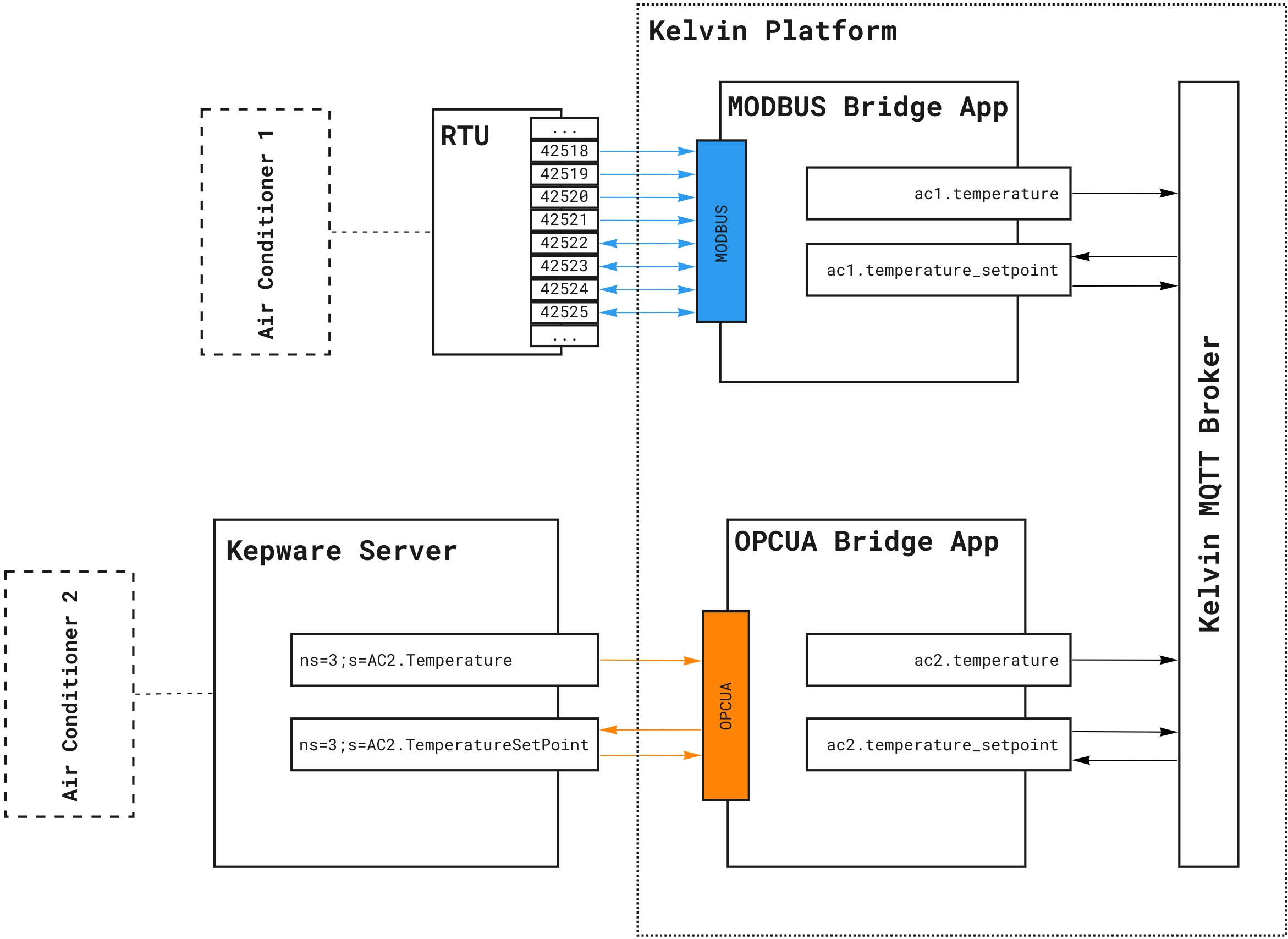
This example is for demonstration purposes only, since both MODBUS and OPCUA bridges are already provided by Kelvin via the Control Center.
The diagram above is an example deployment on a Node of two Bridge Apps. One
connects to an RTU via MODBUS and the other to a Kepware Server via OPCUA.
They provide access to Air Conditioner 1 and Air Conditioner 2,
respectively.
Both air conditioners expose the same kind of functionality: a temperature sensor reading and the ability to define a temperature set point.
The metrics map of the MODBUS bridge app could be:
metrics_map:
  - name: temperature
    asset_name: ac1
    data_type: raw.int32
    access: RO
    configuration:
      address: 42518
      protocol_type: int32
  - name: temperature_setpoint
    asset_name: ac1
    data_type: raw.int32
    access: RW
    configuration:
      address: 42522
      protocol_type: int32
And for the OPCUA bridge:
metrics_map:
  - name: temperature
    asset_name: ac2
    data_type: raw.int32
    access: RO
    configuration:
      node: ns=3;s=AC2.Temperature
  - name: temperature_setpoint
    asset_name: ac2
    data_type: raw.int32
    access: RW
    configuration:
      node: ns=3;s=AC2.TemperatureSetPoint