Control Change
On this page you will learn about Kelvin Control Change in Kelvin Core and how it fits into Kelvin Collaborative Control Software.
What is Kelvin Control Change ? 
Kelvin Control Change allows you to send variable changes to the edge devices such as PLC's or HMI's from the Cloud Server.
The changes can be performed by Kelvin API, Kelvin Maps or Kelvin CoPilot.
This process is different from a standard Read/Write data variable as the change at the edge will be written and the control change manager at the edge will communicate with the Kelvin Bridges to ensure the write is completed and verified successfully.
The process itself is explained in this infographic;
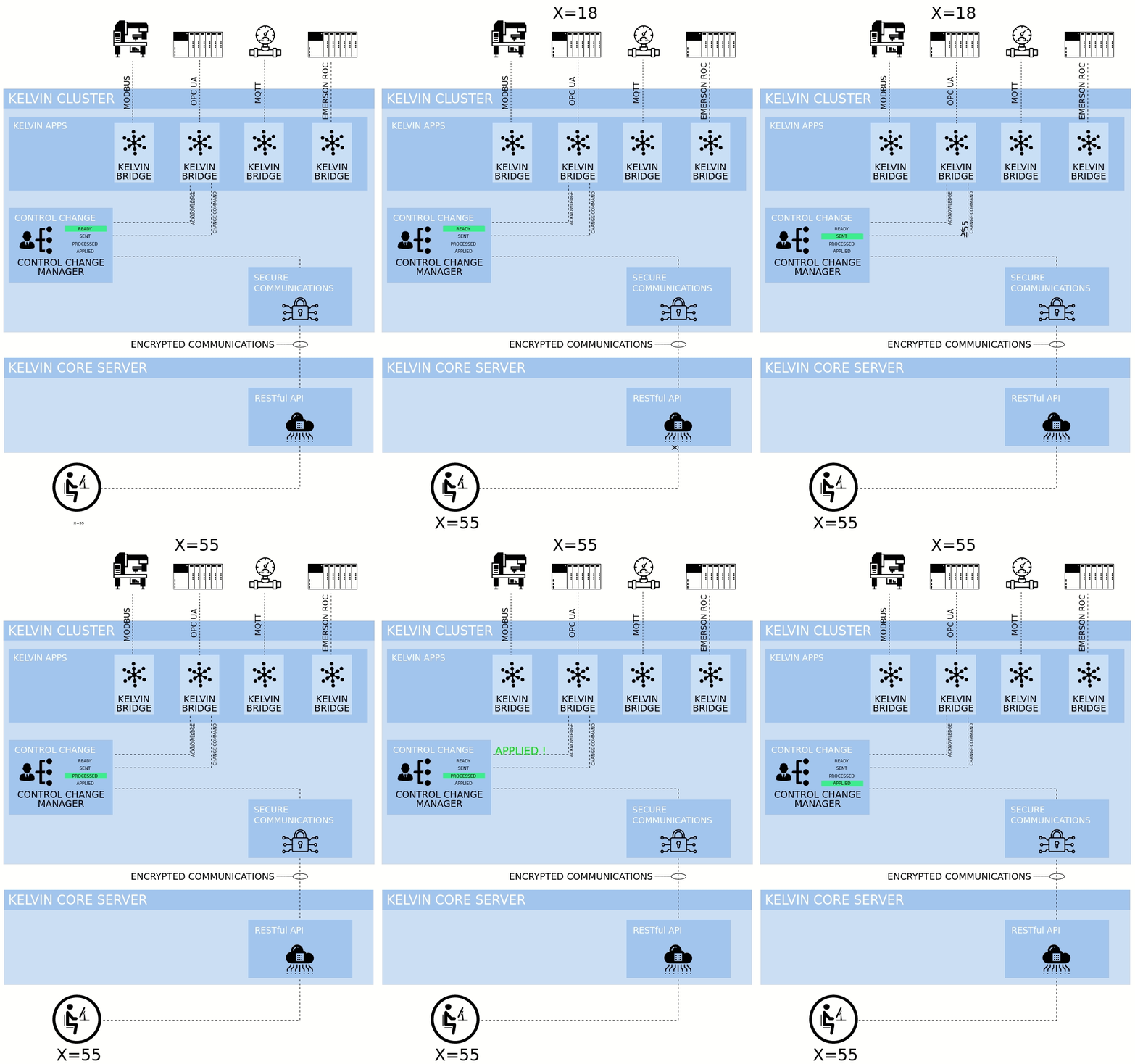
A lot happens here to ensure a write succeeds or a failure is confirmed which you can read in detail later on this page or you can go straight to the Getting Started Guide pages to try out some examples.
Not shown in this infographic is the failure cases. There are two cases where the Control Change Manager will stop trying and return a failure status.
- The number of retries to communicate from the Control Change Manager to the Kelvin Bridge is exceeded. This is a variable you can set.
- The expiration date passes waiting to get an "Applied" status from the Kelvin Bridge to the Kelvin Control Change Manager. This is a variable you can set.
Where is Kelvin Control Change Used ?
Kelvin Control Change is used by Kelvin CoPilots, Kelvin Maps and Cloud Server.
For Kelvin CoPilots, these controls will be built in depending on the specifications for each project.
For Kelvin Maps, you will be able to manage key parameters directly from Kelvin Maps. This is especially useful when you need to monitor and adjust key parameters coming from multiple PLC's or machines.
You can also create Kelvin Rules to automate the create of Kelvin Control Change requests.
You can also use Kelvin Recommendations to create when Kelvin Control Changes should be implemented. The main difference between Kelvin Rules and Kelvin Recommendations is that recommendations have to be approved by an Operator before they will be automatically implemented.
For Cloud Server, you will be able to integrate the Kelvin Control Change options into your own Kelvin App programs to create highly customized applications for your system. Some areas of use are in adding machine learning layers to your PLC and existing setup to automating parameter changes across multiple PLC control systems.
From API to Applied
Let's follow the journey of a control change initiated by a user on a computer through an API call.
API Call to Pending (On the Cloud Only)
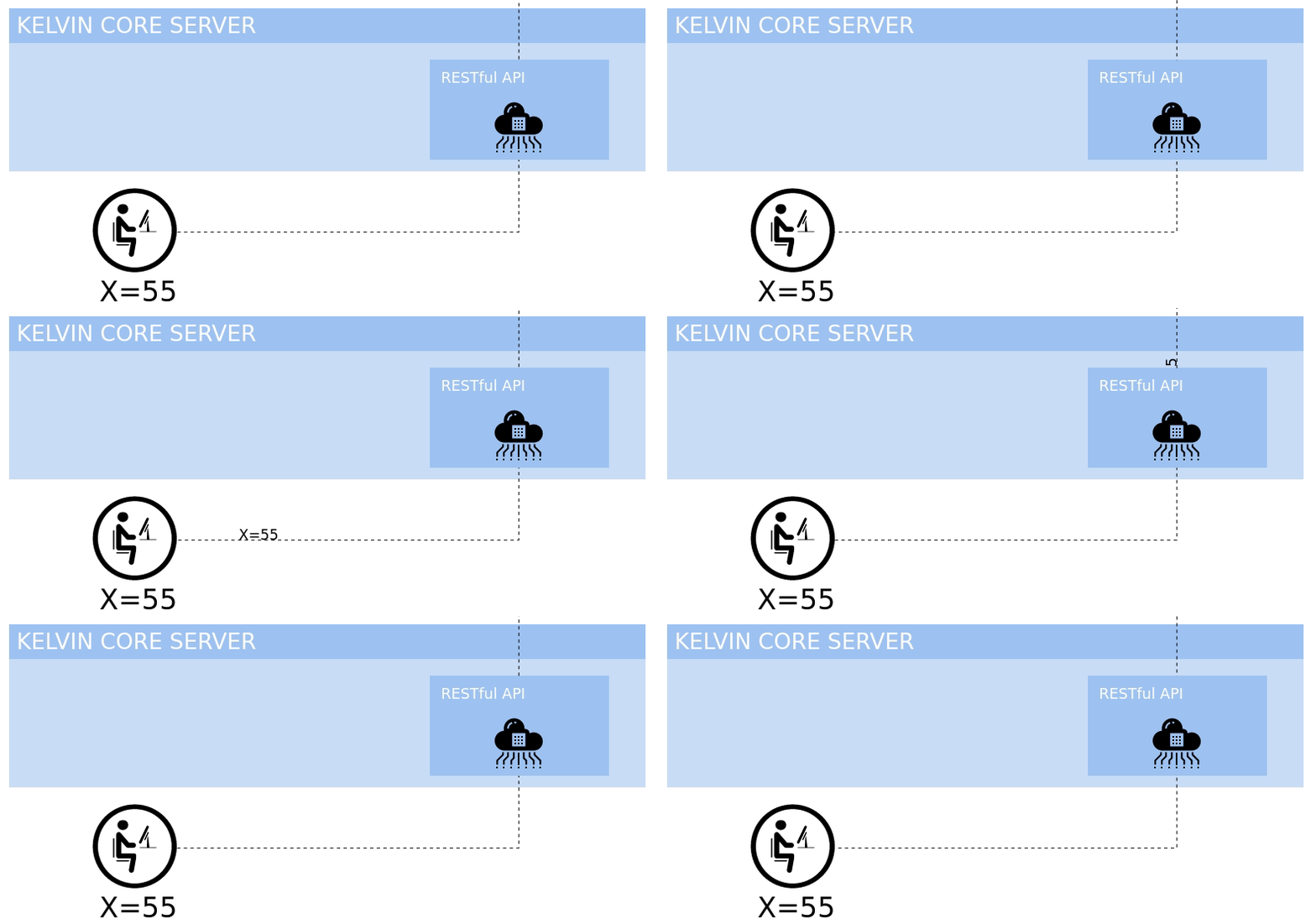
When a user sends an API call to create a new Control Change request to the Cloud Server, the Kelvin Core Server assigns a unique ID and assigns it initially as Pending. It will then send the control change information to the nominated Kelvin Cluster.
This will be updated as the Control Change Manager on the Kelvin Cluster reports back the status of this Control Change request.
Ready (On the Kelvin Cluster)
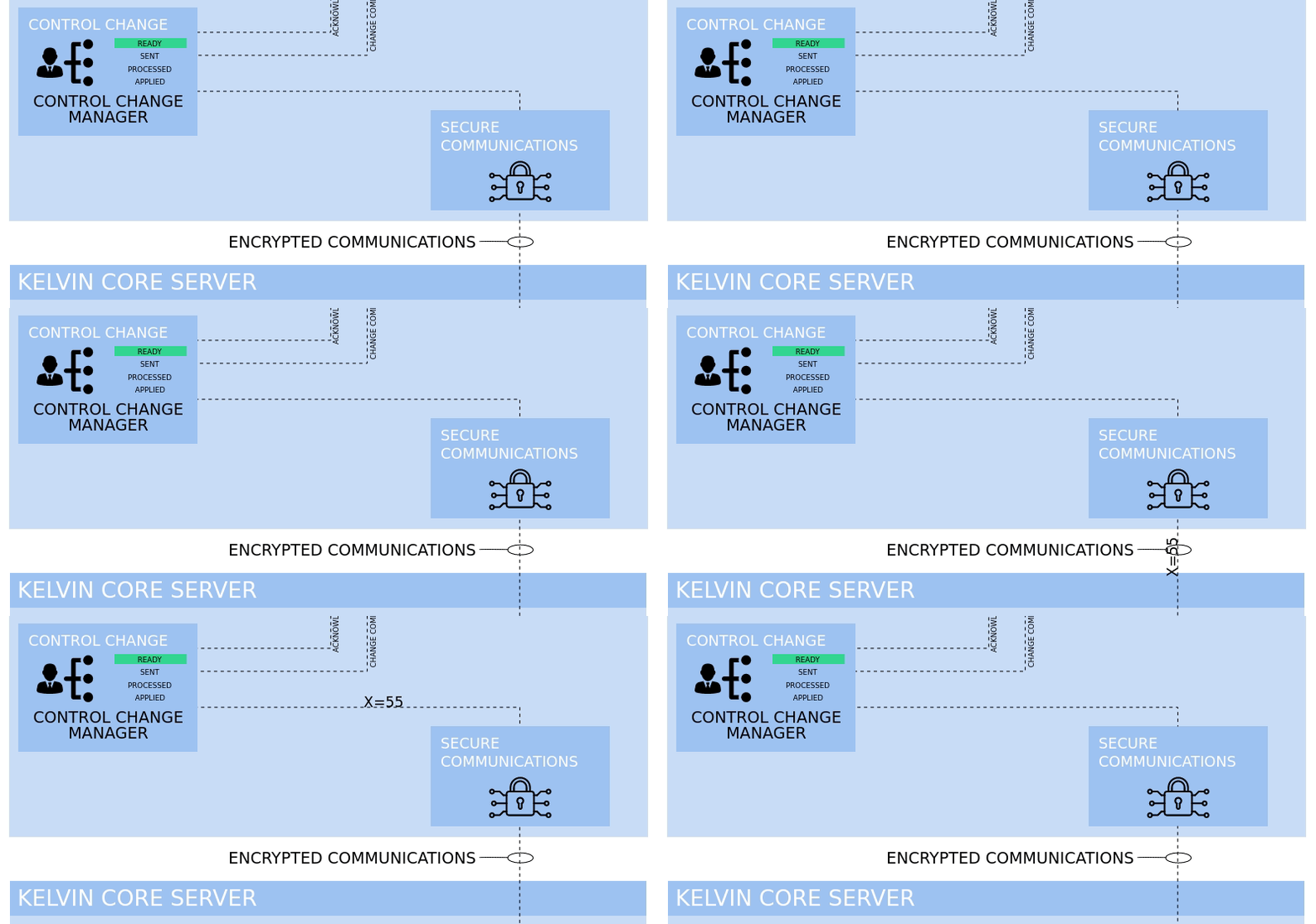
When the Control Change request is sent to the Kelvin Control Manager on the Kelvin Cluster, the status is set on the Kelvin Cluster as Ready.
Ready to Sent (On the Kelvin Cluster)
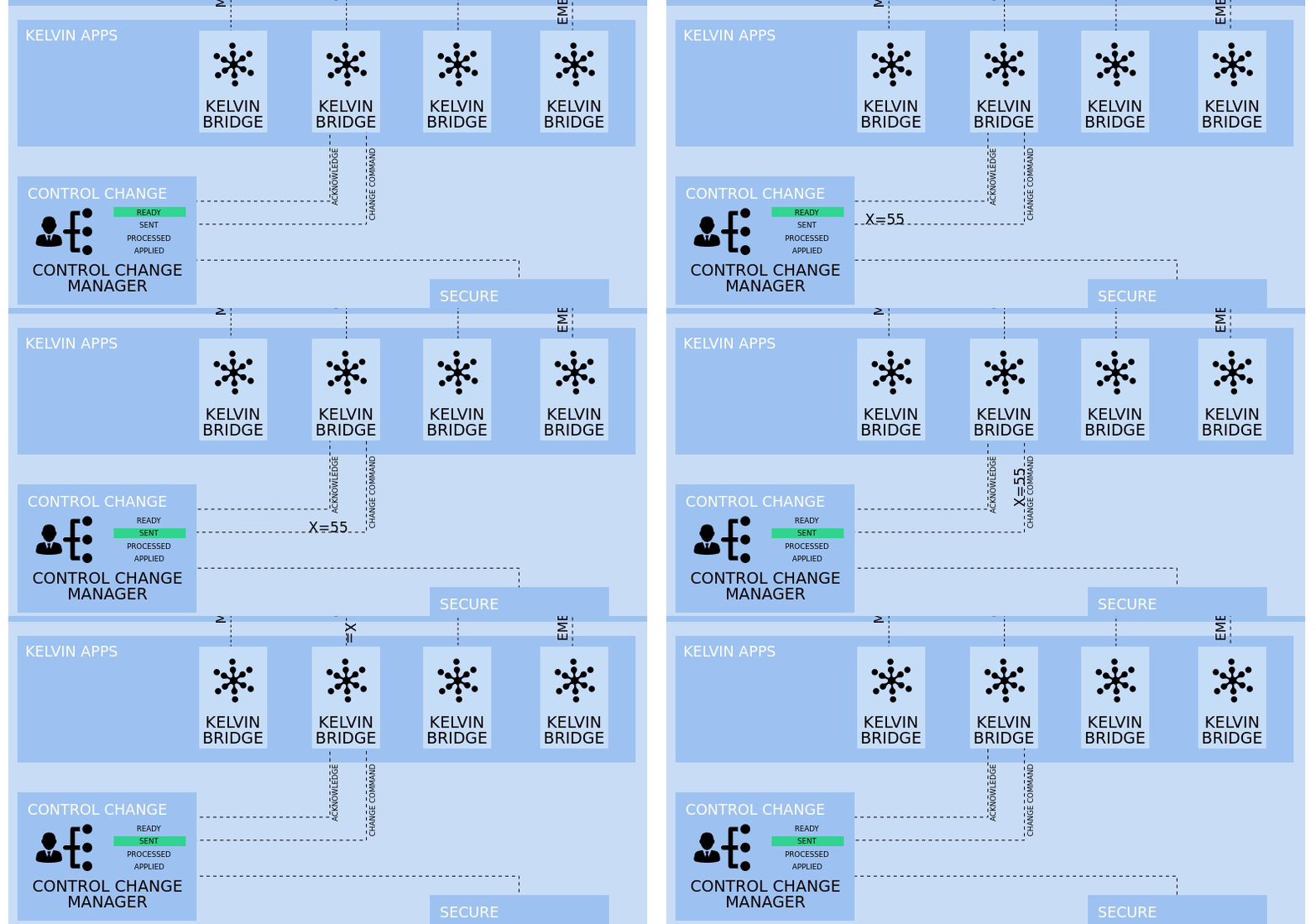
When the Control Change Manager sends the Control Change request to the assigned bridge the status will be changed to Sent.
The Control Change Manager will continue to send the Control Change request at fixed intervals until it receives a "Processed" acknowledgement from the Kelvin Bridge.
Sent to Processed (On the Kelvin Cluster)
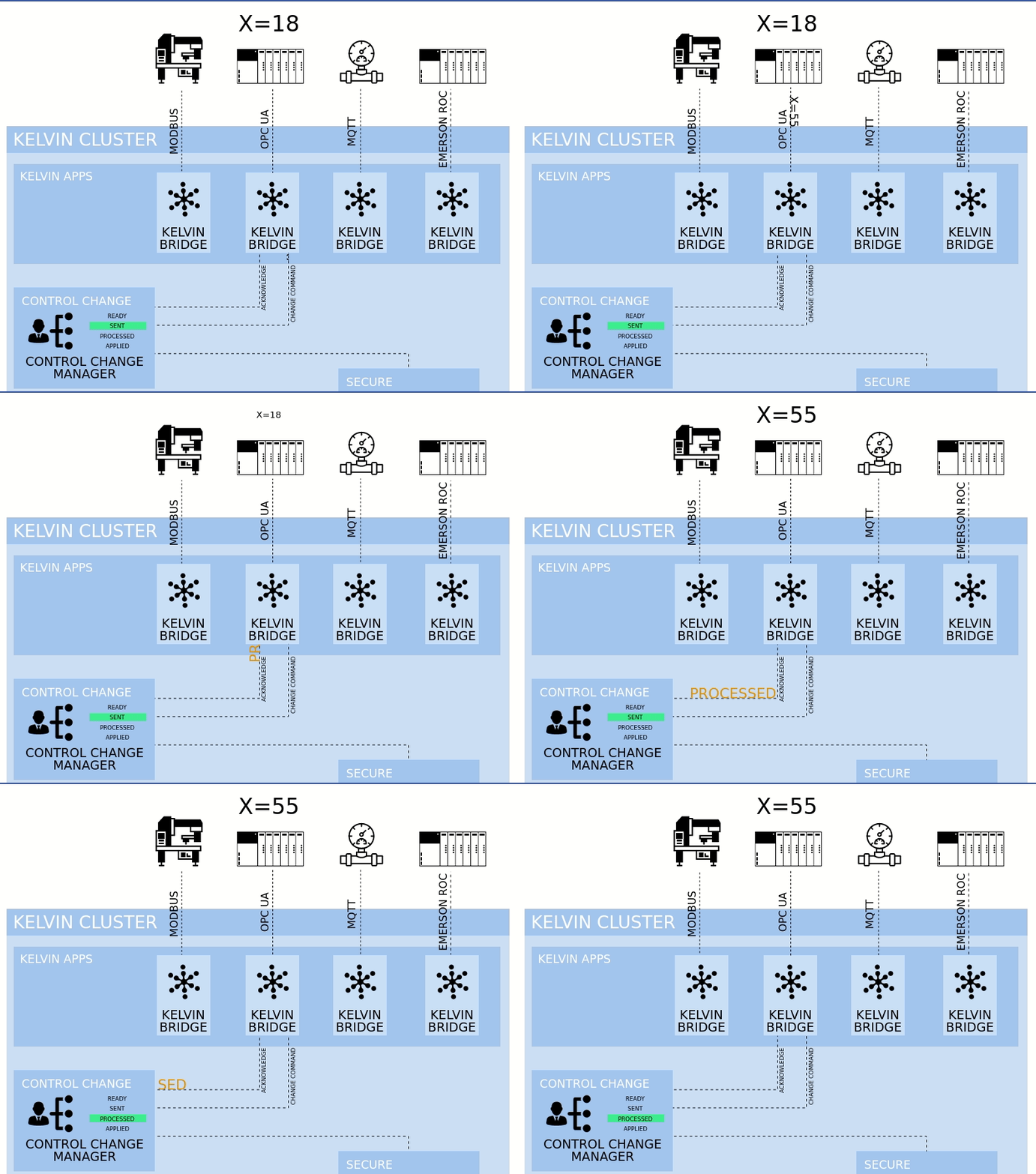
When the Kelvin Bridge has sent the control change request to the machine then it will send a Processed acknowledgement back to the Control Change Manager.
Once the Control Change Manager receives the Processed acknowledgement from the Kelvin Bridge, it will stop sending the Control Change request and will wait for any status updates from the Kelvin Bridge.
Processed to Applied (on the Kelvin Cluster)
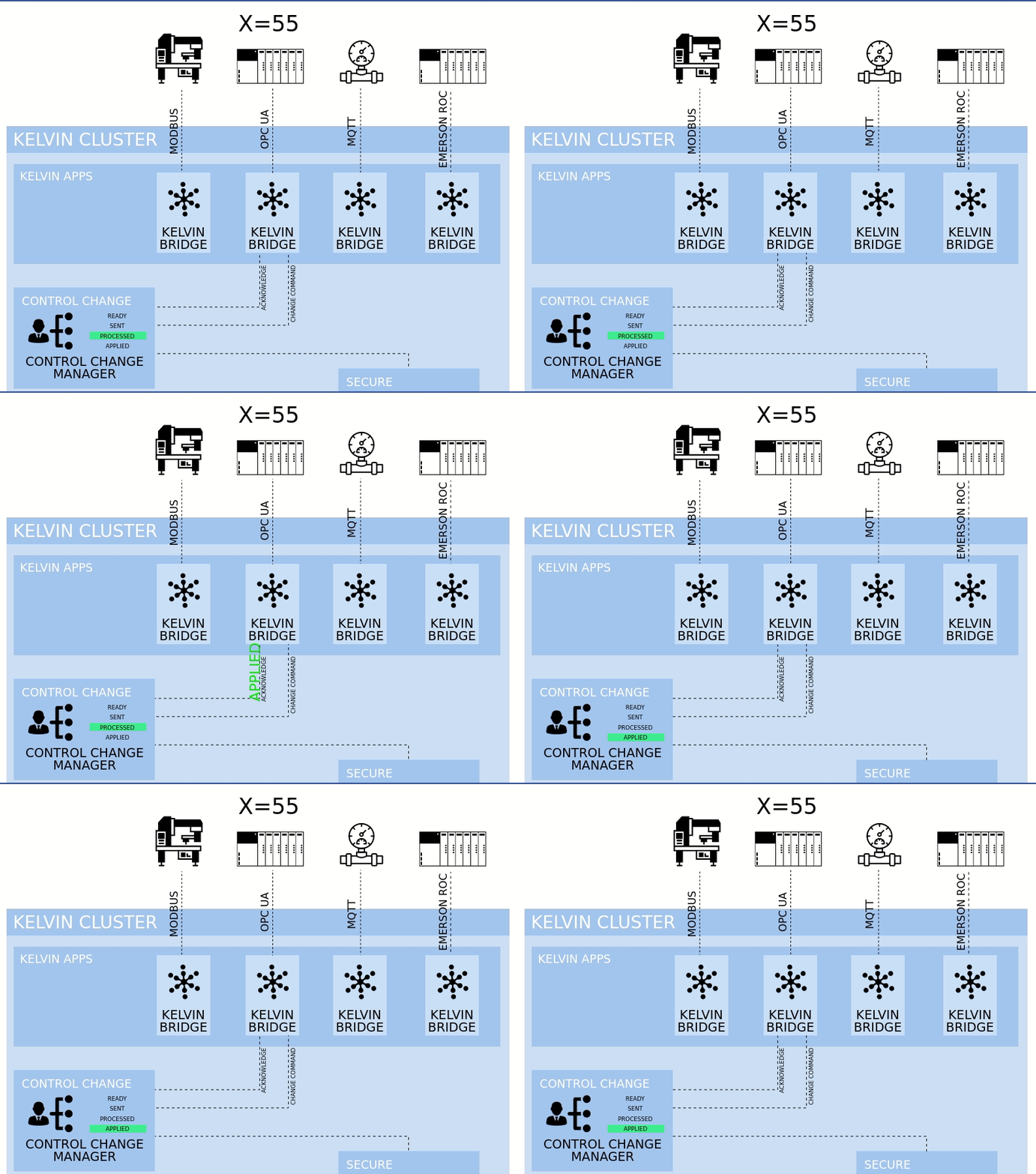
When the Kelvin Bridge receives its regular read data updates from the machine, it will compare the value received with the new control change request value. If they match, then the Kelvin Bridge will sent an Applied Acknowledgement to the Control Change Manager.
Once the Control Change Manager receives the Applied Acknowledgement update the status as Applied and the Control Change Request is considered completed.
Failure Cases
Sometimes the changes can not be applied to the end machine. Some reasons can be;
- Broken communications between the Cloud Server and the Kelvin Cluster
- Kelvin Bridge Failure
- Bad settings on the Kelvin Bridge
- Broken communications between the Kelvin Bridge and the machine
In all cases, the Kelvin Control Change Manager monitors two failure scenarios both of which can be set by the User when sending the control change request through the create API;
- Retry sending control change request to the Kelvin Bridge
- Timeout getting an Applied response from the Kelvin Bridge
In both cases a Failed status means no more attempts will be made to complete the control change request.
Sent to Failed - Too Many Retries
The Control Change Manager will send the control change request to the Kelvin bridge at regular intervals until it receives a Processed acknowledgement from the Kelvin Bridge.
A Processed Acknowledgement does not mean that the write to the machine has been successful. It only means that the kelvin Bridge confirms it has received valid information and is processing it.
This is an optional variable in the Control Change request. usually the default will be adequate.
Any Status to Failed - Timeout
Both the Cloud Server and the Kelvin Control Manager will wait for an Applied response from the Kelvin Bridge until the timeout is triggered.
The timeout is a date/time variable when the control change command expires, all attempts will be canceled and the control change request status will be changed to Failed.
Other Related Links 
Interesting links related to Kelvin AI Failure
- Kelvin Overview -> Overview
- Kelvin Overview -> Cloud Server -> Kelvin Apps
- Documentation -> Kelvin Maps -> Kelvin Maps Editors -> Kelvin Maps Rules Editor
Last Modified
Last Modified on 28th June 2022
22nd June 2023
* Updated Kelvin Platform to the new name Kelvin Core Server and Kelvin Core Services
* Updated and improved the infographics and explanations
28th June 2022
* Started new detailed last modified section

Kelvin Documentation AI Support
Hi. My name is KevDocBot. How can I help you?