AI Failure Detection
On this page you will learn about Kelvin AI Failure Detection in Kelvin Core and how it fits into Kelvin Collaborative Control Software.
What is Kelvin AI Failure Detection ?
Kelvin AI Failure Detection is the AI / Machine Learning section. Kelvin.ai uses advance machine learning techniques and decades worth of industrial data to create advanced failure detection models for all types of machines.
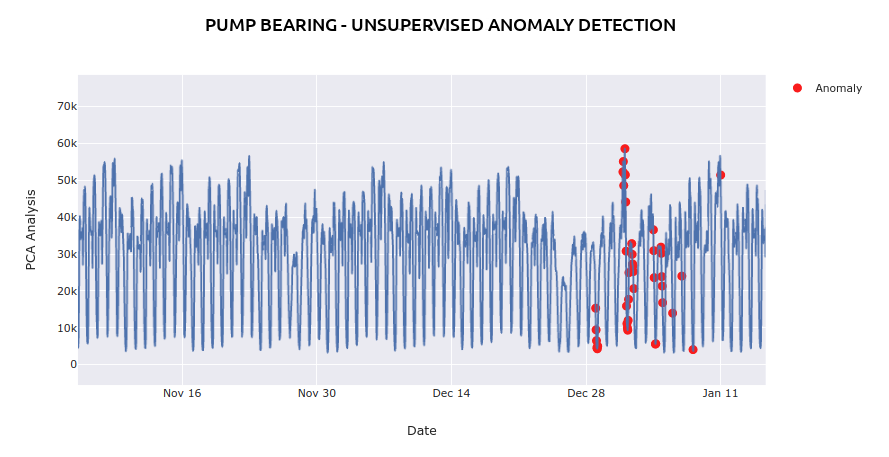
Failure detection uses a semi-supervised machine learning anomaly detection system. Machine learning models have been created and tuned using many decades worth of industrial data on many types of machinery and components.
How is this Data Used ?
Failure detection is used in a number of areas of the Kelvin Core to provide insights into the data and its effect on your operations and processes;
Preventative Alarms
When a failure detection is detected, this does not mean that the asset has yet failed. In most cases, unless there is a catastrophic failure or disassembly, this alarm is a pre-warning on a potential failure of your asset.
After analyzing the alarm and its data, you can then plan proper maintenance schedule to replace or maintain the problem.
Carbon Maps
Carbon Maps is a built-in analytical tool that helps identify where assets are performing poorly. With this data it can calculate the monetary losses incurred by these assets and help you plan your maintenance expenditure and production efficiency against all your asset real-time performances.
It also calculates the additional carbon emissions produced by these inefficient assets through the higher electricity consumption and converts these figures into the additional carbon dioxide emissions entering the atmosphere.
This is a good tool to promote your company's ambitions to protecting the environment and limiting the carbon emissions being released.
Failure Detection Alarms
The Failure Detection Alarms are created by the Kelvin Machine Learning Model algorithms.

Data is not enough to create good models. The Kelvin Data Scientists also worked closely with Industrial Experts to create the right feature engineering processing on the data based on their domain experience so that failure detections are reliable.
What is Detected ?
If you are not familiar with the new Kelvin Asset, Kelvin Component, Kelvin Part and Kelvin Sensor structure of Kelvin Assets, we highly recommend you read about Kelvin Assets first before reading here. We will reference the Kelvin Asset structure many times throughout this page.
Kelvin AI Failure Detection can detect failures in many different areas of a machine through direct or indirect methodology.
The Kelvin AI Failure Detection will use the available sensors in an asset to try and detect any preventative maintenance failures, imminent failures or actual physical failures on many of the parts in an asset.
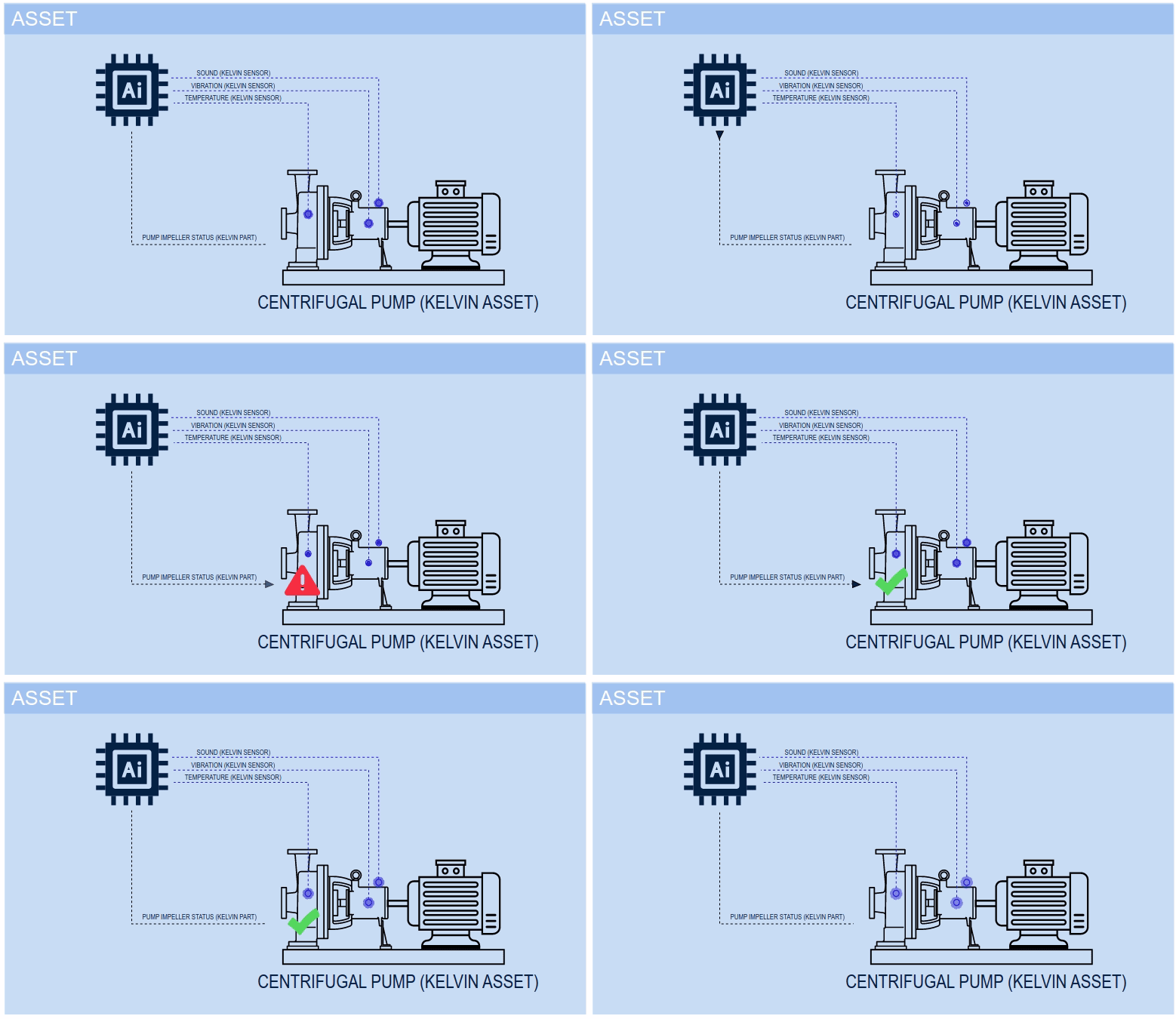
Kelvin Part Detection
Using the Kelvin Sensors, the Kelvin AI Failure Detection will monitor the health of many of the Kelvin Parts in the Kelvin Asset.
When an anomaly is detected, you will receive a Kelvin Alarm that will identify the Kelvin Part which has the detected problem along with a description of the type of problem and possible solutions.
Kelvin Component Detection
If the Kelvin AI Failure Detection detects an anomaly but can not identify which Kelvin Part is causing the anomaly, you will receive a Kelvin Alarm which will identify the Kelvin Component which has the problem.
You will need to inspect the asset and identify yourself which part in the Kelvin Component is causing the anomaly.
Plug and Play
The Kelvin Core takes out all the hard work of applying AI to your data.
Activating the AI is as simple as a click of a button and setting a few simple a parameters. The analysis will then immediately start monitoring and analyzing your real time data stream.
Be careful when setting the parameters as this can have a significant impact on the accuracy of the failure detection. For example the bearing failure detection relies on the right axis (x, y or z) of an accelerometer being selected during setup.
Activating Failure Detection
The failure detection models are built into the Kelvin Assets, Components, Parts and Sensors in the Asset Templates. When you drag and drop any Kelvin Template you will have the failure detection options available in properties.
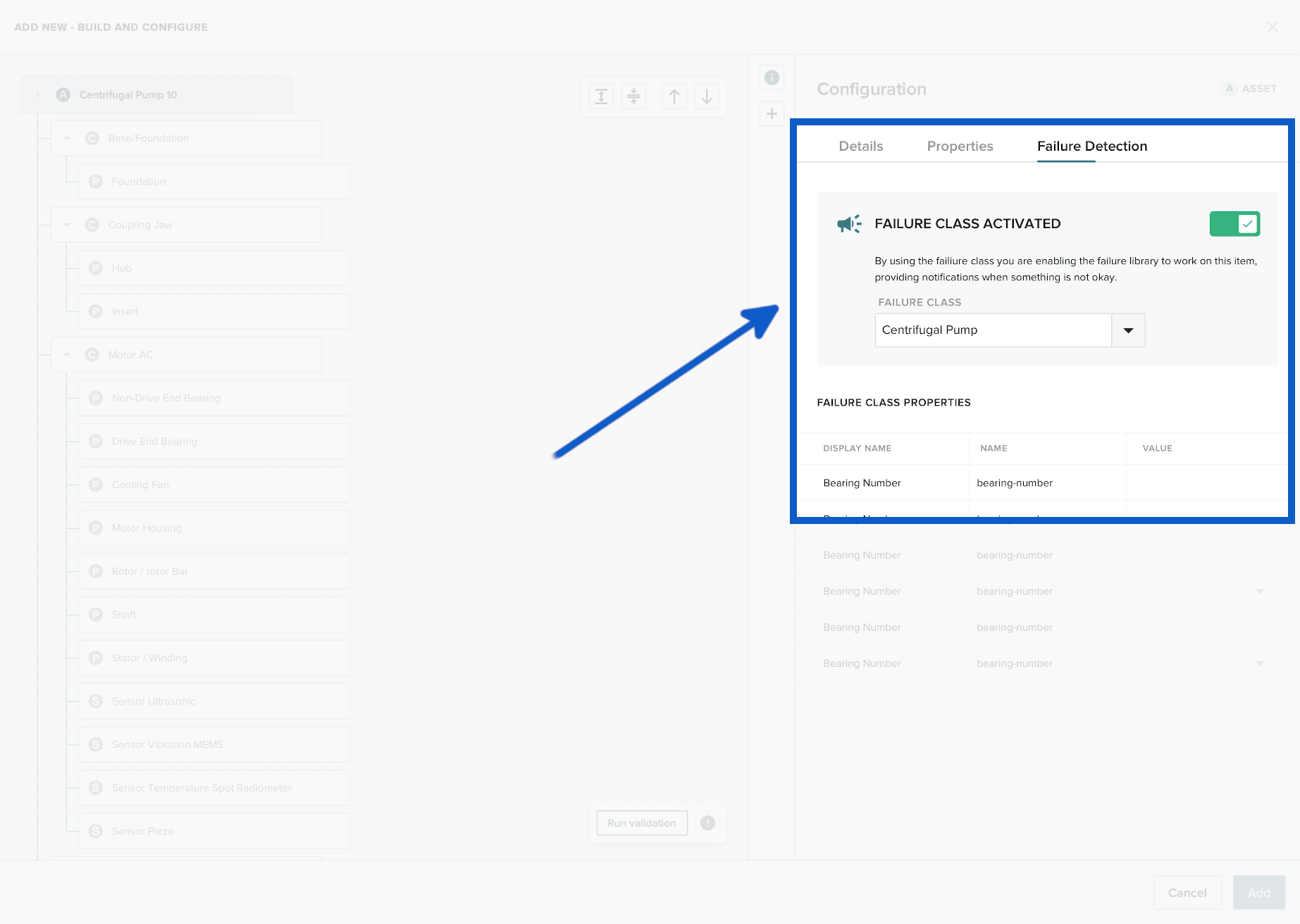
Failure detection features are available for the complete Kelvin Assets or on a per Kelvin Component level and requires minimal setup to start detecting failures.
Details of Failure Detection
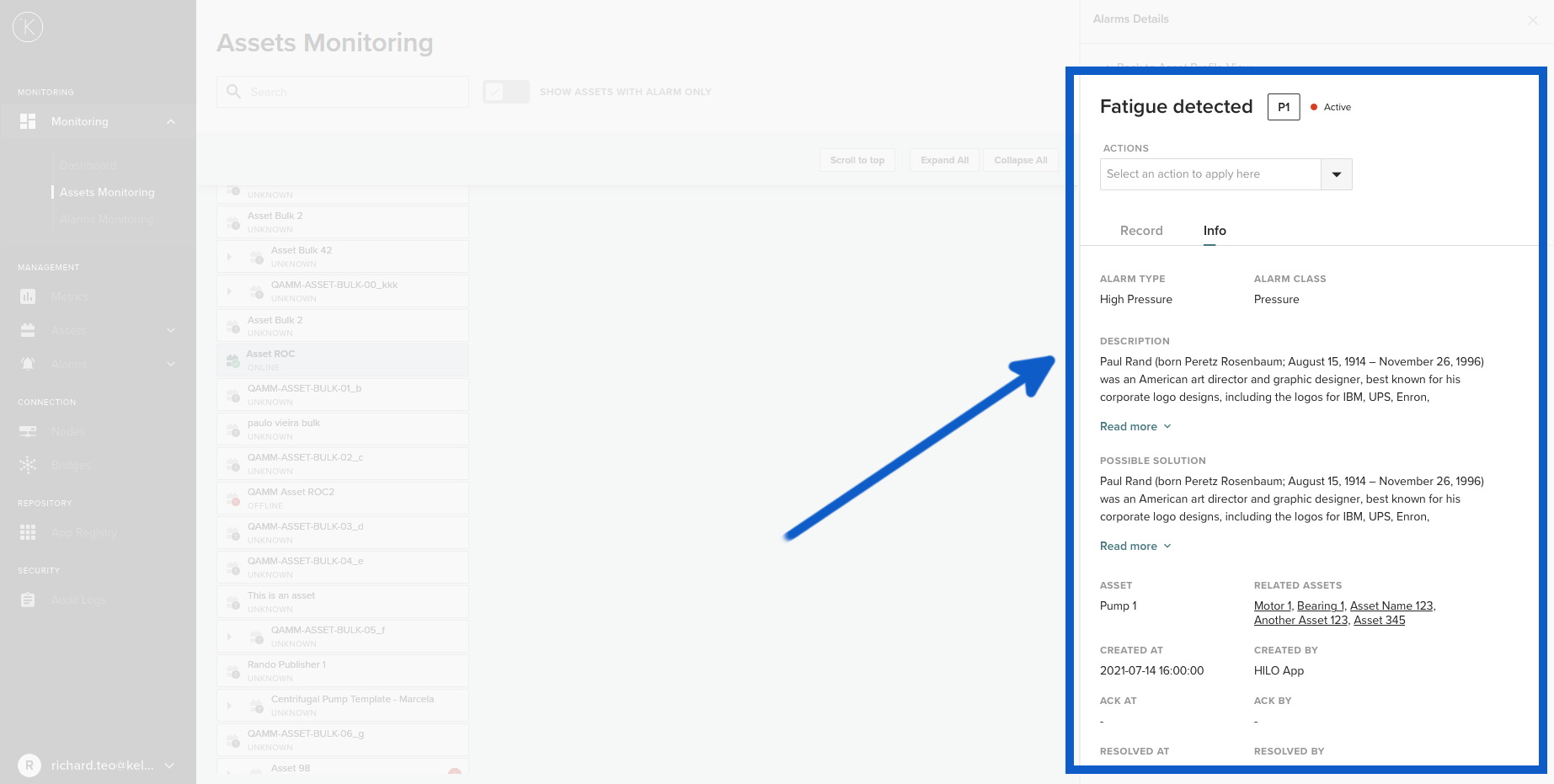
When a failure is detected, then an Alarm will be generated. You can go to the Asset to see the details of the data which created the Alarm.
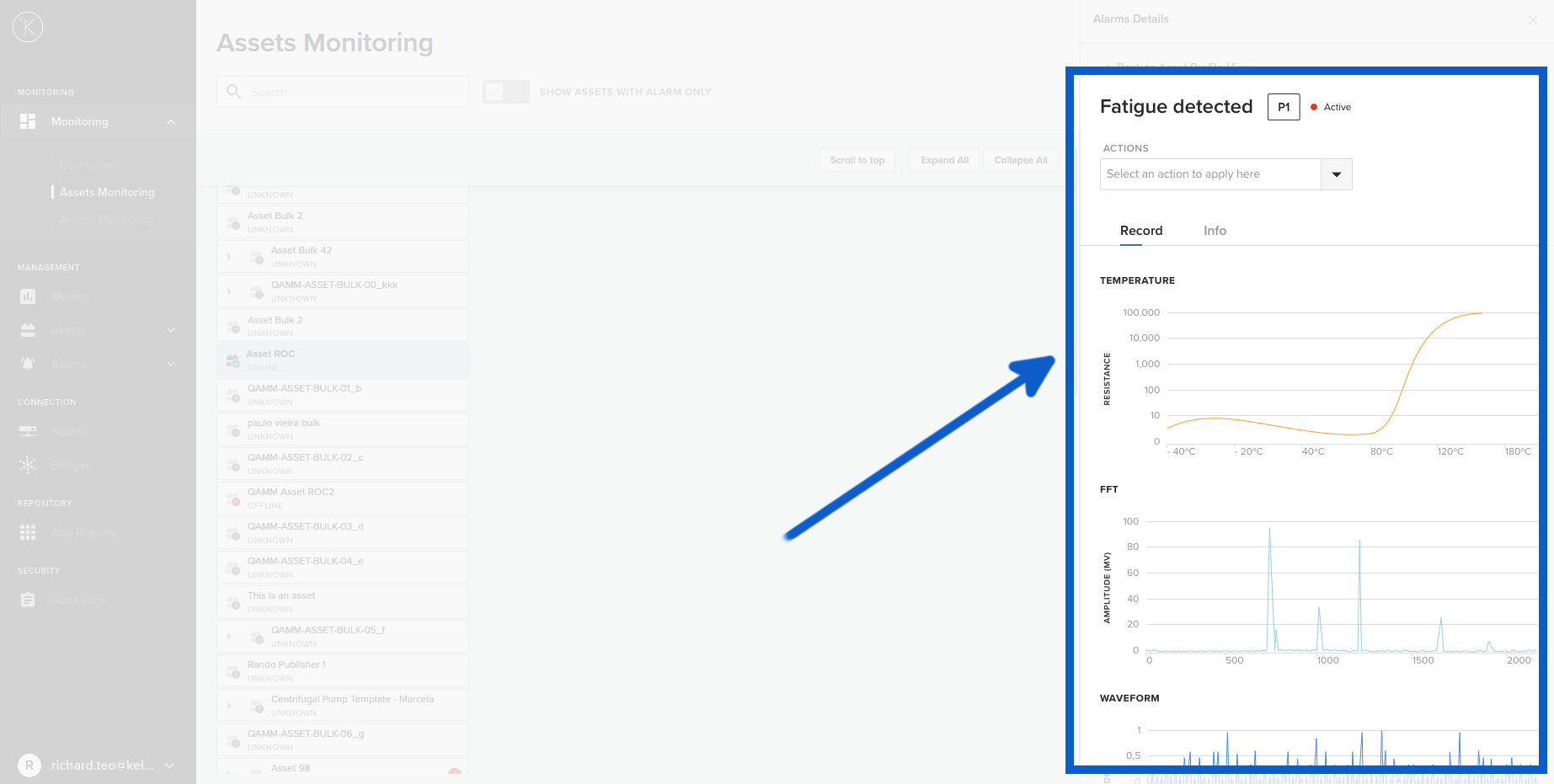
To understand more how to setup the Kelvin AI Failure Detection, see the documentation at Kelvin Manager UI -> Manager -> Assets -> Assets -> Add New Asset or just click here.
Rules for Setup Failure Detection
The Failure Detection has a number of rules that you need to follow while setting up (by adding New Kelvin Assets). If they are configured wrong, then you will find the Failure Detection does not work as expected.
Principles of Failure Detection
The Kelvin AI Failure Detection will detect failures in Kelvin Parts by monitoring any Kelvin Sensors attached to the machine.
If you do not understand how Kelvin Assets are structured, then we strongly advise you read about Kelvin Assets first before proceeding here. We will reference Kelvin Assets, Kelvin Components, Kelvin Parts and Kelvin Sensors continuously in our examples.
The Kelvin Sensors do not need to be attached to the direct parent Kelvin Component where the Kelvin Part is being monitored.
For example, the bearings (Kelvin Part) on a pump (Kelvin Component 1) can be monitored by vibration sensors mounted on the AC Motor (Kelvin Component 2).
Run Validation
When you add a new Kelvin Asset (or add a new Kelvin Component, Kelvin Part or Kelvin Sensor to an existing Kelvin Asset), then you need to Run Validation before you can save it.
Run Validation will check that the failure detection structure and all properties have been properly setup.
There are a few areas not checked by Run Validation. These are the value types such as integer, float or date formats in the failure class properties. Even though it will come up with a "Validation was successful" message you should ensure all values are valid otherwise the failure detection will not work as expected.
List of AI Failure Detections Available
Centrifugal Pump
Failure Types
| Kelvin Component | Kelvin Parts | Failure Detections |
|---|---|---|
| AC Motor | Bearings | Fatigue |
| Housing | Distortion | |
| Rotor | Fatigue | |
| Shaft | Fatigue |
|
| Stator / Winding | Single Phase |
|
| Pump - Centrifugal | Bearings | Corrosion |
| Impeller | Wear | |
| Seal | Wear | |
| Shaft | Fatigue |
|
| Base / Foundation | Foundation | Fatigue |
Required Information
| Kelvin Component | Kelvin Sensor | Parameters | Mandatory |
|---|---|---|---|
| AC Motor | Vibration | Axial Orientation | Yes |
| Bearings | Manufacturer |
No | |
| Temperature | Yes | ||
| Pump Centrifugal | Vibration | Axial Orientation | Yes |
| Temperature | Yes | ||
Vibration Sensor
For the vibration or accelerometer sensors, you need to select which axis is in the same plane as the pump shaft. This ensures the failure detection will be monitoring the correct plane for anomalies.

Failure Detection Definitions
| Failure Detections | Failure Reasons |
|---|---|
| Corrosion | No protection such as lubrication oil or grease leading to corrosion on metal moving parts. |
| Distortion | Excessive heat on equipment, footing of equipment loose, etc. |
| Fatigue | Undue stress on moving parts leading to fatigue failure. This could be caused by excessive vibration, misalignment, imbalance, excessive force, etc. |
| Fluting | Faulty or loose wiring, etc. |
| Single Phase | Missing one or two phases of a three phase motor. This could be caused by faulty contactor, broken wire, faulty connections, blown fuse, etc. |
| Thermal Deterioration | Deterioration of equipment due to thermal stress. In motors this could be due to excessive loads, faulty terminal connections, unbalance voltage between phases, etc. |
| Wear | Commonly known as wear and tear, this usually is due to age (useful life) but can also be because of contamination, lack of lubrication, loose fastenings, imbalance, misalignment, etc. |
Failure Class Properties
When entering numbers, be careful not to accidentally type in any spaces. This will affect the ability for Kelvin AI Failure Detection to work.
Kelvin Assets
| Failure Class | Failure Class Properties | Values / Units | Mandatory |
|---|---|---|---|
| Centrifugal Pump | None | No |
Kelvin Components
| Failure Class | Failure Class Properties | Values / Units | Mandatory |
|---|---|---|---|
| Base/Foundation | Attachment | Anything | No |
| Installation Date | Float | No | |
| Repair Date | Float | No | |
| Motor AC | None | ||
| Centrifugal Pump Component | None | ||
| Coupling-Jaw | Manufacturer | Anything | No |
| Serial Number | Anything | No | |
| Attachment | Anything | No | |
| Installation Date | Float | No | |
| Repair Date | Float | No |
Kelvin Parts
| Failure Class | Failure Class Properties | Values / Units | Mandatory |
|---|---|---|---|
| Bearing | Manufacturer | Anything | No |
| Bearing Number | Anything | No | |
| Bearing Type | Anything | No | |
| Lube Type | Anything | No | |
| Lube Manufacturer | Anything | No | |
| Lube Product | Anything | No | |
| Viscosity Grade | Anything | No | |
| Casing | Manufacturer | Anything | No |
| Model Number | Anything | No | |
| Serial Number | Anything | No | |
| Orientation | Anything | No | |
| HP | Float | No | |
| Flow Rate | Float | No | |
| Pressure | Float | No | |
| Size | Float | No | |
| Coupling Jaw Part | None | ||
| Fan | Blade Count | Integer | No |
| Foundation | Construction Material | Anything | No |
| Housing | Manufacturer | Anything | No |
| Frame | Anything | No | |
| Model Number | Anything | No | |
| Seal Type | Anything | No | |
| Serial Number | Anything | No | |
| Hub | None | ||
| Impeller | Blade Count | Integer | No |
| Insert | Construction Material | Anything | No |
| Rotor/Rotor Bar | Rotor Bar Count | Integer | No |
| Seal | Manufacturer | Anything | No |
| Model Number | Anything | No | |
| Seal Type | Anything | No | |
| Serial Number | Anything | No | |
| Shaft | Orientation | Anything | No |
| Running Speed RPM | Float | No | |
| Stator/Winding | Amps | Float | No |
| Efficiency | Float | No | |
| Field Current | Float | No | |
| Field Volts | Float | No | |
| HP | Float | No | |
| Insulation Class | Anything | No | |
| kW | Float | No | |
| Phase | Float | No | |
| Service Factor | Float | No | |
| Volts | Float | No | |
| Winding Configuration | Anything | No |
Kelvin Sensors
| Failure Class | Failure Class Properties | Values / Units | Mandatory |
|---|---|---|---|
| Spot Radiometer | Baseline Temperature | Fahrenheit or Celsius depending on Metric value ( Float ) | Yes |
| Maximum Temperature | Fahrenheit or Celsius depending on Metric value ( Float ) | Yes | |
| IR Thermal Imaging | Baseline Temperature | Fahrenheit or Celsius depending on Metric value ( Float ) | Yes |
| Maximum Temperature | Fahrenheit or Celsius depending on Metric value ( Float ) | Yes | |
| Resolution | Resolution of Imaging ( Float ) | No | |
| Thermocouple | Baseline Temperature | Fahrenheit or Celsius depending on Metric value ( Float ) | Yes |
| Maximum Temperature | Fahrenheit or Celsius depending on Metric value ( Float ) | Yes | |
| Vibration MEMS | Sampling Rate | Hertz ( Float ) | Yes |
| Sample Duration | Seconds ( Float ) | Yes | |
| Axial Orientation | X, Y or Z Axis predefined options | Yes | |
| Horizontal Radial Orientation | X, Y or Z Axis predefined options | Yes | |
| Vertical Radial Orientation | X, Y or Z Axis predefined options | Yes | |
| Vibration Piezo | Sampling Rate | Hertz ( Float ) | Yes |
| Sample Duration | Seconds ( Float ) | Yes | |
| Axial Orientation | X, Y or Z Axis predefined options | Yes | |
| Horizontal Radial Orientation | X, Y or Z Axis predefined options | Yes | |
| Vertical Radial Orientation | X, Y or Z Axis predefined options | Yes |
Other Related Links 
Interesting links related to Kelvin AI Failure
- Kelvin Overview -> Overview
- Documentation -> Kelvin Core -> Kelvin Manager UI -> Management -> Assets -> Assets
Last Modified
Last Modified on 22nd June 2023
22nd June 2023
* Updated Kelvin Platform to the new Kelvin Core Services and Kelvin Core Server
* Updated status of development of the AI models
* Added the new features in Kelvin Maps related to Kelvin AI Failure Detection
30th June 2022
* Started new detailed last modified section

Kelvin Documentation AI Support
Hi. My name is KevDocBot. How can I help you?