Control Changes
Control Change Messages
Control Changes are a special type of output Message which is a more rigorous fault tolerant process to write any data to an Asset.
Note
It also has failure protocols should it be impossible to write to the Asset, for example if it is offline.
To learn more about control changes and the detailed workflow, check out the full documentation in the overview concepts here.
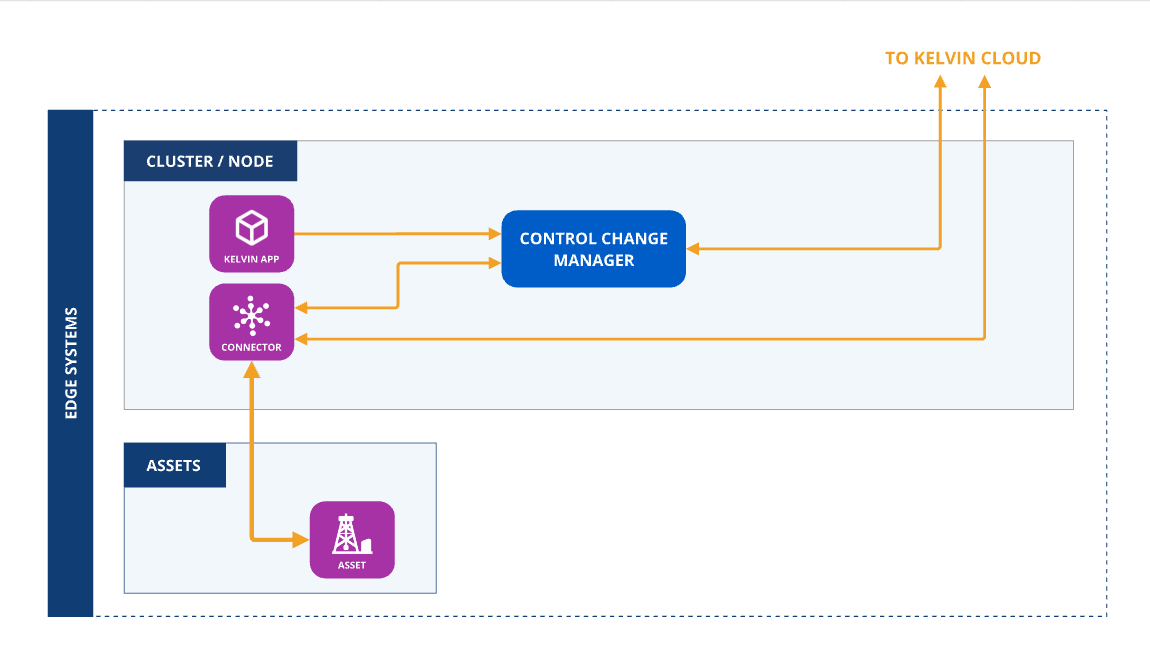
To ensure the output is treated as a control change an extra flag needs to be set under its output definition in the app.yaml file (control_change: True):
app:
  type: kelvin
  kelvin:

    outputs:
    - data_type: number
      name: motor_speed_set_point
      control_change: true
The ControlChange Object supports the following attributes :
| Attribute | Required | Default Value | Description |
|---|---|---|---|
resource |
required | N/A | The KRNAssetDatastream that this Control Change is meant for. |
expiration_date |
required | N/A | Absolute datetime or a timedelta (from now) when the Control Change will expire. |
payload |
required | N/A | The desired target value for the control change (Boolean, Integer, Float or String). |
retries |
optional | 0 | Number of retries. |
timeout |
optional | 300s | Timeout for each retry in seconds. 0 means try forever until expiration date. |
control_change_id |
optional | Random UUID | Sets a user specific ID for the control change (UUID). |
from_value |
optional | Initial (trigger) value of the control change. |
Offline Edge Operations
Control Changes can operate even if the edge device does not have any Internet connection.
The only stipulation is that the Kelvin SmartApp™ that produces the control change object and the Kelvin SmartApp™ or Connector that consumes the control change object are hosted on the same Cluster and have local communications if they are hosted on different Nodes.
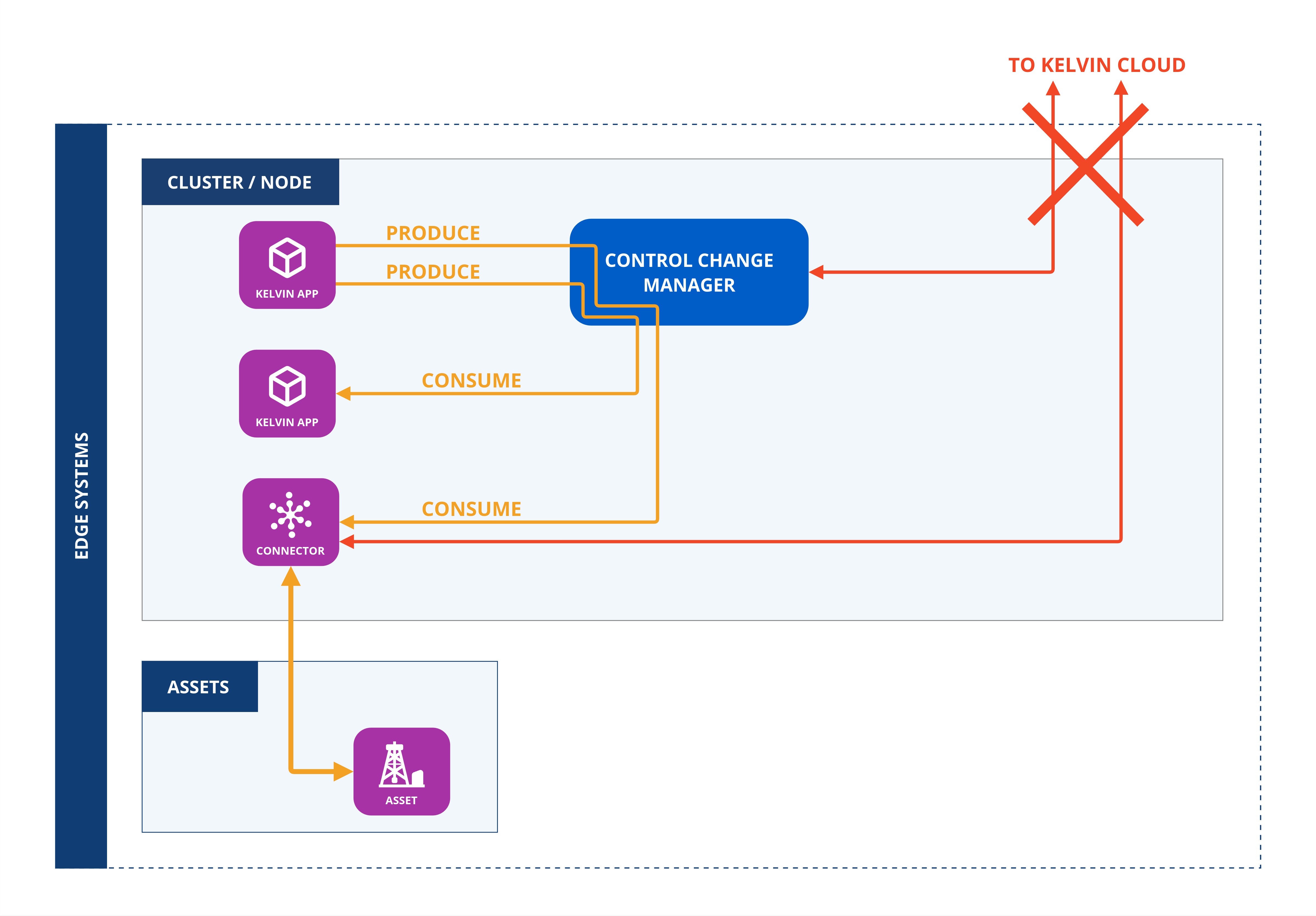
To set this up, the app.yaml file of the Kelvin SmartApp™ that produces the control change object must define the output Data Stream with the control_change key.
app:
  type: kelvin
  kelvin:

    outputs:
    - data_type: number
      name: motor_speed_set_point
      control_change: true
and the Kelvin SmartApp™ that consumes the control change object must define the input Data Stream with the control_change key.
app:
  type: kelvin
  kelvin:

    inputs:
    - data_type: number
      name: motor_speed_set_point
      control_change: true
If the consumer is a Connector, then this key is automatically set using the Kelvin Connector setup process.
The Kelvin SmartApp™ or Connector will now automatically receive the control change object directly from the Kelvin SmaartApp™ without requiring any connection to the Kelvin Cloud.
Examples
Here is a minimal Control Change.
from datetime import timedelta

from kelvin.application import KelvinApp
from kelvin.message import ControlChange
from kelvin.krn import KRNAssetDataStream

(...)

# Create and Publish a Control Change
await app.publish(
    ControlChange(
        resource=KRNAssetDataStream("my-motor-asset", "motor_speed_set_point"),
        payload=1000,
        expiration_date=timedelta(minutes=5)
    )
)
In some cases if a write attempt fails to be validated, you can to build a cool off period before retrying or to give up if the Control Change has retired a certain amount of times, regardless of the expiration date.
from datetime import timedelta

from kelvin.application import KelvinApp
from kelvin.message import ControlChange
from kelvin.krn import KRNAssetDataStream

(...)

# Create and Publish a Control Change
await app.publish(
    ControlChange(
        resource=KRNAssetDataStream("my-motor-asset", "motor_speed_set_point"),
        payload=1000,
        expiration_date=timedelta(minutes=10),
        retries=3, # only attempt 3 extra times to write the data if the first attempt fails
        timeout=60 # retry every minute if the previous attempt failed
    )
)
If the "Applied" status isn't received from the Connection to the Control Change Manager by the Expiration Date, the process is deemed unsuccessful and will be marked as failed.
No more attempts will be made to apply the new value to the Asset.
In this example the expiration date is made ten minutes from the time the control change is created.
from datetime import timedelta

from kelvin.application import KelvinApp
from kelvin.message import ControlChange
from kelvin.krn import KRNAssetDataStream

(...)

# Create and Publish a Control Change
await app.publish(
    ControlChange(
        resource=KRNAssetDataStream("my-motor-asset", "motor_speed_set_point"),
        payload=1000,
        expiration_date=timedelta(minutes=10),
        retries=3, # only attempt 3 extra times to write the data if the first attempt fails
        timeout=60 # retry every minute if the previous attempt failed
    )
)
Timeout sets the amount of time the control change will wait to see if the new values have been successfully written to the Asset before retrying to write again.
In this example we set it to 60 seconds.
from datetime import timedelta

from kelvin.application import KelvinApp
from kelvin.message import ControlChange
from kelvin.krn import KRNAssetDataStream

(...)

# Create and Publish a Control Change
await app.publish(
    ControlChange(
        resource=KRNAssetDataStream("my-motor-asset", "motor_speed_set_point"),
        payload=1000,
        expiration_date=timedelta(minutes=10),
        retries=3, # only attempt 3 extra times to write the data if the first attempt fails
        timeout=60 # retry every minute if the previous attempt failed
    )
)