Kelvin SmartApps™ Configuration
Kelvin SmartApps™ Configurations enable global variables to be set for a Kelvin SmartApp™.
Warning
Do not confuse Asset Parameters with App Configuration variables.
App Configuration variables are global SmartApp™ variables that maintain the same value across all Assets deployed to the Kelvin SmartApp™.
Asset Parameter variables, on the other hand, are SmartApp variables specific to each Asset deployed to the Kelvin SmartApp™.
App Configuration values are fixed upon upload to the Kelvin Cloud, whereas Asset Parameters are dynamic and can be modified via Operations in the Kelvin UI or through the Kelvin API.
The configuration variable names and values are defined in the Kelvin SmartApp™'s app.yaml file as configuration.
Updating Configuration Values
The default configuration values are set in the Kelvin SmartApp™'s app.yaml file.
Developers and Administrators can update these values through the Kelvin API without needing to re-upload the complete Kelvin SmartApp™.
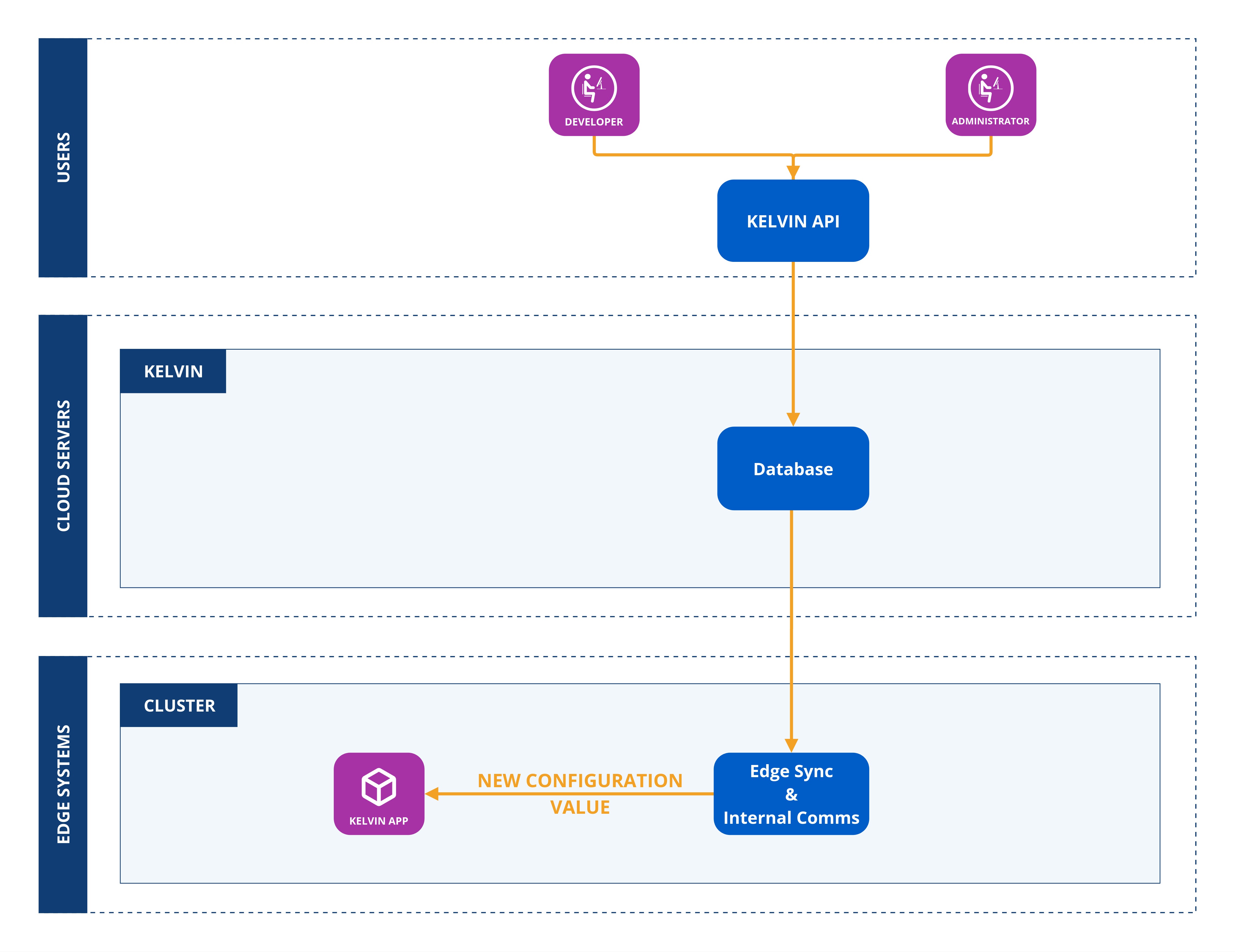
Examples
Read Configuration in SmartApp
For the app.yaml file, the configuration is set like this;
app:
  type: kelvin
  kelvin:

    configuration:
      connection:
        ip: 192.168.0.1
        port: 4747
      credentials:
        username: my-username
        password: my-password

      temperature_threshold_tolerance: 5
And this is how to access the global configuration variables in a Kelvin SmartApp™:
-
app_configurationObjectAccess a single
Kelvin SmartApps™ Configurationvalue directly from anapp_configurationDictionary Object embedded withinKelvinApp:import asyncio from kelvin.application import KelvinApp async def main() -> None: app = KelvinApp() await app.connect() (...) # Get IP ip = app.app_configuration["connection"]["ip"]Info
app.app_configurationwill only be available afterapp.connect()
Write New Configuration Values Dynamically
To update the configuration values dynamically, you use the Kelvin API endpoint /workloads/{workload_name}/configurations/update.
Note
The configurations values are applied directly to a workload. This will not affect the values in the App Registry.
If you have a Kelvin SmartApp™ deployed as many workloads, the updates will only affect the workload you target.
curl -X 'POST' \
  "https://<url.kelvin.ai>/api/v4{workloads/<workload_name}/configurations/update" \
  -H "Authorization: Bearer <Your Current Token>" \
  -H 'accept: application/json' \
  -H 'Content-Type: application/json' \
  -d '{
  "configuration": {
    "recommendations": [
      {
        "description": "Water level increasing, higher pump speed will lead water level to return to optimal.",
        "setpoint": {
          "name": "speed_sp",
          "variation_factor": 0.1
        },
        "type": "increase_speed"
      },
      {
        "description": "Production gain possible after step test, with higher pump speed",
        "setpoint": {
          "name": "speed_sp",
          "variation_factor": 0.1
        },
        "type": "increase_speed"
      },
      {
        "description": "Erratic Torque detected at this speed previously, lower pump speed will reduce vibrations",
        "setpoint": {
          "name": "speed_sp",
          "variation_factor": -0.1
        },
        "type": "decrease_speed"
      },
      {
        "description": "Reducing Speed will save energy and keep production levels constant",
        "setpoint": {
          "name": "speed_sp",
          "variation_factor": -0.1
        },
        "type": "decrease_speed"
      },
      {
        "description": "Above max Drawdown, parameters stable",
        "setpoint": null,
        "type": "no_action"
      },
      {
        "description": "Casing Pressure Event Detected, no changes allowed",
        "setpoint": null,
        "type": "no_action"
      },
      {
        "description": "No action - monitoring",
        "setpoint": null,
        "type": "no_action"
      }
    ]
  }
}'