Timeseries Data
Produce
You can also publish three types of messages to the platform;
- Data Messages (Number, Boolean and String)
- Control Changes
- Recommendations
We'll go through those examples in the following sections.
Timeseries Data
In order to send data messages from Kelvin, you can connect to the Kelvin API to send the Asset / Data Stream pair data with the Timeseries endpoints.
curl -X 'POST' \
  'https://<url.kelvin.ai>/api/v4/timeseries/create' \
    -H 'Authorization: Bearer <Your Current Token>' \
  -H 'accept: application/json' \
  -H 'Content-Type: application/json' \
  -d '{
  "data": [
    {
      "payload": 18000,
      "resource": "krn:ad:bp_01/annulus_pressure",
      "source": "krn:user:demo@kelvin.ai",
      "timestamp": "2022-01-13T12:00:00.000000Z",
      "type": "number"
    }
  ]
}'
Control Changes
In order to send Control Changes from Kelvin, you can connect to the Kelvin API to send the Control Change instructions with the Create Control Change endpoint.
curl -X 'POST' \
  'https://<url.kelvin.ai>/api/v4/control-changes/create' \
    -H 'Authorization: Bearer <Your Current Token>' \
  -H 'accept: application/json' \
  -H 'Content-Type: application/json' \
  -d '{
  "resource": "krn:ad:98-ac-1/humidity_setpoint",
  "payload": 2001,
  "timeout": 300,
  "retries": 0,
  "expiration_date": "2024-03-14T00:00:00Z"
}'
Recommendations
In order to send Recommendations from Kelvin, you can connect to the Kelvin API to send the Recommendation instructions with Control Change information using the Create Recommendation endpoint.
curl -X 'POST' \
  'https://<url.kelvin.ai>/api/v4/recommendations/create' \
    -H 'Authorization: Bearer <Your Current Token>' \
  -H 'accept: application/json' \
  -H 'Content-Type: application/json' \
  -d '{
  "source": "krn:wlappv:cluster-02/perf-berp-rec-gen/1.0.8",
  "resource": "krn:asset:perf-berp-perf-asset",
  "actions": {
    "control_changes": [
      {
        "resource": "krn:ad:perf-berp-perf-asset/perf-berp-perf-number",
        "expiration_date": "2024-03-15T13:11:14.864627Z",
        "payload": 14.5
      }
    ]
  },
  "expiration_date": "2024-03-15T13:11:14.864661Z",
  "metadata": {},
  "resource_parameters": {
    "closed_loop": false
  },
  "type": "perf-recommendation_type"
}'
There is also the option to add Dynacard data that can be viewed in the Recommendation.
In the Kelvin UI, the Dynacard is named Production in the Recommendation.
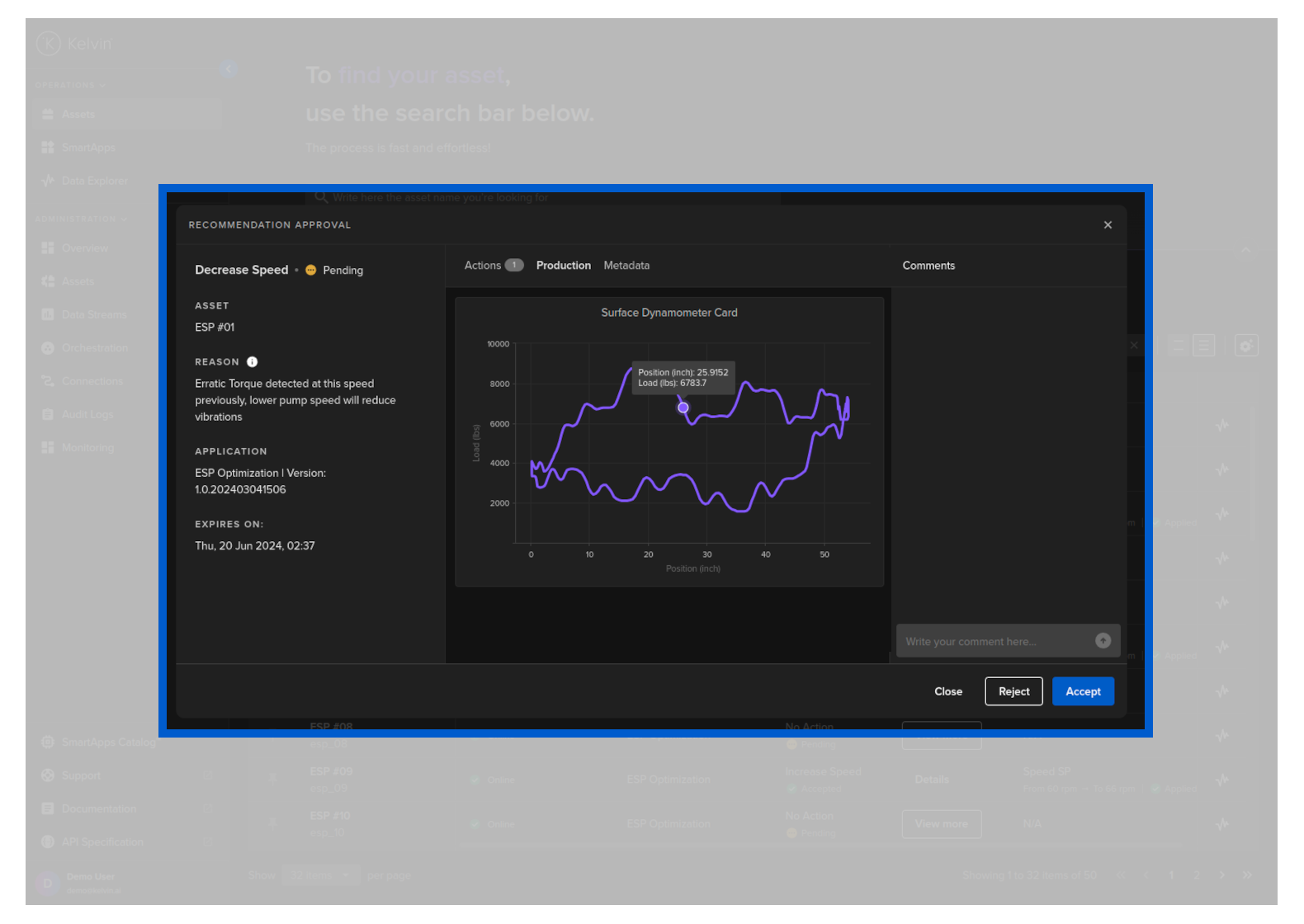
To add Dynacard data, add an evidence key inside metadata with the following structure;
| Key | Description |
|---|---|
| type | dynacard to make the Kelvin UI treat this as Production data |
| title | Title to be used by Kelvin UI |
| payload / data | The actual data to be plotted in Prodcution graph |
| payload / axisLabel | The labels for the x and y axis |
curl -X 'POST' \
  'https://<url.kelvin.ai>/api/v4/recommendations/create' \
    -H 'Authorization: Bearer <Your Current Token>' \
  -H 'accept: application/json' \
  -H 'Content-Type: application/json' \
  -d '{
   "actions":{
      "control_changes":[
         {
            "resource":"krn:ad:98-ac-1/cp_temperature",
            "expiration_date":"2024-07-18T13:11:14.864627Z",
            "payload":77
         }
      ]
   },
   "confidence":7,
   "description":"Temperature adjustment required for optimization of equipment.",
   "expiration_date":"2024-07-19T13:11:14.864661Z",
   "metadata":{
      "evidence":[
         {
            "type":"dynacard",
            "title":"Shutdown Dynacard",
            "payload":{
               "data":[
                        [0, 0],
                        [1, 1],
                        [2, 2],
                        [3, 3],
                        [4, 4],
                        [5, 5],
                        [6, 6],
                        [7, 7],
                        [8, 8],
                        [9, 9]
               ],
               "axisLabel":{
                  "x":"Position",
                  "y":"Load"
               }
            }
         }
      ]
   },
   "resource_parameters":{
    "closed_loop": false
   },
   "source":"krn:app:cp-temperature-producer",
   "resource":"krn:asset:98-ac-1",
   "type":"control-change"
}'